Meet Ask JAI - your personal AI assistant for creative brainstorming, model recommendations, workflow suggestions, and prompt optimization. Get instant help for video ideas, image generation, advertising concepts, and more. Free to use!
Ever found yourself staring at a blank canvas, unsure which AI model to use? Or struggling to write the perfect prompt? Or wondering how to create that viral social media content you've been thinking about? Say hello to Ask JAI - your 24/7 AI creative assistant that's about to change the game. 🎨
What is Ask JAI?
Ask JAI is JAI Portal's intelligent AI assistant that helps you navigate the world of AI content creation. Think of it as having a creative expert by your side who knows all 300+ AI models on our platform, understands workflows, and can guide you from idea to final creation.
Whether you're a complete beginner wondering where to start, or a pro looking for the most efficient workflow - Ask JAI has your back.
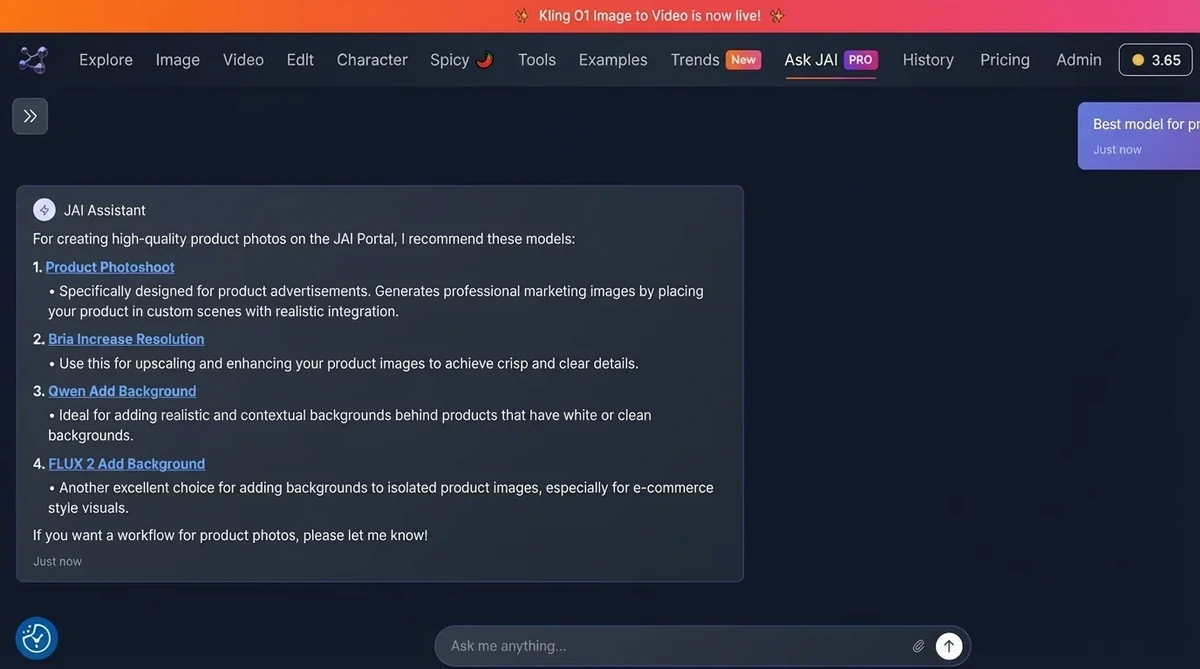
What Can Ask JAI Do For You?
Ask JAI is more than just a chatbot. It's your creative partner that can:
🎯 Model Recommendations
Your question: "I need to create a photorealistic image of a futuristic city"
Ask JAI: Recommends the best models (FLUX 2 Pro, Midjourney, or Ideogram v3) based on your specific needs, explains why each is suitable, and even provides sample prompts.
🔄 Workflow Suggestions
Your question: "I want to turn my product photo into a video ad"
Ask JAI: Provides a complete step-by-step workflow: Image enhancement → Background removal → Image-to-video generation → Adding music → Final touches. Suggests specific models for each step.
✍️ Prompt Optimization
Your question: "My prompts don't give good results"
Ask JAI: Teaches you prompt engineering techniques, gives examples, and helps you craft perfect prompts for any AI model.
💡 Creative Ideas
Your question: "I need viral TikTok content ideas"
Ask JAI: Brainstorms trending concepts, suggests visual styles, recommends models to use, and even provides complete production workflows.
🎬 Production Planning
Your question: "How do I create a professional YouTube intro?"
Ask JAI: Breaks down the entire process, suggests tools, provides timeline estimates, and guides you through each step.
Real Use Cases: Ask JAI in Action
Let's look at some real-world scenarios where Ask JAI becomes your secret weapon:
Scenario 1: Social Media Manager
User: "I need to create 30 Instagram posts for my coffee shop this month. How do I do this efficiently?"
Ask JAI: "Great! Here's an efficient workflow:
- Use Instagram Agent for automated content planning
- Generate base images with FLUX 2 Pro (photorealistic coffee shots)
- Create variations using Image Edit tools
- Schedule posts directly through the platform
Estimated time: 2-3 hours for all 30 posts vs. 20+ hours traditionally. Let me show you the exact steps..."
Scenario 2: Game Developer
User: "I need character concept art for my RPG game. What's the best approach?"
Ask JAI: "For RPG character concepts, I recommend this workflow:
- Start with Midjourney or FLUX 2 Pro for initial concepts
- Use Character Swap to test different looks
- Upscale finals to 4K with Topaz Upscaler
- Create turn-arounds with Image-to-3D tools
Here's a sample prompt: 'fantasy warrior, detailed armor, concept art, trending on artstation...' Let me help you refine it!"
Scenario 3: Marketing Agency
User: "Client wants a video ad campaign. We have product photos but need dynamic video content."
Ask JAI: "Perfect! Here's your production pipeline:
- Enhance product photos (Wavespeed Upscaler)
- Remove backgrounds (Background Remover)
- Generate dynamic backgrounds (FLUX 2 Pro)
- Create video with Kling Video v2.6 Pro
- Add voice-over (Minimax Audio)
- Final edit with Video Editor
Total cost: ~$15-20 per video. Traditional production: $500-2000. I can guide you through each step!"
Scenario 4: Content Creator
User: "I want to create a talking head video but I don't want to show my face."
Ask JAI: "No problem! Here's your solution:
- Generate an AI character (FLUX 2 Pro or Midjourney)
- Use Lip Sync Avatar to animate it with your voice
- Add background video (LTX Video or Minimax)
- Combine everything in Video Editor
This creates professional talking head videos without showing your real face. Want me to walk you through it?"
How to Use Ask JAI
Using Ask JAI is incredibly simple:
- Go to JAI Portal Chat
- Type your question, idea, or problem in the chat box
- Ask JAI analyzes your needs and provides tailored recommendations
- Follow the suggested workflow or ask for more details
- Start creating with recommended models!
That's it! No tutorials, no manuals - just ask naturally like you're talking to a friend.
Types of Questions You Can Ask
Ask JAI is incredibly versatile. Here are question categories it excels at:
📱 Creative Questions
- "Give me 10 viral video ideas for my cooking channel"
- "How do I make my images look more cinematic?"
- "What's trending in AI art right now?"
- "I need a unique style for my brand, any ideas?"
🔧 Technical Questions
- "Which model is best for anime-style images?"
- "How do I upscale a video to 4K?"
- "What's the difference between FLUX and Stable Diffusion?"
- "How do I remove backgrounds from videos?"
💼 Business Questions
- "How can I create product ads on a budget?"
- "I need 100 images for my e-commerce store, best approach?"
- "What's the most cost-effective way to create marketing videos?"
- "How do I automate my social media content?"
🎓 Learning Questions
- "Teach me how to write better prompts"
- "What's the best workflow for beginners?"
- "How do AI image models work?"
- "Show me examples of good prompts"
Ask JAI vs. Generic AI Chatbots
You might be thinking: "How is this different from ChatGPT or other AI assistants?" Great question!
| Feature |
Ask JAI |
Generic AI |
| Platform Knowledge |
✅ Knows all 300+ JAI models intimately |
❌ Generic recommendations |
| Workflow Integration |
✅ Direct links to models & tools |
❌ External recommendations |
| Cost Optimization |
✅ Suggests most cost-effective solutions |
❌ No pricing awareness |
| Up-to-date Models |
✅ Always knows latest models |
❌ Outdated information |
| Actionable Steps |
✅ Click and start creating |
❌ You need to find tools separately |
Pro Tips for Getting the Best Results
Want to maximize your Ask JAI experience? Follow these tips:
1. Be Specific
Instead of: "I need a video"
Try: "I need a 15-second product demo video in cinematic style for Instagram Reels"
2. Share Your Constraints
Mention your budget, timeline, or skill level:
"I have $10 budget and need 20 images by tomorrow" - Ask JAI will optimize for speed and cost.
3. Ask Follow-up Questions
Don't hesitate to dig deeper:
"Can you explain that step in more detail?" or "What if I want a different style?"
4. Share Examples
If you have a reference, mention it:
"I want something like [description] but with [modification]"
5. Iterate
Ask JAI can refine recommendations:
"That's good, but can we make it faster?" or "Any cheaper alternatives?"
Common Workflows Ask JAI Recommends
Based on thousands of conversations, here are the most requested workflows:
📸 Product Photography Enhancement
Upload product photo → Background removal → AI background generation → Lighting enhancement → 4K upscaling
🎥 Social Media Video Creation
Concept → Image generation → Image-to-video → Music addition → Text overlays → Export for platform
🎨 Brand Asset Creation
Logo concept → Multiple variations → Color testing → Mockup generation → Final delivery
🎬 YouTube Content Pipeline
Thumbnail design → B-roll generation → Intro/outro creation → Video editing → SEO optimization
🎮 Game Asset Generation
Concept art → Multiple angles → Upscaling → 3D conversion → Texture mapping
Success Stories
"Ask JAI helped me create a complete marketing campaign in 2 hours. Previously would've taken our team a week. The workflow suggestions were spot-on!" - Digital Marketing Agency
"As a beginner, I was completely lost. Ask JAI walked me through everything step-by-step. Now I'm creating professional content daily!" - Freelance Designer
"The model recommendations saved me hundreds of dollars. Ask JAI always suggests the most cost-effective solution without sacrificing quality." - Small Business Owner
Frequently Asked Questions
Is Ask JAI free to use?
Yes! Ask JAI is completely free. You only pay for the AI models you use after getting recommendations.
Does Ask JAI have access to my previous conversations?
Ask JAI can reference context within your current conversation to provide better recommendations.
Can Ask JAI execute tasks for me?
Ask JAI provides recommendations and workflows, but you'll execute them using JAI Portal's tools. It's like having a guide rather than a ghostwriter.
What languages does Ask JAI support?
Ask JAI supports multiple languages including English, Turkish, Spanish, French, German, and more!
Can Ask JAI help with prompts for external platforms?
Absolutely! While optimized for JAI Portal models, Ask JAI can help with prompts for any AI platform.
The Future of AI-Assisted Creativity
Ask JAI represents a new paradigm in creative work. Instead of spending hours researching which tools to use, watching tutorials, or trial-and-error testing - you simply ask. The AI handles the complex decision-making, letting you focus on creativity.
This is especially powerful because JAI Portal has 300+ models. Without Ask JAI, finding the right tool would be overwhelming. With Ask JAI, it's effortless.
Ready to Get Started?
Whether you're creating your first AI image or managing a complex video production pipeline, Ask JAI is here to help. No question is too basic, no project too complex.
💬 Start Chatting with Ask JAI Now - Free!
Try asking:
- "What's the best way to create viral content for my niche?"
- "I have $20 and need 50 images, what's my best strategy?"
- "Show me how to turn my blog posts into engaging videos"
- "I'm a complete beginner, where should I start?"
JAI Portal - Your creative journey starts with a simple question. Ask JAI is ready to answer.