Build Mode Reality: Enter The Sims Game World
Transform Your Photos Into The Sims Game World Reality
Free to try - Sign up in seconds
About This Trend
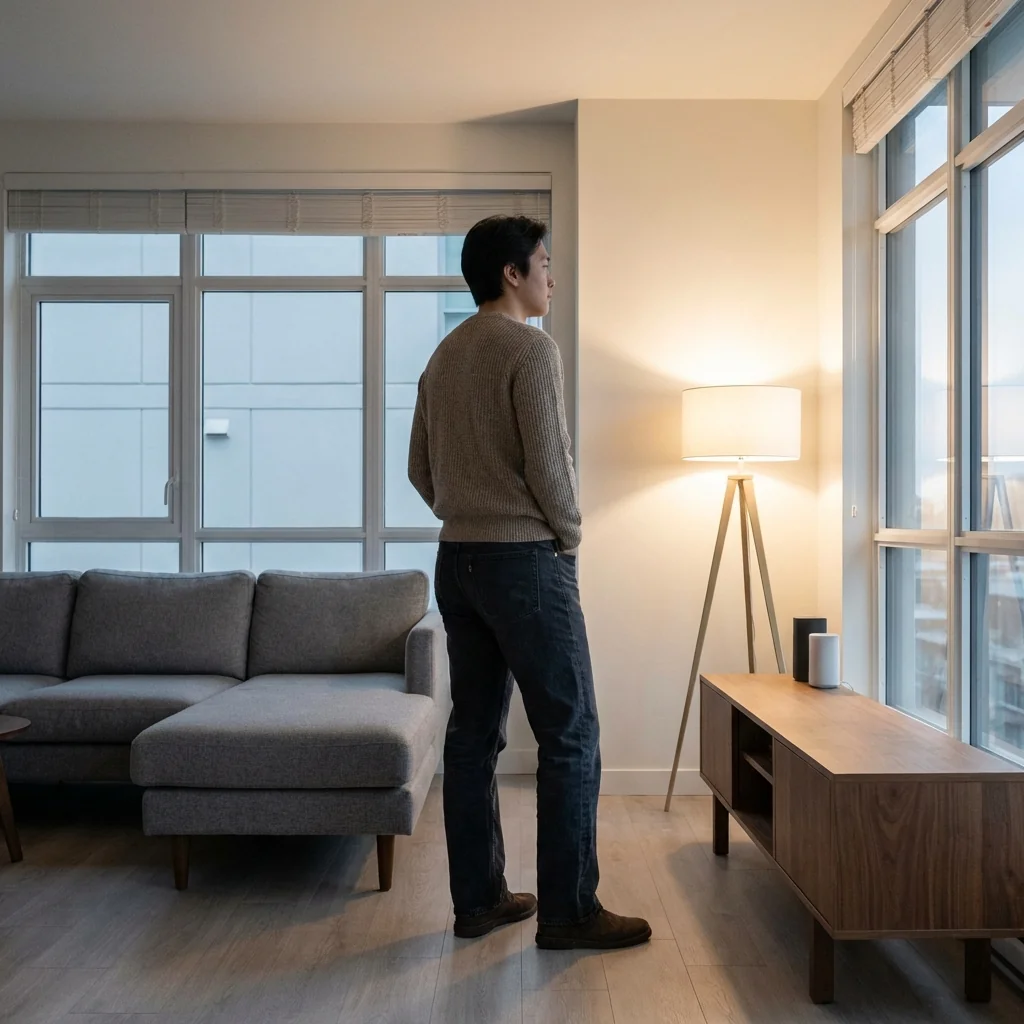
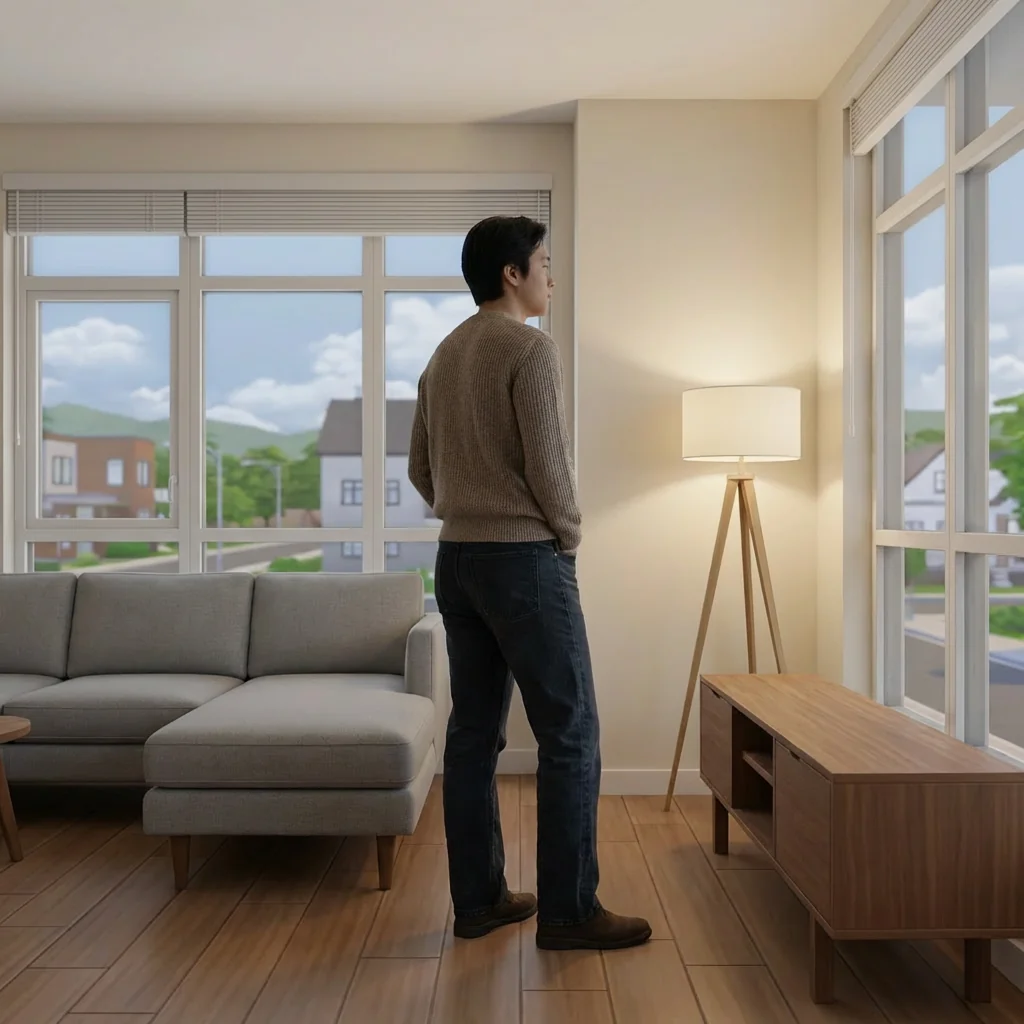
Build Mode Reality brings the beloved world of The Sims directly into your photographs with cutting-edge AI technology. This revolutionary AI trend transforms your entire environment into the iconic The Sims game aesthetic while preserving you as a photorealistic subject. Imagine standing in your room, but everything around you—the furniture, walls, floors, and decor—looks exactly like it was built in The Sims 4's Build/Buy mode. This unique visual effect creates a stunning contrast between reality and gaming simulation, perfect for social media content, creative storytelling, and expressing your love for one of gaming's most iconic franchises.
The AI precisely identifies and separates the main subject (you) from the background environment, applying The Sims' signature visual style only to surroundings. Every element transforms with game-accurate characteristics: smooth geometric shapes, soft ambient lighting, slightly exaggerated proportions, and that distinctive plastic-like finish that makes The Sims instantly recognizable. Whether you're indoors surrounded by Simoleon-bought furniture or outdoors in a Sims neighborhood complete with stylized trees and sidewalks, the transformation maintains perfect visual coherence. The technology understands The Sims aesthetic deeply—from the bright, balanced color palette to the rounded furniture edges and even lighting that mimics actual gameplay screenshots.
Perfect for Sims enthusiasts, content creators, gamers, and anyone seeking unique visual transformations, Build Mode Reality opens endless creative possibilities. Share your real-world Sim life on Instagram, create storytelling content for YouTube, design unique profile pictures, or simply experience the joy of seeing yourself inside your favorite game. The AI maintains photographic quality on your person—preserving skin texture, clothing details, facial features, and natural proportions—while everything else adopts that cozy, familiar Sims game-engine look. No graphic design skills needed; just upload your photo and watch as AI architects transform your reality into a playable Sims lot, complete with the warm, inviting atmosphere that has made The Sims a cultural phenomenon for over two decades.
Ready to create your own?
Try this trend for free. No credit card required, just sign up and start creating.
How It Works
Upload a clear photo showing yourself with visible surroundings (interior or exterior scene works best)
The AI automatically identifies you as the main subject and separates you from the environment
Watch as everything around you transforms into authentic The Sims game-style architecture, furniture, and scenery
Download your Build Mode Reality image and share your real-life Sim moment on social media
Experiment with different locations and poses to create diverse Sims-world scenarios
Features
- Authentic The Sims 4 visual style transformation for environments
- Photorealistic subject preservation with zero stylization
- Precise AI separation between person and surroundings
- Game-accurate lighting with soft ambient illumination
- Official Sims aesthetic: smooth geometry and plastic-like finishes
- Interior and exterior scene transformation capabilities
- Maintains original photo composition and perspective
- Clean edge detection for seamless reality-game blending
- Bright, balanced color palette matching Sims gameplay
- Instant transformation with professional-quality results
Use Cases
- Create viral social media content for Instagram and TikTok
- Design unique gaming-themed profile pictures and avatars
- Generate creative storytelling content for YouTube videos
- Make personalized Sims fan art and community tributes
- Produce eye-catching thumbnails for gaming channels
- Develop marketing materials for Sims-related products
- Create before-after comparison content showcasing AI capabilities
- Design unique greeting cards and digital invitations for gamers
- Generate creative portfolio pieces for digital artists
- Produce educational content about AI image transformation
Pro Tips for Better Results
Choose Photos with Distinct Background Elements
The Sims transformation works best when your environment has clear, recognizable objects like furniture, walls, windows, or outdoor structures. Avoid busy patterns or cluttered backgrounds that might confuse the AI's separation logic. Well-lit rooms with visible furniture pieces give Nano Banana Pro Edit more material to work with, resulting in cleaner Sims-style conversions with that authentic Build Mode aesthetic.
Stand at Least Three Feet from Walls
Give yourself breathing room from background surfaces. When you're too close to walls or furniture, the AI might struggle with edge detection, potentially applying game-style effects to parts of your clothing or hair. A comfortable distance ensures clean separation between photorealistic you and the Sims-transformed environment. This spacing also mimics how Sims actually stand in gameplay, making the final composition feel more authentic.
Use Natural or Soft Indoor Lighting
The Sims aesthetic relies on balanced, ambient lighting without harsh shadows. Photos taken in evenly-lit rooms or during golden hour outdoors produce the most game-accurate transformations. Avoid direct flash or extreme backlighting that creates stark contrast. If you need more control over lighting adjustments before transformation, try OpenAI GPT Image 2 Edit to pre-process your photo, then apply the Sims effect.
Experiment with Different Room Types
Bedrooms, kitchens, living rooms, and home offices each transform differently, showcasing various Sims furniture categories. Try multiple locations to see which Build Mode aesthetic resonates most with your audience. Outdoor shots near houses or in parks create neighborhood-style Sims environments. Each setting tells a different story and generates unique engagement on social media, helping you build a diverse content library.
Wear Solid Colors for Cleaner Results
While the AI preserves your photorealistic appearance, clothing with bold patterns or extremely fine details might create minor visual tension against the simplified Sims background. Solid colors or simple patterns help you stand out naturally against the game-world environment. This contrast emphasizes the reality-meets-simulation concept that makes Build Mode Reality so visually striking and shareable across platforms.
Combine with Headshot Tools for Profile Pictures
After creating your Build Mode Reality image, crop it strategically for profile pictures or use AI Headshot Generator to create complementary professional shots. The Sims-style background makes an excellent conversation starter in gaming communities, while traditional headshots handle formal contexts. Having both styles in your content arsenal shows creative range and helps you connect with different audience segments effectively.
Frequently Asked Questions
Other Models You Could Use
Ready to Try Build Mode Reality: Enter The Sims Game World?
Transform your images with AI in seconds. No design skills required.
Get Started FreeJoin thousands of creators using JAI Portal