Frozen Room Interior: Fill Your Space with Waist-High Snow
Transform any room into a frozen winter wonderland instantly
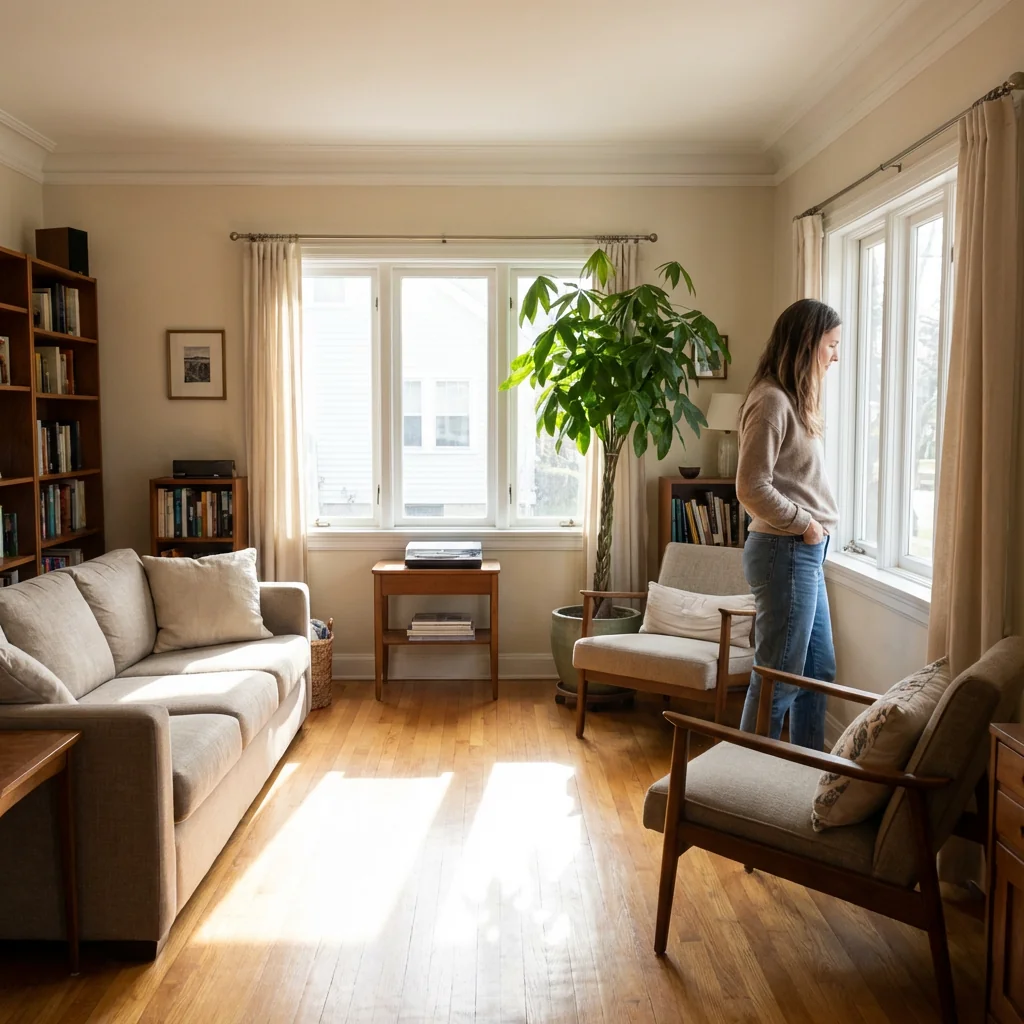
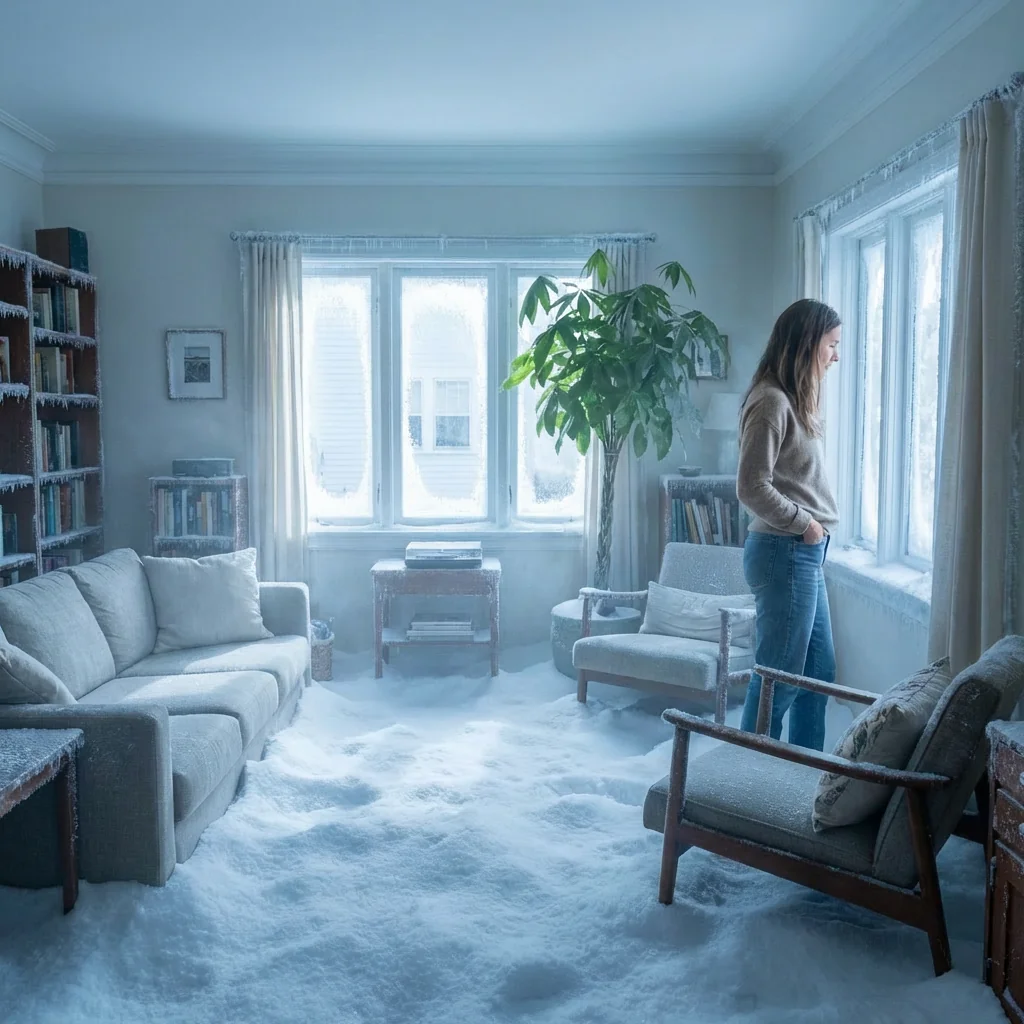
Free to try - Sign up in seconds
About This Trend
Frozen Room Interior is a revolutionary AI-powered transformation tool that converts ordinary interior spaces into breathtaking frozen winter wonderlands filled with waist-high snow. This innovative effect preserves your subject completely while dramatically altering the surrounding environment, creating a stunning contrast between the unchanged person and the snow-filled room around them. The AI intelligently recognizes room elements and applies realistic snow accumulation, frost details, and atmospheric effects that make the transformation feel authentic and natural.
The technology behind this effect uses advanced computer vision and neural networks to maintain perfect subject integrity while seamlessly integrating realistic snow elements into your interior spaces. Unlike simple overlays or filters, this AI understands depth, perspective, and lighting conditions to create snowbanks that rise naturally to waist height, complete with subtle frost crystals on furniture edges, walls, windows, and decorative objects. The cold bluish lighting and soft shadows are automatically adjusted to match winter conditions, while a gentle icy mist adds atmospheric depth without overwhelming the scene.
Perfect for creative photography, social media content, holiday marketing campaigns, real estate staging with a twist, or simply creating memorable winter-themed photos, this tool delivers professional-quality results in seconds. Whether you're a content creator looking for unique visual concepts, a marketer needing seasonal imagery, or someone who wants to add winter magic to their photos, the Frozen Room Interior effect provides an accessible way to achieve stunning transformations. The realistic snow texture, natural depth perception, and attention to environmental details ensure your frozen room scenes look believable and visually captivating, making this one of the most impressive AI photo transformation tools available today.
Ready to create your own?
Try this trend for free. No credit card required, just sign up and start creating.
How It Works
Upload a clear interior photo with a subject standing in the room
The AI automatically detects the subject and room elements for preservation
Watch as realistic waist-high snow fills the space around your subject
Download your frozen room transformation and share or use commercially
Features
- Realistic waist-high snow accumulation in any interior space
- Subject preservation technology - keeps people completely unchanged
- Intelligent frost and ice crystal application on surfaces
- Automatic cold bluish lighting adjustment for winter atmosphere
- Natural shadow rendering that matches frozen environment
- Subtle icy mist effect for enhanced atmospheric depth
- Smart depth perception for realistic snow texture and banking
- Furniture and object recognition for precise frost placement
- Professional-quality output suitable for commercial use
- One-click transformation with no manual editing required
Use Cases
- Create unique winter-themed social media content and posts
- Generate eye-catching holiday marketing and advertising materials
- Produce creative real estate listings with seasonal twist
- Design memorable Christmas card photos and greetings
- Develop conceptual photography for portfolios and exhibitions
- Create engaging before-and-after content for entertainment
- Generate winter scene props for digital storytelling and narratives
Pro Tips for Better Results
Choose Well-Lit Interior Photos for Best Results
The AI performs best with interior photos that have even, natural lighting and minimal shadows. Rooms with large windows or good overhead lighting give the algorithm more detail to work with when applying snow textures and frost effects. Avoid dimly lit spaces or photos with harsh directional lighting that creates extreme contrasts, as these can make the snow integration look less natural and reduce the realism of the frozen transformation.
Position Your Subject Away from Walls
For the most dramatic frozen room effect, photograph your subject standing several feet away from walls and furniture. This gives the AI more room space to fill with waist-high snow and creates better depth perception in the final image. When subjects stand too close to backgrounds, the snow accumulation can appear compressed or less impressive. The Nano Banana Pro Edit model excels at depth understanding when given adequate spatial context in your original photo.
Use High-Resolution Input Images
Upload the highest resolution photo you have available to maximize detail in both the preserved subject and the added snow elements. Higher resolution inputs allow the AI to generate more realistic frost crystals, subtle ice textures, and natural snow banking that looks convincing even when zoomed in. Low-resolution or heavily compressed images may result in pixelated snow effects or less defined boundaries between your subject and the frozen environment surrounding them.
Experiment with Different Room Types
The frozen room effect works beautifully across various interior styles, from minimalist modern spaces to cluttered vintage rooms. Try bedrooms, living rooms, kitchens, or even bathrooms for unexpected results. Each room type offers different furniture and architectural elements for the AI to frost over. If you want more control over specific environmental edits beyond snow, consider OpenAI GPT Image 2 Edit for text-prompted modifications after your initial transformation.
Keep Your Subject Centered and Visible
Position your subject prominently in the frame with their full body or at least torso clearly visible. The AI's subject preservation technology works best when it can clearly identify and isolate the person from the background. Avoid photos where the subject is partially obscured by furniture or standing in doorways, as this can confuse the boundary detection and result in snow accidentally covering parts of your subject that should remain untouched.
Consider the Original Room Color Palette
Rooms with lighter walls and furniture tend to showcase the frozen effect more dramatically because the cool blue winter tones create stronger visual contrast. However, darker rooms can produce equally stunning results with a more mysterious, ice-cave atmosphere. The Nano Banana Pro Edit model automatically adjusts lighting to match winter conditions, but starting with a well-exposed photo gives you the best foundation for these automatic adjustments to build upon.
Frequently Asked Questions
Other Models You Could Use
Ready to Try Frozen Room Interior: Fill Your Space with Waist-High Snow?
Transform your images with AI in seconds. No design skills required.
Get Started FreeJoin thousands of creators using JAI Portal