Frozen Sculpture Gallery: Transform Yourself into a Realistic Ice Statue
Turn Photos into Stunning Frozen Ice Sculptures with AI
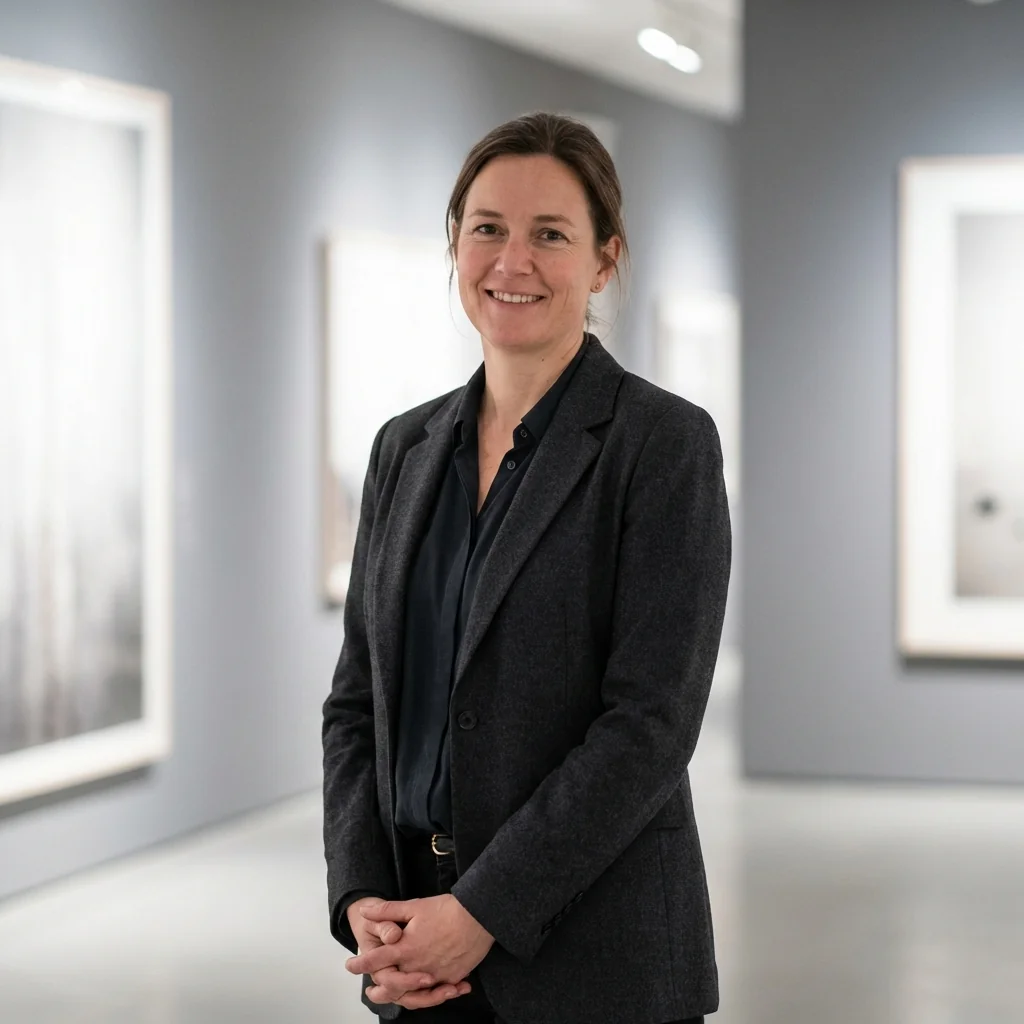
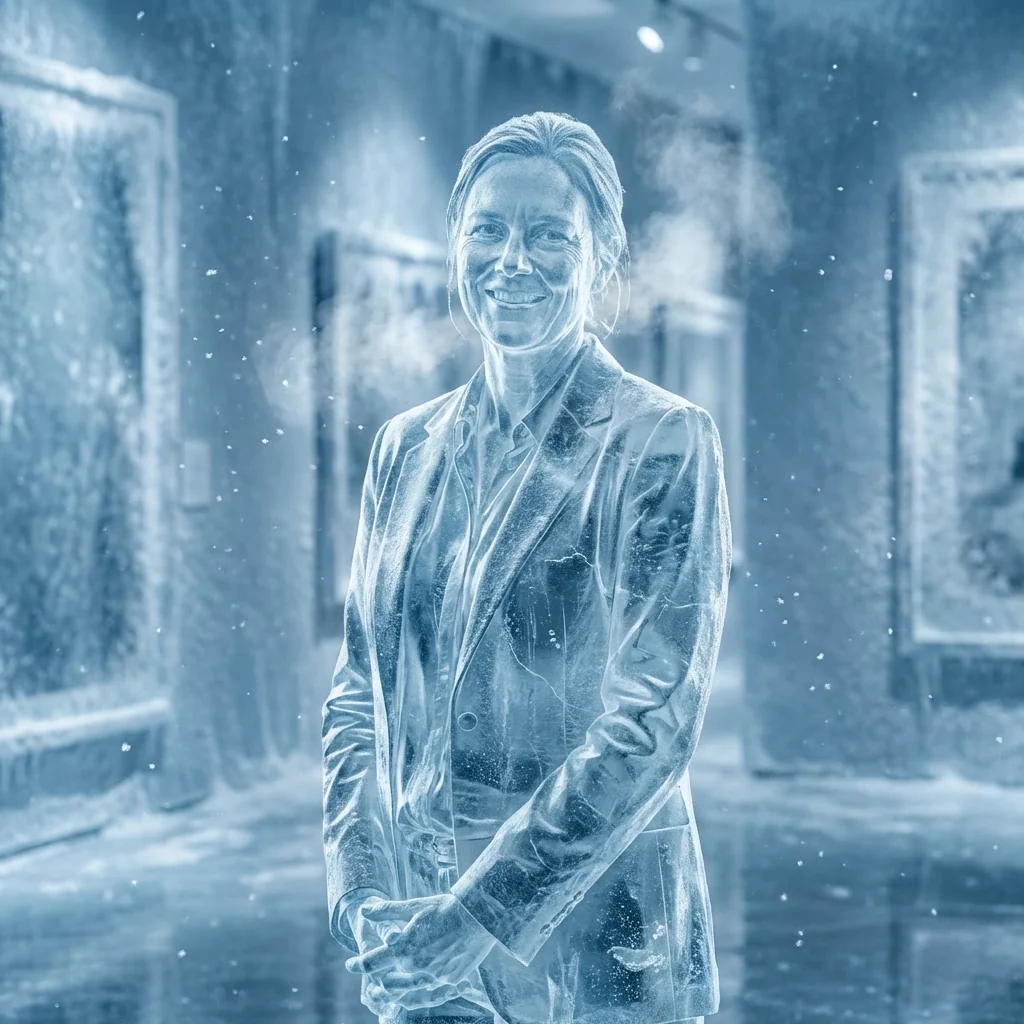
Free to try - Sign up in seconds
About This Trend
Experience the mesmerizing power of AI with our Frozen Sculpture Gallery transformation tool. This cutting-edge AI effect converts any portrait or photograph into a breathtaking hyper-realistic ice sculpture that looks like it was carved by master artisans from solid glacial ice. Unlike simple filters or overlays, our advanced AI technology analyzes every detail of your image—from facial features and expressions to clothing textures and body proportions—and recreates them with stunning accuracy in crystalline ice form. The result is a photorealistic frozen masterpiece that maintains the soul and essence of the original subject while transforming them into an ethereal frozen work of art.
The transformation process goes far beyond basic image editing. Our AI generates authentic ice physics including internal light refraction, realistic crack patterns, subtle air bubbles trapped within the ice, and layers of frost that accumulate naturally on the surface. Every strand of hair becomes delicate frozen filaments, skin takes on the translucent quality of blue-white ice, and clothing maintains its recognizable shape while appearing carved from solid frozen water. The surrounding environment automatically adapts to match, creating a cohesive winter atmosphere complete with frost particles floating in the air, visible breath vapor, and icy ground reflections that enhance the frozen aesthetic. The dramatic cold lighting with blue-white color grading adds cinematic quality to every creation.
Whether you're a digital artist looking to create fantasy artwork, a photographer wanting to offer unique portrait transformations, a social media enthusiast seeking viral-worthy content, or a creative professional developing winter-themed marketing materials, the Frozen Sculpture Gallery delivers professional 8k resolution results in seconds. Perfect for creating holiday cards with a twist, fantasy character concepts, artistic portfolio pieces, or simply experiencing the thrill of seeing yourself immortalized as a beautiful ice sculpture. No complex software skills required—simply upload your photo and watch as our AI transforms it into a frozen masterpiece that captures imagination and amazes viewers with its photorealistic detail and artistic vision.
Ready to create your own?
Try this trend for free. No credit card required, just sign up and start creating.
How It Works
Upload a clear portrait photo with good lighting and visible facial features to the Frozen Sculpture Gallery tool
Click the transform button and let the AI analyze facial structure, pose, and clothing details for accurate ice conversion
Wait 10-30 seconds while AI generates realistic ice textures, frost layers, cracks, and frozen atmospheric effects
Download your photorealistic 8k ice sculpture image and share your frozen masterpiece on social media or use in creative projects
Features
- Hyper-realistic ice sculpture transformation with authentic frozen textures
- Preserves exact facial features, expressions, and recognizable details
- Advanced ice physics simulation with cracks, frost layers, and air bubbles
- Internal light refraction and translucent ice material rendering
- Automatic winter atmosphere conversion with frost particles and vapor
- Dramatic cold lighting with professional blue-white color grading
- Complete clothing and hair transformation to ice while maintaining silhouette
- Photorealistic 8k resolution output for print and professional use
- Icy ground reflections and environmental integration
- One-click transformation with no manual editing required
Use Cases
- Create unique frozen-themed profile pictures and avatars for social media
- Design fantasy artwork and ice queen/king character concepts for creative projects
- Generate eye-catching winter holiday cards and seasonal greetings
- Produce stunning portfolio pieces for digital artists and photographers
- Develop frozen-themed marketing materials and advertisement visuals
- Create viral social media content with mesmerizing ice transformation effects
- Design book covers, album art, or poster designs with frozen aesthetics
Pro Tips for Better Results
Choose High-Resolution Source Photos for Maximum Detail
The Nano Banana Pro Edit model preserves intricate details like individual hair strands and skin texture when converting to ice. Start with photos at least 1920x1080 pixels to ensure the AI has enough information to create realistic frost patterns, ice cracks, and translucent effects. Higher resolution inputs produce dramatically better 8k outputs with sharper ice crystal formations and more convincing frozen textures that hold up even when printed large.
Front or Three-Quarter Lighting Works Best
The AI generates more dramatic ice refraction effects when your source photo has clear directional lighting from the front or side. Avoid heavily backlit photos where facial features disappear into shadow—the frozen sculpture effect relies on visible contours to create realistic ice depth and translucency. Well-lit portraits allow the model to accurately simulate how light would pass through and reflect off actual ice, creating those signature blue-white highlights and internal glow that make the sculpture look authentic.
Solid Backgrounds Enhance the Frozen Effect
While Nano Banana Pro Edit automatically generates winter atmospheres, starting with a relatively simple background helps the AI focus processing power on the subject's ice transformation. Busy or cluttered backgrounds can sometimes compete with the frozen effect. If you need more control over background elements, consider using FLUX 2 Dev Edit first to simplify the scene, then apply the ice sculpture transformation for cleaner, more professional results.
Portraits with Clear Expressions Create Emotional Impact
The most striking frozen sculptures preserve recognizable facial expressions—a slight smile, intense gaze, or serene look frozen in time. Choose photos where the subject's emotion is clear and engaging. The AI maintains these expressions perfectly while adding ice texture, creating an eerie, beautiful contrast between human warmth and frozen stillness. Neutral or dramatic expressions typically work better than exaggerated ones, as they appear more naturally preserved in ice form.
Full-Body Poses Add Sculptural Drama
While headshots work beautifully, full-body or three-quarter length poses create more dynamic frozen sculptures with interesting silhouettes. The AI transforms clothing folds, flowing hair, and body positioning into carved ice details. Dynamic poses—reaching, turning, or mid-movement—look especially stunning when frozen, as if capturing a moment in time. The model preserves pose complexity while adding realistic ice weight and translucency throughout the entire figure.
Compare Results with Alternative Edit Models
If you want more control over specific frozen elements, try running your photo through OpenAI GPT Image 2 Edit or Qwen Image 2 Edit with custom ice-related prompts for different stylistic interpretations. Each model handles ice physics and color grading differently. Testing the same portrait across models helps you discover which AI produces the exact frozen aesthetic you're after—some lean more stylized while Nano Banana Pro Edit emphasizes photorealism.
Frequently Asked Questions
Other Models You Could Use
Ready to Try Frozen Sculpture Gallery: Transform Yourself into a Realistic Ice Statue?
Transform your images with AI in seconds. No design skills required.
Get Started FreeJoin thousands of creators using JAI Portal