Security Scanner Vision: See Through Airport X-Ray Style
Transform Photos into Realistic Airport X-Ray Security Scans

Free to try - Sign up in seconds
About This Trend
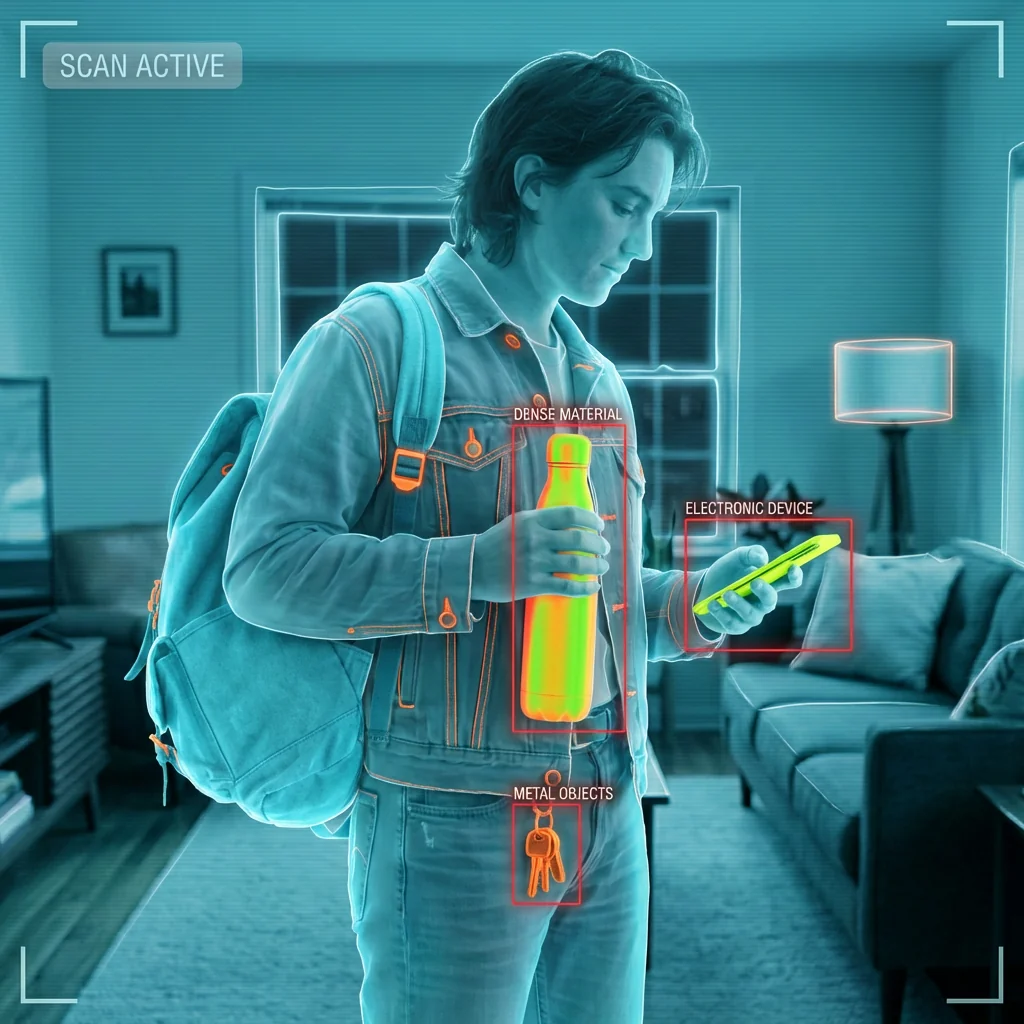
Experience cutting-edge AI technology that transforms ordinary photographs into hyper-realistic airport security X-ray scans. Our Security Scanner Vision effect replicates the exact visual aesthetics used by TSA baggage scanners worldwide, complete with authentic material differentiation and professional threat-detection overlays. This innovative AI filter analyzes your uploaded images and applies the same color-coding system used in real airport security: organic materials rendered in cool blues and teals, metals highlighted in bright neon orange-green, electronics displaying high-contrast yellow-green, and textiles appearing in semi-transparent cyan tones.
What sets this AI transformation apart is its intelligent preservation of your original composition while adding genuine security scanner elements. The advanced algorithm maintains every subject, object, pose, and spatial relationship from your source image, ensuring nothing is added or invented. Instead, it focuses purely on visual style conversion, applying subtle internal density shading instead of full skeletal exposure, creating clean glowing outlines around glass and hard plastics, and overlaying high-security UI elements that would appear on actual TSA monitoring stations. Red bounding boxes intelligently highlight dense or irregular items detected in your scene, accompanied by authentic corner HUD brackets, thin white contour lines, and characteristic horizontal scanlines.
Perfect for creative projects, security training materials, artistic exploration, or social media content that demands attention, this AI-powered X-ray filter delivers professional-grade results that look indistinguishable from real airport scanner footage. The cold, clinical aesthetic combined with machine-learning threat detection overlays creates an ultra-realistic security checkpoint experience. Whether you're a content creator looking for unique visual effects, an educator developing security awareness materials, or simply curious about how everyday objects appear under X-ray technology, Security Scanner Vision provides an authentic, safe, and completely automated solution that respects privacy while delivering stunning visual transformations.
Ready to create your own?
Try this trend for free. No credit card required, just sign up and start creating.
How It Works
Upload your photo - any subject, pose, or composition works perfectly
AI instantly analyzes and applies authentic TSA X-ray scanner color mapping to all materials
Threat-detection UI overlays are automatically generated with red boxes highlighting dense objects
Download your transformed security scan image in high resolution, ready to share or use professionally
Features
- Authentic TSA airport baggage scanner visual aesthetics with accurate material color-coding
- Intelligent AI preservation of original composition, poses, and object placement
- Realistic material differentiation: blue organics, orange metals, cyan fabrics, yellow electronics
- Professional threat-detection UI overlay with red bounding boxes and HUD elements
- Semi-transparent rendering that maintains depth perception and realistic lighting
- Automated scanline effects and contour mapping for genuine scanner appearance
- Privacy-focused design with no full skeletal exposure or anatomy distortion
- One-click transformation requiring no manual editing or technical expertise
- High-resolution output suitable for professional and creative applications
- Smart object recognition that only highlights items present in uploaded images
Use Cases
- Create viral social media content with unique X-ray security scanner effects
- Develop security training and educational materials for TSA procedures
- Produce artistic photography projects exploring transparency and surveillance themes
- Generate attention-grabbing thumbnails for technology and security content
- Visualize everyday objects through authentic airport scanner perspective
- Design creative marketing materials with futuristic security aesthetics
- Enhance presentations about airport security, scanning technology, or AI applications
Pro Tips for Better Results
Choose High-Contrast Source Photos for Best Results
The Nano Banana Pro Edit model performs best when your uploaded image contains distinct objects with clear boundaries. Photos with good lighting and varied materials—like bags containing electronics, metal items, and fabrics—produce the most dramatic X-ray scanner effects. Avoid overly dark or washed-out images, as the AI relies on contrast to differentiate materials and apply accurate color-coding. Well-lit product photography, travel bag contents, or everyday carry items make ideal subjects for authentic TSA-style transformations.
Position Dense Objects Strategically for Threat Detection Overlays
The AI automatically generates red bounding boxes around items it detects as dense or irregular, mimicking real security scanner behavior. To maximize this effect, arrange metal objects, electronics, or layered items prominently in your composition before uploading. Unlike general editing tools like OpenAI GPT Image 2 Edit, this specialized model focuses purely on replicating scanner aesthetics, so thoughtful object placement ensures your final image features compelling threat-detection UI elements that look genuinely pulled from an airport security monitor.
Use Square or Landscape Orientations for Authentic Monitor Appearance
Real TSA baggage scanner displays typically use landscape or square aspect ratios to maximize screen real estate for security personnel. For the most authentic airport checkpoint aesthetic, upload images in 1:1 or 16:9 formats rather than vertical portraits. This framing allows the AI to apply scanlines, HUD brackets, and contour mapping across a wider field, creating output that genuinely resembles footage from actual security monitoring stations rather than phone snapshots.
Avoid Busy Backgrounds to Maintain Scanner Clarity
Airport X-ray scanners image isolated items against dark backgrounds, emphasizing material differentiation through color-coded transparency. For best results, photograph subjects against plain or neutral backgrounds before uploading to Nano Banana Pro Edit. Cluttered backgrounds can muddy the semi-transparent rendering and make it harder for viewers to appreciate the blue organics, orange metals, and cyan fabrics that define the TSA aesthetic. Clean compositions produce cleaner, more professional scanner transformations.
Combine Multiple Objects for Richer Material Variety
The AI's strength lies in its ability to differentiate materials through authentic color-coding systems used in real scanners. Images containing diverse materials—organic items, metallic hardware, plastic components, electronic devices, and textiles—showcase the full range of blues, oranges, yellows, and cyans the model can apply. Single-material subjects work but lack the visual complexity that makes airport scanner imagery so distinctive and attention-grabbing for social media or creative projects.
Export at Full Resolution for Professional Applications
If you're creating security training materials, educational presentations, or marketing content, always download the highest resolution output available. The detailed scanlines, contour mapping, and HUD elements remain crisp and legible at larger sizes, making them suitable for projection or print. For quick social media posts, standard resolutions work fine, but professional applications benefit from the full detail the AI generates during transformation, especially when viewers examine material differentiation closely.
Frequently Asked Questions
Other Models You Could Use
Ready to Try Security Scanner Vision: See Through Airport X-Ray Style?
Transform your images with AI in seconds. No design skills required.
Get Started FreeJoin thousands of creators using JAI Portal