Vice City Nights: Transform Your Scene into GTA Vice City Aesthetic
Transform photos into iconic GTA Vice City 2002 aesthetic
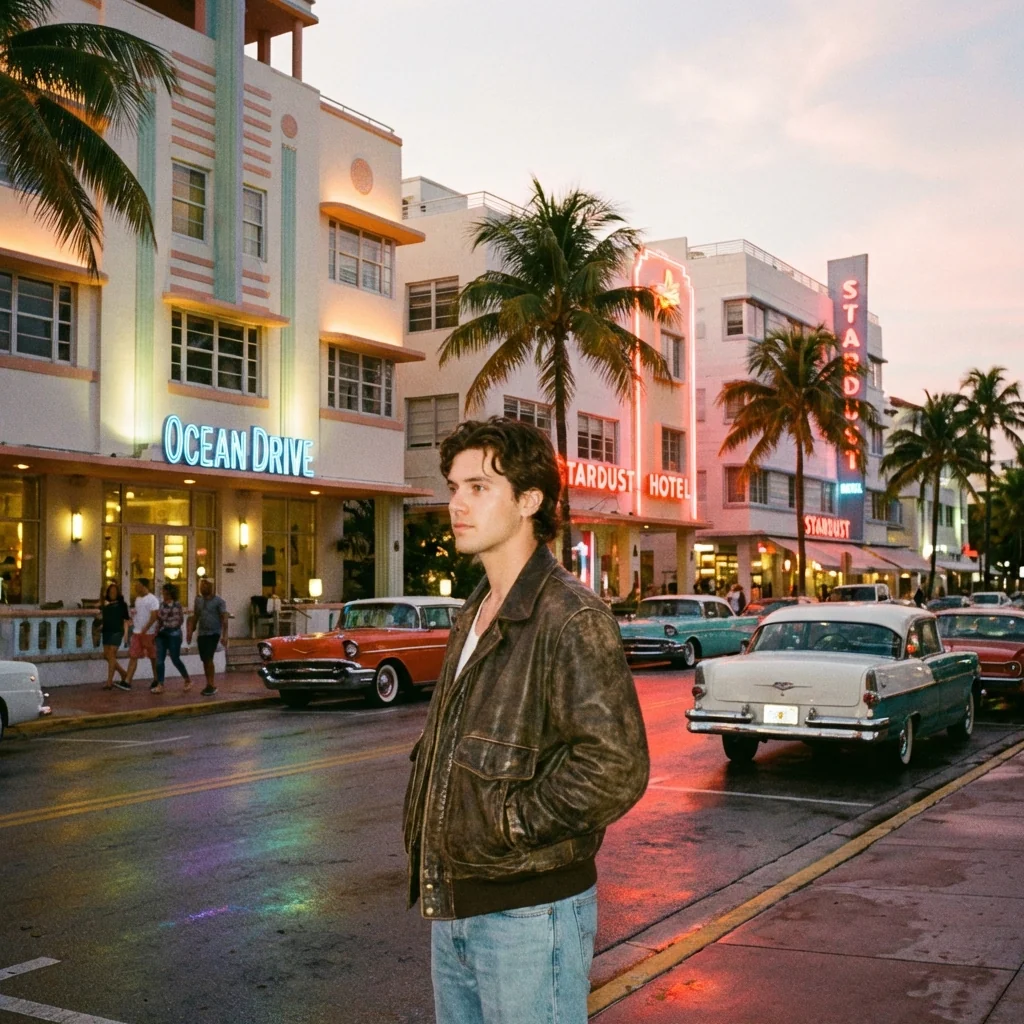
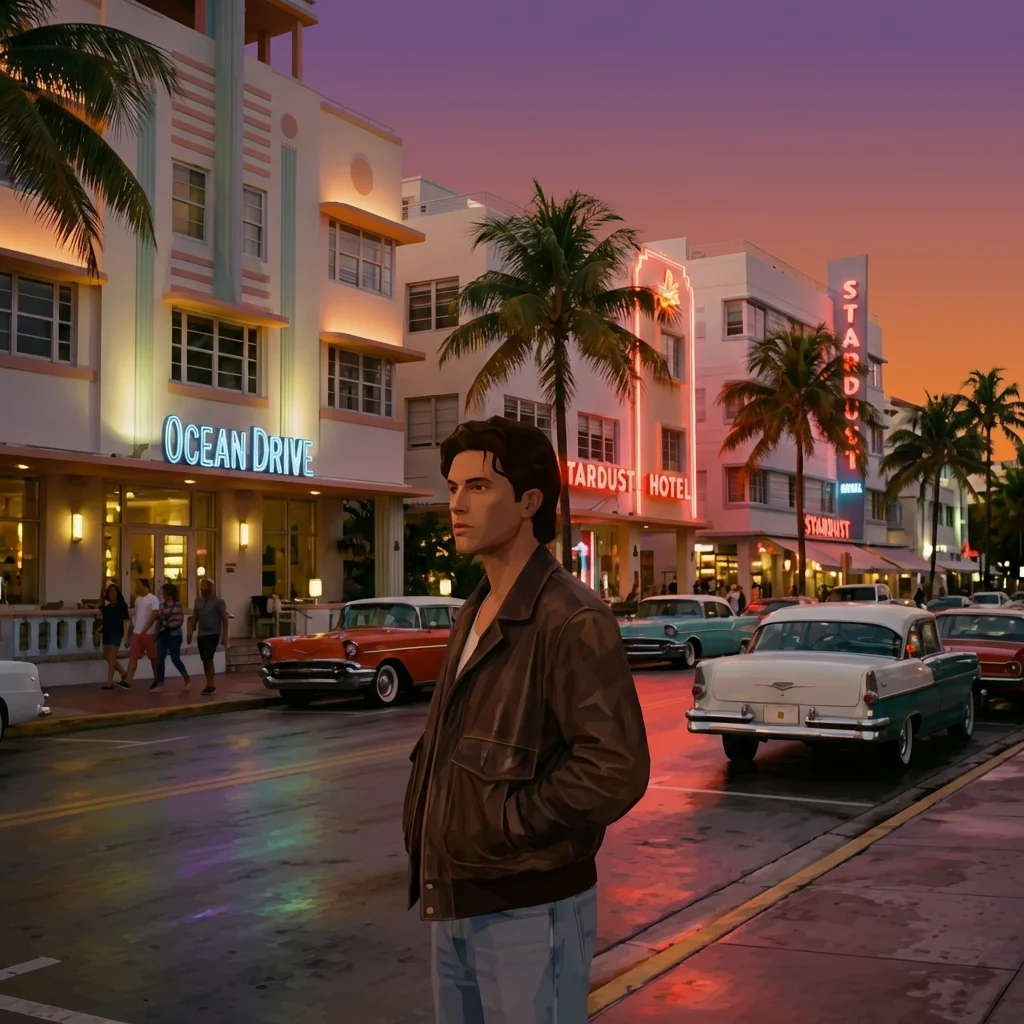
Free to try - Sign up in seconds
About This Trend
Experience the nostalgia of GTA Vice City with our revolutionary AI-powered photo transformation tool. This advanced scene-locked style transfer technology converts your ordinary photos into authentic Vice City aesthetic from the legendary 2002 game, preserving every spatial detail while applying the iconic 80s Miami visual style. Unlike generic filters, our AI performs intelligent scene analysis to identify and transform each element—buildings, people, vehicles, vegetation—into their Vice City equivalents while maintaining exact positioning, scale, and perspective.
The transformation process uses RenderWare engine aesthetics to recreate the distinctive low-poly geometry, flat shading, and early-2000s console-quality textures that defined Vice City's visual identity. Your photo's composition remains completely intact as the AI re-skins each object with period-accurate materials: Art Deco buildings replace modern architecture, low-poly NPCs replace people, classic 80s vehicles substitute contemporary cars, and palm trees adopt that characteristic Vice City silhouette. The lighting system applies authentic sunset orange-purple hazes or neon-lit night scenes with pink and cyan rim lighting, all while respecting your original photo's light direction and time of day.
Whether you're creating content for social media, designing retro gaming artwork, or simply reliving Vice City memories, this tool delivers pixel-perfect authenticity. The strict scene-locking technology ensures no unwanted additions, deletions, or repositioning—only a faithful aesthetic conversion that honors both your original composition and Vice City's legendary visual style. No modern post-processing, no ray tracing, no cinematic effects—just pure, nostalgic 2002 gaming magic applied to your personal photos with surgical precision and artistic reverence for one of gaming's most iconic visual styles.
Ready to create your own?
Try this trend for free. No credit card required, just sign up and start creating.
How It Works
Upload your photo - Choose any scene with buildings, people, or vehicles for best results
AI analyzes scene - Automatic object detection locks positions, identifies elements to transform
Vice City conversion - Each object re-skinned with authentic 2002 game aesthetics and textures
Download result - Get your Vice City-styled image with preserved composition and nostalgic graphics
Share & enjoy - Post your transformation on social media or use in creative projects
Features
- Scene-locked spatial preservation maintains exact object positions and scale
- Authentic RenderWare 2002 engine rendering with low-poly geometry
- Intelligent object segmentation identifies buildings, people, vehicles, vegetation
- Vice City aesthetic mapping converts each element to period-accurate equivalent
- 80s Miami lighting with sunset hazes and neon night illumination
- Identity-locked face and pose preservation for main subjects
- Early-2000s console-quality textures and flat shading technique
- No modern post-processing: pure nostalgic Vice City visual style
- Camera angle and perspective remain absolutely locked to original
- Art Deco building conversion with same footprint and height preservation
Use Cases
- Transform personal photos into Vice City style for social media content
- Create retro gaming artwork and nostalgic GTA Vice City tributes
- Generate 80s Miami aesthetic images for creative projects
- Convert travel photos into Vice City-style virtual postcards
- Design unique profile pictures with iconic game aesthetics
- Produce vintage-style marketing materials with 2002 gaming vibes
- Create themed content for gaming communities and Vice City fans
Pro Tips for Better Results
Choose Photos with Clear Architectural Elements
The Vice City transformation works best with photos containing distinct buildings, streets, and urban infrastructure. The AI needs recognizable structures to convert into Art Deco Vice City equivalents. Avoid abstract or nature-only scenes—cityscapes, street photography, and architectural shots yield the most authentic results. Buildings with clear geometric shapes translate perfectly into the low-poly aesthetic.
Shoot During Golden Hour for Authentic Lighting
Vice City's signature look features warm sunset tones and purple-orange hazes. Photos taken during golden hour or early evening naturally align with this palette, making the AI transformation more seamless. The Nano Banana Pro Edit model preserves your original lighting direction while applying Vice City's atmospheric glow, so starting with warm natural light amplifies the nostalgic effect.
Include Vehicles for Maximum Nostalgia Factor
Cars are iconic in Vice City, and the AI excels at converting modern vehicles into 80s equivalents with period-accurate low-poly models. Photos featuring sedans, sports cars, or motorcycles get transformed into Cheetahs, Sentinels, and PCJ-600s. This adds instant recognition value for gaming fans. If you need different vehicle styles, OpenAI GPT Image 2 Edit offers more manual control over specific object replacements.
Use High-Resolution Source Images
While Vice City aesthetics are deliberately low-poly, starting with a high-resolution photo gives the AI more spatial data to work with during scene analysis. The model needs to identify object boundaries, depth layers, and compositional elements before applying the retro rendering style. Higher input quality means more accurate object segmentation and cleaner transformations, even though the final output intentionally mimics 2002 console graphics.
Avoid Overly Complex Backgrounds
The scene-locked transformation preserves every element in your photo, so cluttered backgrounds with hundreds of small objects can create visual noise in the Vice City style. Simpler compositions with clear subject-background separation work best. If you're working with portraits against busy backgrounds, consider FLUX 2 Face to Full Portrait first to isolate subjects, then apply Vice City aesthetics.
Embrace the Flat Shading Aesthetic
Vice City used early-2000s flat shading without modern lighting techniques like ambient occlusion or global illumination. The Nano Banana Pro Edit model intentionally replicates this limitation for authenticity. Don't expect photorealistic gradients or soft shadows—the charm lies in the blocky, simplified rendering that defined RenderWare graphics. This stylistic constraint is what creates the genuine nostalgia factor.
Frequently Asked Questions
Other Models You Could Use
Ready to Try Vice City Nights: Transform Your Scene into GTA Vice City Aesthetic?
Transform your images with AI in seconds. No design skills required.
Get Started FreeJoin thousands of creators using JAI Portal