Winter Storm Scene: Add Heavy Snowfall Effect
Transform Photos into Magical Winter Wonderland Scenes
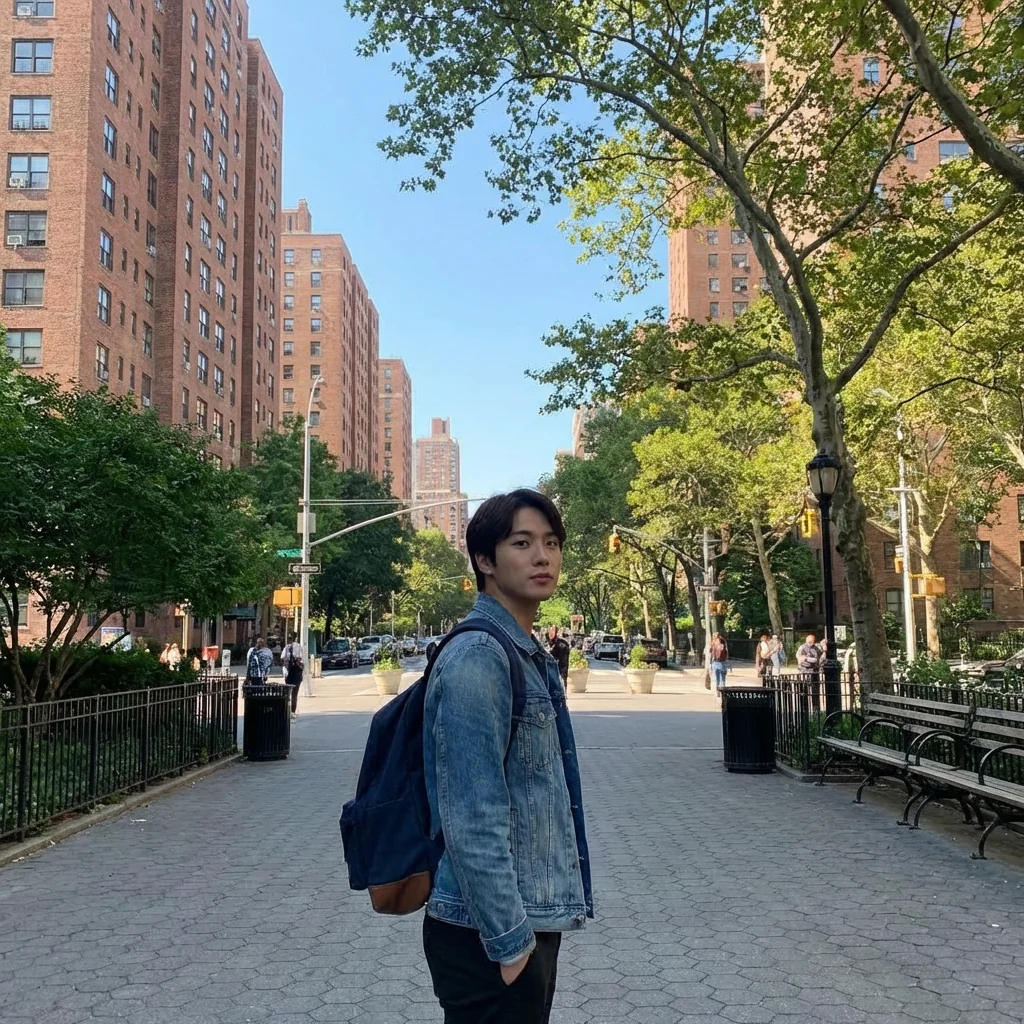
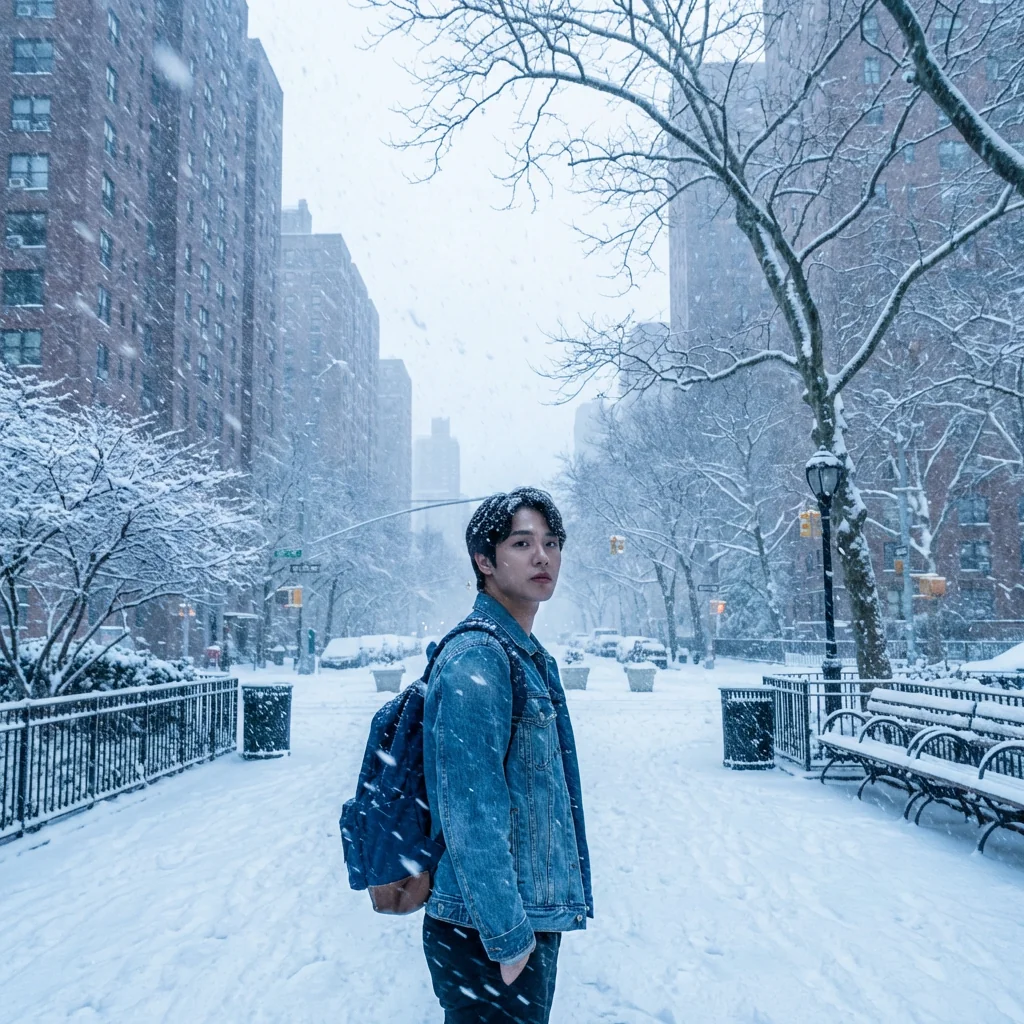
Free to try - Sign up in seconds
About This Trend
Transform any photograph into a breathtaking winter wonderland with our advanced AI-powered Winter Storm Scene effect. This sophisticated tool adds realistic heavy snowfall, frosted surfaces, and authentic winter atmosphere to your images while preserving the original subject's identity and details perfectly. Whether you're looking to create seasonal greetings, enhance your social media content, or simply add magical winter vibes to your photos, this effect delivers professional-quality results instantly.
Our intelligent algorithm carefully analyzes your image and applies multi-layered snowfall effects that include various snowflake sizes, motion blur for falling snow, realistic accumulation on surfaces, and proper depth perception. The system maintains the subject's facial features, expression, pose, and clothing while adding subtle winter touches like snow on hair and shoulders. The background transforms completely into a winter storm scene with snow-covered ground, frosted elements, and atmospheric snowfall that creates depth and movement. The color grading automatically adjusts to cooler winter tones while preserving the natural lighting and shadows of your original photo.
Perfect for photographers, content creators, marketers, and anyone wanting to add seasonal magic to their images, this AI effect works on portraits, landscapes, street photography, and architectural shots. Create stunning before-and-after transformations for your portfolio, generate unique seasonal content for brands, or simply have fun reimagining your favorite photos in a winter setting. The effect maintains photorealistic quality, ensuring that the final result looks natural and professionally edited, not artificially generated or cartoonish. Experience the power of AI-driven photo transformation and bring winter magic to your images year-round.
Ready to create your own?
Try this trend for free. No credit card required, just sign up and start creating.
How It Works
Upload your photo - works best with outdoor scenes, portraits, or architectural shots
AI automatically analyzes the image and identifies subjects, background elements, and surfaces
Winter transformation applies heavy snowfall, frost buildup, and cool color grading instantly
Download your winter storm photo in high resolution - ready to share or print
Features
- Realistic heavy snowfall with varying snowflake sizes and densities
- Automatic snow accumulation on ground, surfaces, and objects
- Motion-streaked falling snow for dynamic blizzard effect
- Preserves subject identity, facial features, and pose perfectly
- Natural snow dusting on hair, shoulders, and clothing edges
- Cool winter color grading with bluish atmospheric tones
- Maintains original lighting direction and shadow integrity
- Enhanced contrast between subject and snowy background
- Dense background snowfall with proper depth layering
- Professional photorealistic output quality
Use Cases
- Create seasonal holiday greeting cards and winter-themed invitations
- Transform summer photos into winter wonderland scenes for social media
- Generate before-and-after portfolio pieces for photography showcases
- Add snowfall effects to product photography for winter campaigns
- Create unique seasonal content for brands and marketing materials
- Enhance portrait photography with magical winter atmosphere
- Transform travel photos into snowy adventure scenes
Pro Tips for Better Results
Pick photos with depth and layers
Snowfall looks most dramatic when there are foreground, midground, and background elements. Flat-perspective photos (close-up portraits) give the AI nowhere for the snow to fall through. Wide outdoor shots with trees, buildings, or street furniture work best. Qwen Image 2 Pro Edit is also good for this kind of atmospheric effect.
Specify storm intensity
Default snowfall is moderate. For a blizzard look, add 'heavy snowstorm, low visibility, blowing snow' to your prompt. For light flurries, say 'gentle snow, clear visibility'. The AI calibrates the density of falling snow particles to your description — vague prompts produce safe, in-the-middle results.
Combine with cold-temperature color grading
Snow alone doesn't always feel cold — adding 'blue-gray color grade, cold tone, overcast lighting' reinforces the wintry mood. Nano Banana Pro Edit applies these tone shifts naturally without making the image look filtered or fake.
Avoid sun-drenched summer photos
A bright sunny photo with high contrast shadows is hard for the AI to convincingly winterize. Try photos with overcast skies or even shade. If you must use a sunny shot, expect 2-3 generation attempts to get convincing results. FLUX 2 Dev Edit handles lighting transitions slightly more gracefully than peers.
Think about ground coverage
By default, the AI mostly adds falling snow but may not coat the ground. If you want full snow accumulation on streets, rooftops, and surfaces, specify it: 'thick snow on ground, snow-covered rooftops, snow on tree branches'. Without this hint, the result can feel like snow is appearing without sticking.
Use it for seasonal marketing creatives
This effect is gold for holiday campaigns, real estate winter listings, and seasonal product shots. Generate one base scene, then run it through Nano Banana Pro Edit with different snow intensities to produce a series of seasonal variations from a single source photo.
Frequently Asked Questions
Other Models You Could Use
Ready to Try Winter Storm Scene: Add Heavy Snowfall Effect?
Transform your images with AI in seconds. No design skills required.
Get Started FreeJoin thousands of creators using JAI Portal