Battle Royale Fighter: Become a PUBG Battleground Character
Transform into a PUBG Warrior with AI Photo Magic
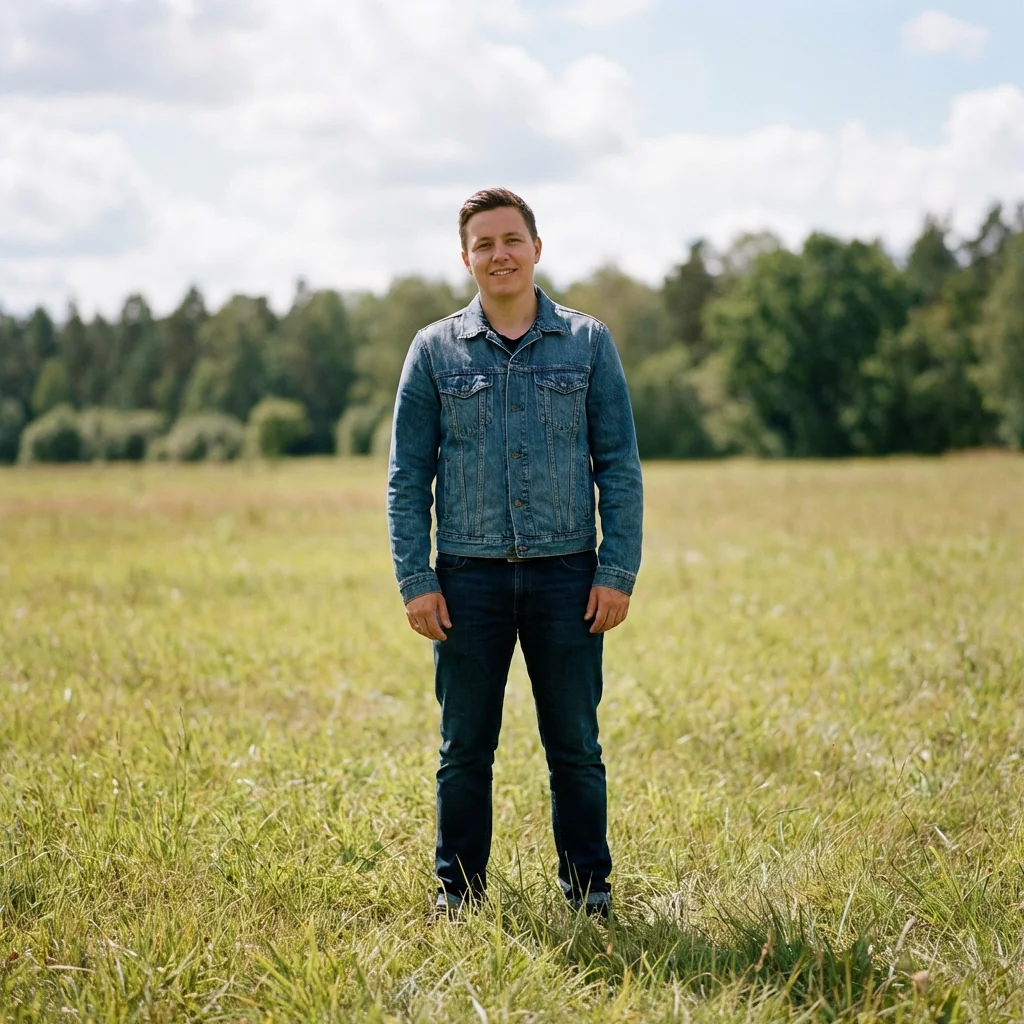
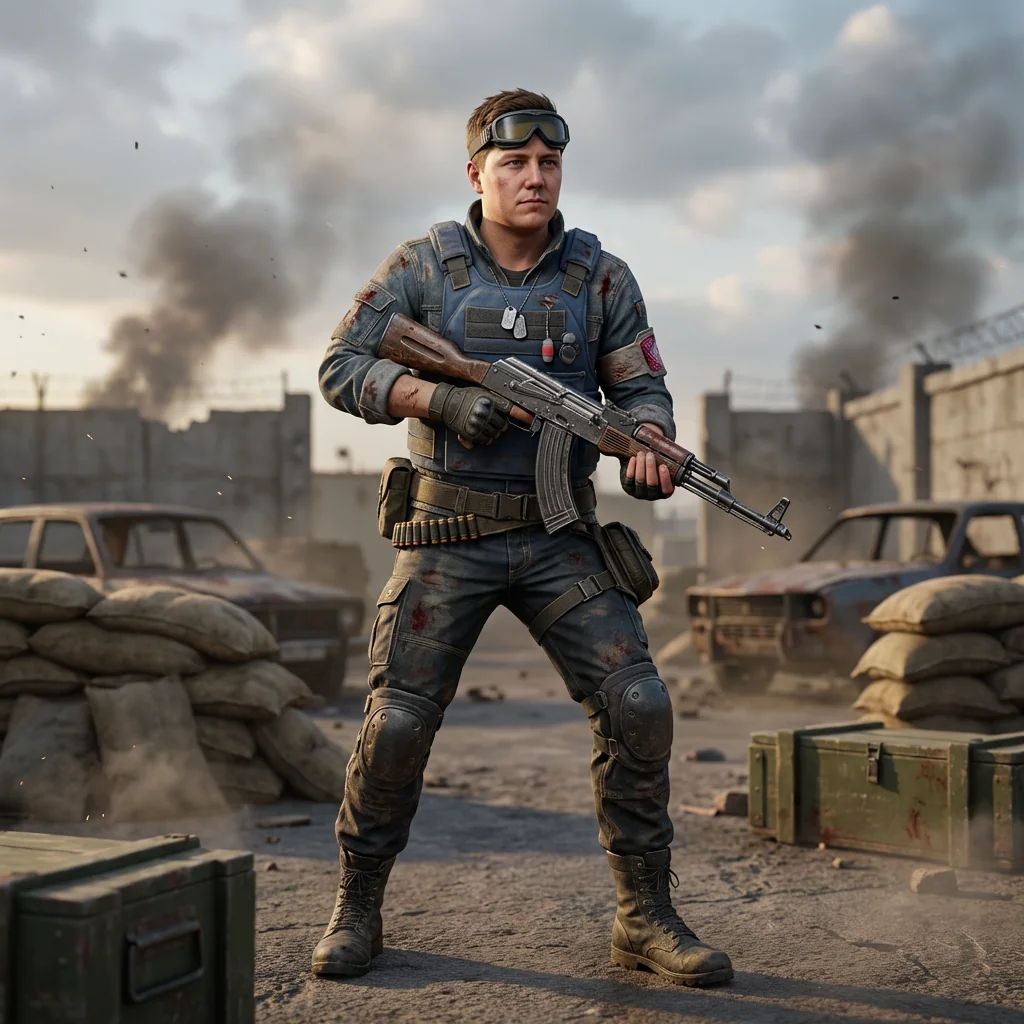
Free to try - Sign up in seconds
About This Trend
Step into the battleground like never before with our revolutionary AI-powered PUBG character transformation tool. This cutting-edge technology takes your ordinary photo and reimagines you as a battle-hardened warrior straight out of PUBG: Battlegrounds, complete with tactical gear, authentic weapons, and cinematic atmosphere. Whether you're a hardcore PUBG fan, content creator, or just want to see yourself as an elite soldier, this AI tool delivers photorealistic results that preserve your unique facial features while transforming your entire look into a combat-ready operator.
Our advanced AI engine meticulously analyzes your photo and applies sophisticated rendering techniques to create a highly detailed, game-quality character model. Every element is crafted with attention to detail: rugged ballistic vests with visible wear patterns, reinforced tactical pants with authentic knee pads, battle-worn weapons with realistic scratches and dirt, and atmospheric environmental effects including dust particles and cinematic lighting. The AI preserves your facial expression and hairstyle perfectly, ensuring you remain instantly recognizable while your body transforms into a natural PUBG combat stance. The result is a stunning 3:4 vertical image that looks like it was pulled directly from the game, complete with professional color grading featuring desaturated midtones, warm highlights, and cool blue shadows that define the PUBG aesthetic.
Perfect for social media profiles, gaming content, YouTube thumbnails, or simply showing off your battle-ready alter ego to friends, this AI transformation combines the best of photorealism and game art. The background environments are authentic PUBG battlegrounds featuring ruined compounds, scattered military equipment, smoke plumes, and dramatic skies that add depth and storytelling to your character portrait. With cinematic late-afternoon lighting, shallow depth of field, and gritty texture work on fabrics and armor, every generated image achieves AAA game quality. Join thousands of players who've already transformed themselves into PUBG legends and experience the thrill of seeing yourself as the ultimate battleground survivor, armed and ready for victory.
Ready to create your own?
Try this trend for free. No credit card required, just sign up and start creating.
How It Works
Upload a clear, front-facing photo with good lighting and visible facial features for best AI recognition
Select 'Battle Royale Fighter: PUBG Character' transformation and choose your preferred intensity level
Let the AI process your image (30-60 seconds) to apply tactical gear, weapons, and battleground environment
Preview your PUBG warrior transformation and download in high-resolution 3:4 format ready for sharing
Optional: Adjust settings for different weapon types, environmental backgrounds, or lighting moods
Features
- Photorealistic PUBG character transformation preserving facial features and expressions perfectly
- Authentic tactical gear rendering: ballistic vests, cargo pants, combat boots, helmets and tactical accessories
- Battle-worn weapon integration with realistic AKM/assault rifle styling and weathering effects
- Cinematic lighting with warm rim light, cool shadows, and atmospheric dust particles
- Authentic PUBG battleground environments with ruined compounds, vehicles, and military props
- Professional color grading: desaturated midtones, warm highlights, cool blue shadows
- High-resolution 3:4 vertical format perfect for mobile screens and social media
- Advanced AI texture rendering: fabric weave, scratched metal, dirt, blood smears, and realistic weathering
- Natural combat-ready poses with balanced weight distribution and tactical positioning
- Game-quality character model with subsurface scattering, pores, and detailed normal maps
Use Cases
- Create epic PUBG-themed social media profile pictures and gaming avatars
- Design professional YouTube thumbnails for PUBG gameplay videos and streams
- Generate unique content for gaming communities, Discord servers, and esports teams
- Make personalized PUBG birthday gifts and custom artwork for gaming friends
- Produce eye-catching promotional material for gaming events and tournaments
- Develop character art for fan fiction, role-playing, and PUBG community projects
- Craft attention-grabbing Twitch panels, stream overlays, and channel branding
Pro Tips for Better Results
Choose Photos with Clear Facial Structure
The Nano Banana Pro Edit model excels at preserving facial features when your source photo has clear definition. Use images with direct or slightly angled lighting that shows your bone structure, jawline, and eyes clearly. Avoid heavily shadowed selfies or photos with harsh overhead lighting. If your photo is too dark or blurry, consider running it through AI Headshot Generator first to create a clean base image before applying the PUBG transformation.
Upper Body Visibility Improves Gear Rendering
The AI needs to see your shoulders and upper torso to properly map tactical vests, weapon straps, and combat gear onto your body. Crop your photo to show from mid-chest up rather than just a tight face crop. Photos where you're wearing a plain t-shirt or tank top work better than busy patterns or bulky jackets, as the AI can more accurately replace clothing with authentic PUBG tactical gear. This gives the model clean edges to work with when rendering ballistic vests and ammunition pouches.
Neutral Expressions Create Versatile Warriors
While the AI preserves any expression you upload, neutral or slightly serious faces tend to match the gritty PUBG aesthetic better than big smiles. Think about the mood you want: a calm, focused expression reads as a seasoned veteran, while a slight smirk suggests confidence. Extreme expressions like wide-open mouths can sometimes conflict with the tactical helmet and face mask elements the AI adds. For comparison, FLUX 2 Face to Full Portrait offers more control over final expressions if you need specific emotional tones.
Simple Backgrounds Let the AI Focus
Photos with plain or slightly blurred backgrounds allow Nano Banana Pro Edit to concentrate processing power on transforming you rather than interpreting complex scenery. The AI will replace your background with authentic PUBG battlegrounds anyway—ruined compounds, military vehicles, dust and smoke—so a busy original background just adds unnecessary complexity. Indoor shots with neutral walls or outdoor photos with natural bokeh work perfectly. This approach ensures maximum detail goes into your tactical gear, weapon weathering, and facial preservation.
Resolution Matters for Print-Quality Results
Upload the highest resolution version of your photo available. While the AI outputs a 3:4 vertical format optimized for mobile and social media, starting with a high-res source (at least 1080px on the shortest side) ensures crisp details in the final render. You'll see better texture definition in fabric weave, metal scratches on weapons, and skin pores. Lower resolution inputs can result in slightly softer edges on tactical accessories. For professional thumbnail work, this detail level makes the difference between amateur and AAA-game quality output.
Experiment with Different Source Photo Angles
While front-facing photos are most reliable, don't be afraid to try 3/4 profile shots for more dynamic compositions. The AI adapts the combat pose and weapon positioning based on your angle, creating more varied results. A slight turn to the left or right can result in different shoulder armor visibility and rifle placement. If you need more dramatic angle control or want to test multiple variations quickly, OpenAI GPT Image 2 Edit offers flexible prompt-based adjustments, though with less PUBG-specific styling than this specialized trend.
Frequently Asked Questions
Other Models You Could Use
Ready to Try Battle Royale Fighter: Become a PUBG Battleground Character?
Transform your images with AI in seconds. No design skills required.
Get Started FreeJoin thousands of creators using JAI Portal