Crystal Ice Sculpture: Transform into Translucent Frozen Art
Transform Photos into Stunning Translucent Ice Sculptures

Free to try - Sign up in seconds
About This Trend
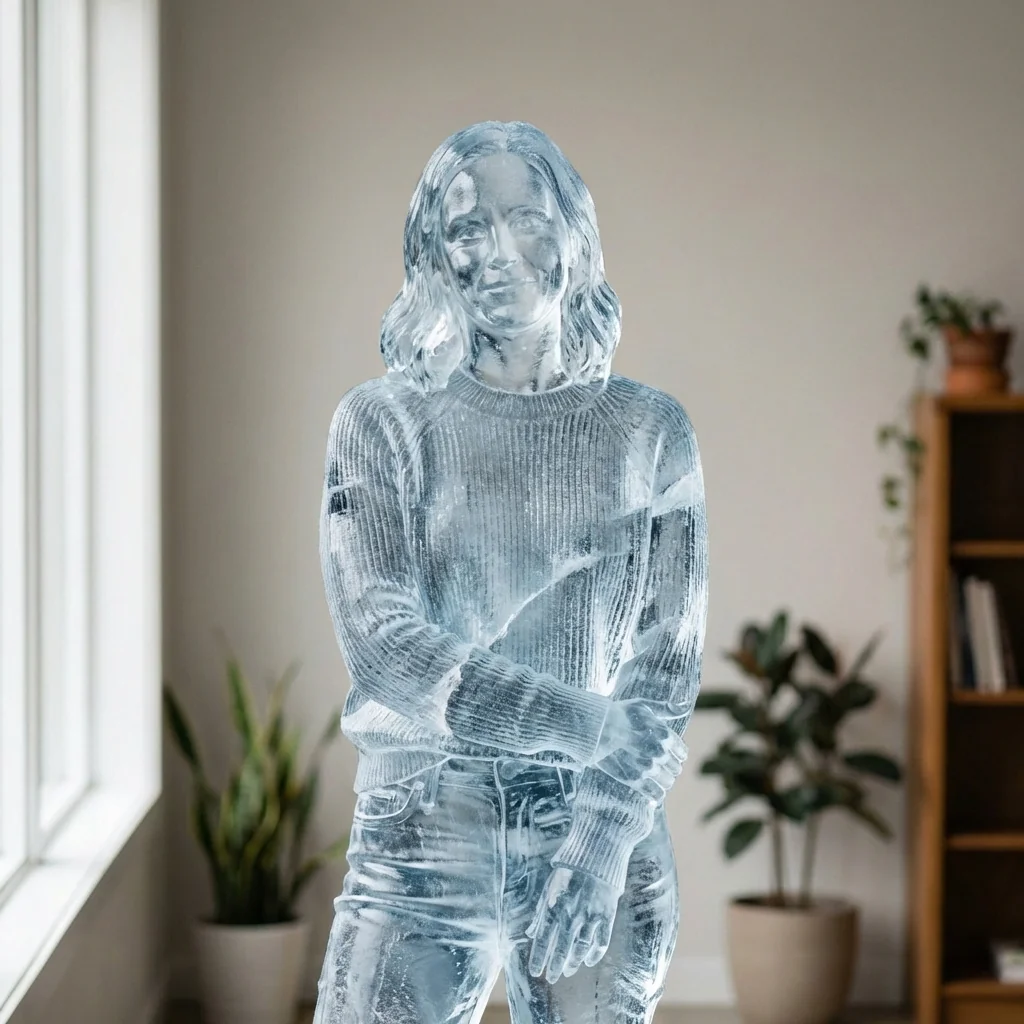
Experience the mesmerizing beauty of ice sculpture art without the cold workshop. Our Crystal Ice Sculpture AI transforms ordinary photographs into extraordinary translucent frozen masterpieces that capture the delicate interplay of light, texture, and crystalline structure. This revolutionary AI technology analyzes every detail of your subject and recreates it as a photorealistic ice sculpture, complete with internal bubbles, natural cracks, layered frozen textures, and the signature luminous quality of hand-carved ice.
The advanced algorithm preserves the exact pose, proportions, and stance of your original subject while applying sophisticated ice material properties. Clothing and accessories are seamlessly converted into sculpted ice details, creating the illusion that every element was meticulously carved from a single block of crystal-clear ice. Natural light diffusion effects simulate how real ice interacts with ambient lighting, producing subtle cold highlights, internal refractions, and the ethereal glow that makes ice sculptures so captivating. Whether you're creating artwork for professional presentations, unique social media content, or exploring creative digital art possibilities, this tool delivers museum-quality results.
Unlike simple filters or cartoon effects, our AI generates truly photorealistic ice sculptures with scientific accuracy in material rendering. The technology accounts for ice transparency gradients, surface frost patterns, internal stress fractures, and the subtle color shifts that occur when light passes through frozen water. Each generated sculpture maintains perfect environmental consistency with your original photo's background and camera angle, ensuring the ice subject appears naturally integrated into the scene. From portraits to full-body poses, from pets to objects, transform any subject into a stunning frozen work of art that rivals professional ice carving exhibitions.
Ready to create your own?
Try this trend for free. No credit card required, just sign up and start creating.
How It Works
Upload a clear photo with your desired subject in a distinct pose against any background
Click the Crystal Ice Sculpture transform button to initiate the AI processing
Wait 10-30 seconds as the AI analyzes proportions and applies realistic ice material properties
Download your photorealistic ice sculpture image in high resolution for any creative project
Experiment with different poses and lighting conditions to discover unique frozen art variations
Features
- Photorealistic ice sculpture transformation with authentic translucent properties
- Preserves exact pose, proportions, and stance of original subjects
- Realistic internal details: bubbles, cracks, and layered frozen textures
- Natural light diffusion and cold highlight rendering
- Clothing and accessories converted to sculpted ice details
- Maintains original environment and camera angle consistency
- Scientific material rendering with accurate transparency gradients
- Professional-grade output suitable for commercial and artistic projects
- Works with portraits, full-body images, pets, and objects
- No melting effects or cartoon distortions, pure photorealism
Use Cases
- Create unique social media content that stands out from typical photo filters
- Generate stunning artwork for digital galleries and online portfolios
- Design eye-catching marketing materials for winter events and campaigns
- Produce professional visualizations for ice sculpture exhibition concepts
- Transform wedding photos into memorable frozen art commemorations
- Create surreal portrait series exploring themes of preservation and transformation
- Develop creative content for photography blogs and tutorial demonstrations
Pro Tips for Better Results
Use High-Contrast Source Photos for Best Results
Photos with clear subject separation from the background produce the most striking ice sculptures. The Nano Banana Pro Edit model excels when your subject has distinct edges and good lighting contrast. Avoid heavily shadowed images or subjects that blend into busy backgrounds. Well-lit portraits with simple backgrounds yield the most photorealistic translucent effects, allowing the AI to accurately map ice properties to clothing folds, facial features, and body contours.
Experiment with Different Pose Complexity Levels
While the model preserves exact proportions and stance, simpler poses with extended limbs often showcase the ice sculpture effect more dramatically. Full-body standing poses work beautifully, but seated or action poses can create interesting challenges for the crystal rendering. Try both portrait crops and full-body shots to see how the translucent properties interact with different compositions. Dynamic poses with outstretched arms highlight the light diffusion effects through sculpted ice limbs.
Compare Results with Other Editing Models
If you need more control over specific transformations, try OpenAI GPT Image 2 Edit or FLUX 2 Dev Edit for prompt-based adjustments. However, Nano Banana Pro Edit specializes in this precise ice sculpture aesthetic without requiring detailed prompts. For pure ice transformation with authentic material physics, this dedicated model delivers superior photorealism compared to general-purpose editors that may require multiple iterations to achieve similar translucent quality.
Optimize Lighting Conditions in Your Source Image
The AI's light diffusion simulation works best with natural or studio lighting that already has directional quality. Photos taken outdoors in daylight or with professional lighting setups will produce more convincing cold highlights and internal refractions. Avoid flat, shadowless lighting or extreme backlighting that obscures subject details. The model interprets existing light sources to generate realistic ice translucency, so starting with well-exposed images ensures the frozen sculpture appears naturally integrated into your scene.
Consider Your Subject's Clothing and Texture
Clothing with visible texture and structure translates beautifully into sculpted ice details. Flowing fabrics, fitted garments, and accessories with distinct shapes all become fascinating frozen elements. The model converts fabric folds into carved ice ridges and transforms jewelry into crystalline ornaments. For maximum visual impact, choose source photos where clothing details are clearly visible rather than obscured by shadows or motion blur. Textured materials produce more interesting internal bubble patterns.
Test Multiple Images for Portfolio Consistency
If creating a series, maintain consistent lighting angles and background simplicity across your source photos. The Nano Banana Pro Edit model preserves environmental consistency, so similar shooting conditions will produce a cohesive frozen art collection. For professional headshot-style ice sculptures, compare results with AI Headshot Generator for traditional portraits, then apply this ice effect to create unique gallery presentations. Series work best when source images share similar composition styles.
Frequently Asked Questions
Other Models You Could Use
Ready to Try Crystal Ice Sculpture: Transform into Translucent Frozen Art?
Transform your images with AI in seconds. No design skills required.
Get Started FreeJoin thousands of creators using JAI Portal