Editorial Marker Art: Transform into Hand-Drawn Fashion Illustration with Alcohol Markers
Turn photos into stunning hand-drawn fashion illustrations
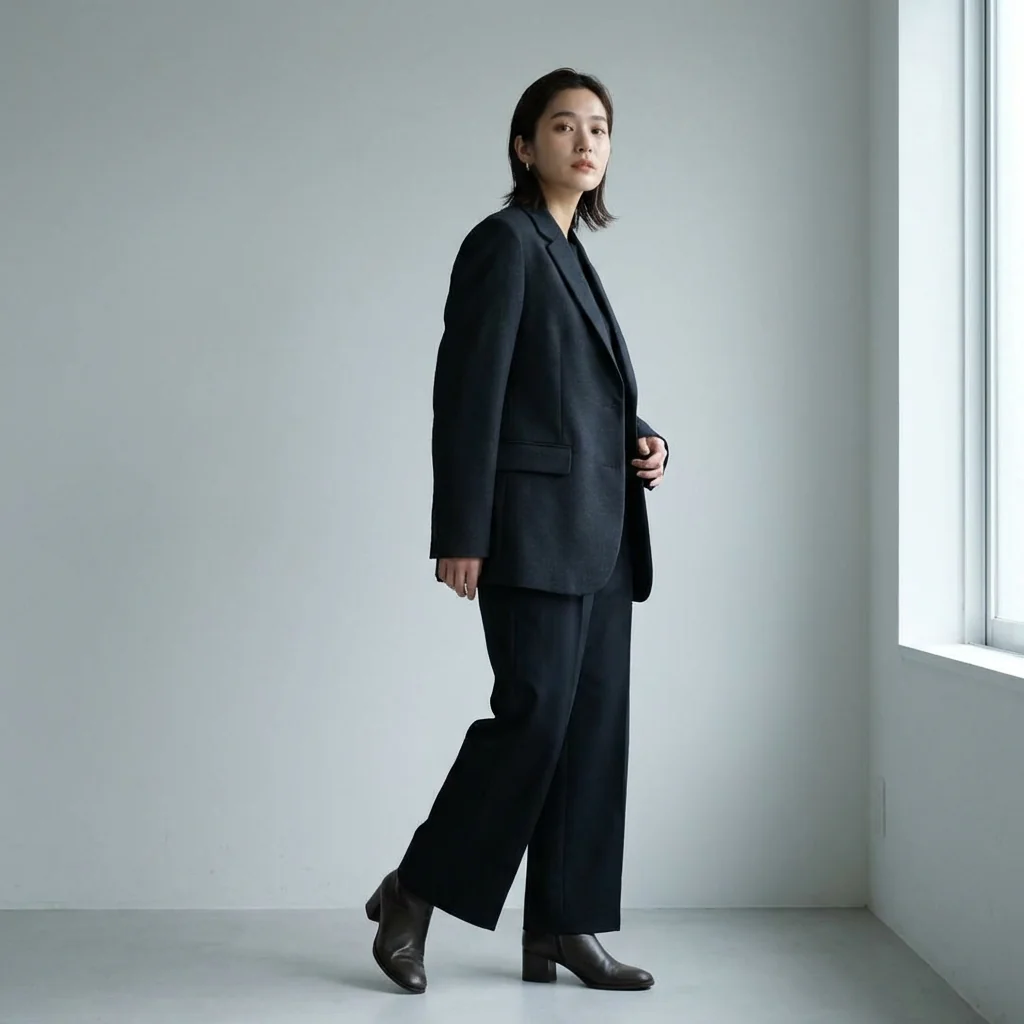
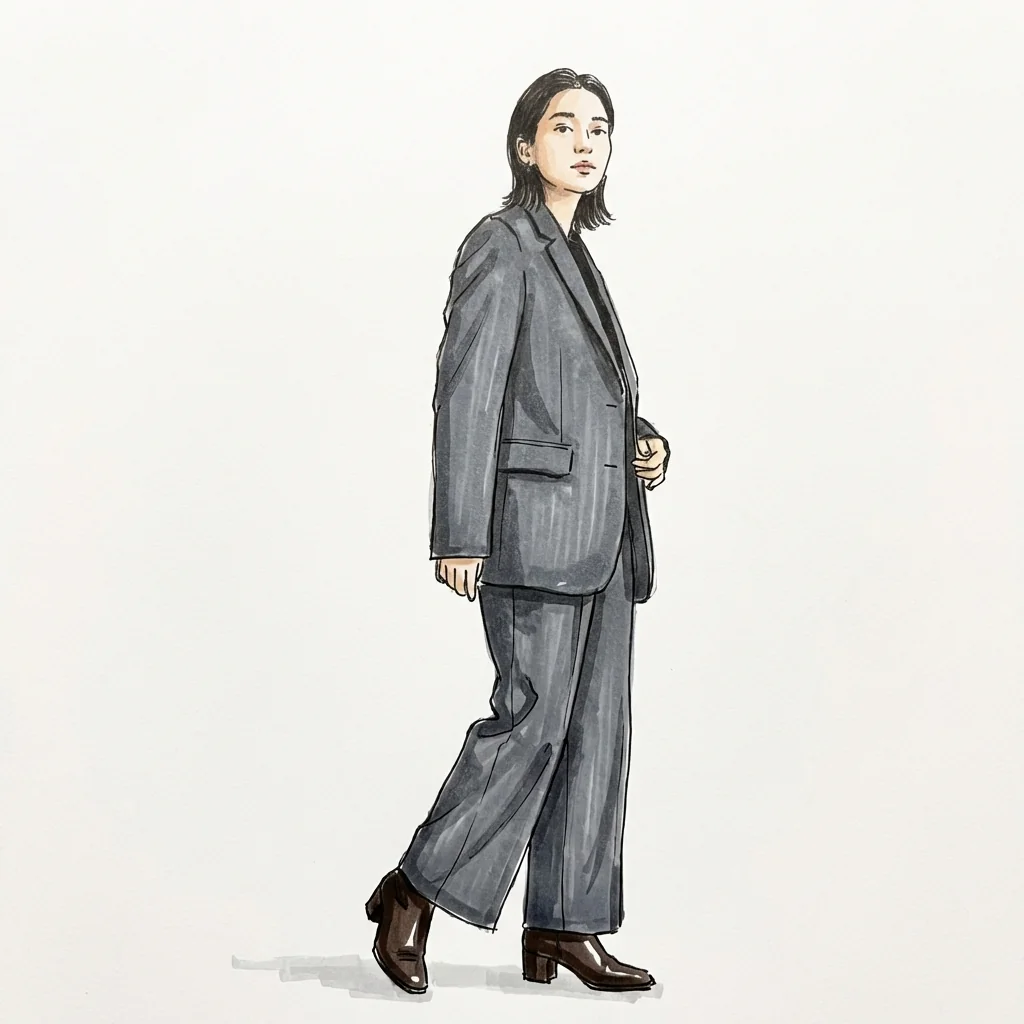
Free to try - Sign up in seconds
About This Trend
Editorial Marker Art brings the timeless elegance of traditional fashion illustration to your photos using advanced AI technology. This innovative tool transforms ordinary photographs into sophisticated hand-drawn fashion sketches that look like they came straight from a luxury designer's sketchbook. Using alcohol marker rendering techniques and fine black ink outlines, the AI creates authentic editorial-style illustrations that preserve every detail of your subject while adding artistic flair.
Unlike simple filters or cartoon effects, Editorial Marker Art employs specialized algorithms trained on professional fashion illustration techniques. The result is artwork featuring visible marker textures, confident hand-drawn linework, and the organic imperfections that make traditional fashion sketches so captivating. Whether you're a fashion designer seeking to visualize concepts, a brand creating unique marketing materials, or an individual wanting artistic portraits, this tool delivers premium-quality illustrations that capture the essence of high-end fashion editorial art.
The technology preserves facial features, poses, outfits, and proportions with remarkable accuracy while applying authentic alcohol marker aesthetics—including subtle color bleeding, layered shading, and paper texture. Each illustration maintains the subject's identity and expression while transforming them into elegant fashion art suitable for portfolios, social media, marketing campaigns, or personal collections. Experience the perfect blend of traditional fashion illustration artistry and modern AI capabilities.
Ready to create your own?
Try this trend for free. No credit card required, just sign up and start creating.
How It Works
Upload a clear, well-lit photo showing the full outfit and pose you want illustrated
Select Editorial Marker Art transformation style from the AI effects menu
Click generate and wait 10-30 seconds for AI processing to complete
Download your high-resolution hand-drawn fashion illustration in PNG format
Use in portfolios, social media, marketing materials, or print projects
Features
- Authentic alcohol marker texture with visible streaking and color overlap
- Hand-drawn ink outlines with organic, confident linework
- Precise identity and pose preservation from uploaded photos
- Professional editorial fashion illustration style
- White paper background with subtle grain texture
- Minimal layered shading using marker techniques only
- Full-body and half-body composition options
- Premium quality suitable for professional portfolios
- No digital gradients or 3D effects—pure traditional style
- Instant transformation with AI-powered illustration engine
Use Cases
- Fashion designers visualizing collection concepts and lookbooks
- Brands creating unique editorial-style marketing materials
- Social media influencers generating artistic portrait content
- Artists exploring fashion illustration without manual drawing skills
- Personal artistic portraits for gifts or home decoration
- Fashion bloggers creating distinctive blog post visuals
- Portfolio development for creative professionals
Pro Tips for Better Results
Use Well-Lit Photos with Clear Outfit Details
The Nano Banana Pro Edit model works best with photos that have even lighting and visible clothing textures. Avoid harsh shadows or backlit shots that obscure fabric details. Natural daylight or studio lighting helps the AI capture garment structure, seams, and draping accurately. The marker effect translates fabric folds and clothing contours into confident ink lines, so the clearer your original photo, the more sophisticated your final illustration will appear.
Choose Full-Body or Three-Quarter Poses
Editorial fashion illustrations traditionally showcase the entire outfit and body proportions. Upload photos where the subject is standing or posed naturally with minimal cropping. Full-body shots allow the AI to render complete garments and proportions authentically. If you need tight headshots with different styling, consider AI Headshot Generator instead, but for True editorial marker art, showing the full silhouette produces the most professional results with proper fashion illustration composition.
Avoid Busy Backgrounds for Clean Paper Effect
The model automatically replaces backgrounds with white paper texture, but complex or cluttered backgrounds can sometimes interfere with edge detection. Plain walls, outdoor settings with simple backgrounds, or studio backdrops work best. This ensures the AI focuses on rendering your subject with clean ink outlines rather than struggling to separate foreground from background. The result is crisp, professional illustrations that look like they were sketched on pristine illustration board.
Upload High-Resolution Source Images
While the AI handles various input sizes, higher-resolution photos (1500px+ on the longest side) give the model more detail to work with when creating marker textures and ink lines. Blurry or low-res images may result in simplified illustrations with less nuanced shading. If you need to edit or enhance photos before transformation, try OpenAI GPT Image 2 Edit to improve clarity first, then run the editorial marker transformation for optimal results.
Expect Authentic Traditional Art Imperfections
Real alcohol marker illustrations have organic streaking, slight color overlap, and hand-drawn line variations—the Nano Banana Pro Edit model preserves these authentic qualities intentionally. Don't expect perfectly smooth digital rendering. The visible marker texture, paper grain, and confident (not perfectly smooth) ink lines are what make the output look like genuine traditional fashion illustration rather than a sterile digital filter. Embrace the artistry.
Consider Multiple Generations for Variation
Each generation may emphasize different marker strokes or line weights slightly differently due to AI variability. If you want options to choose from, run the same photo 2-3 times. The core identity and pose remain consistent, but subtle artistic variations in shading intensity or line confidence can emerge. This gives you creative options similar to how a traditional illustrator might sketch multiple versions of the same concept before finalizing.
Frequently Asked Questions
Other Models You Could Use
Ready to Try Editorial Marker Art: Transform into Hand-Drawn Fashion Illustration with Alcohol Markers?
Transform your images with AI in seconds. No design skills required.
Get Started FreeJoin thousands of creators using JAI Portal