Ethereal Sunset Dreams: Add Dreamy Golden Hour Glow to Your Portrait
Transform portraits with magical golden hour glow effects
Free to try - Sign up in seconds
About This Trend
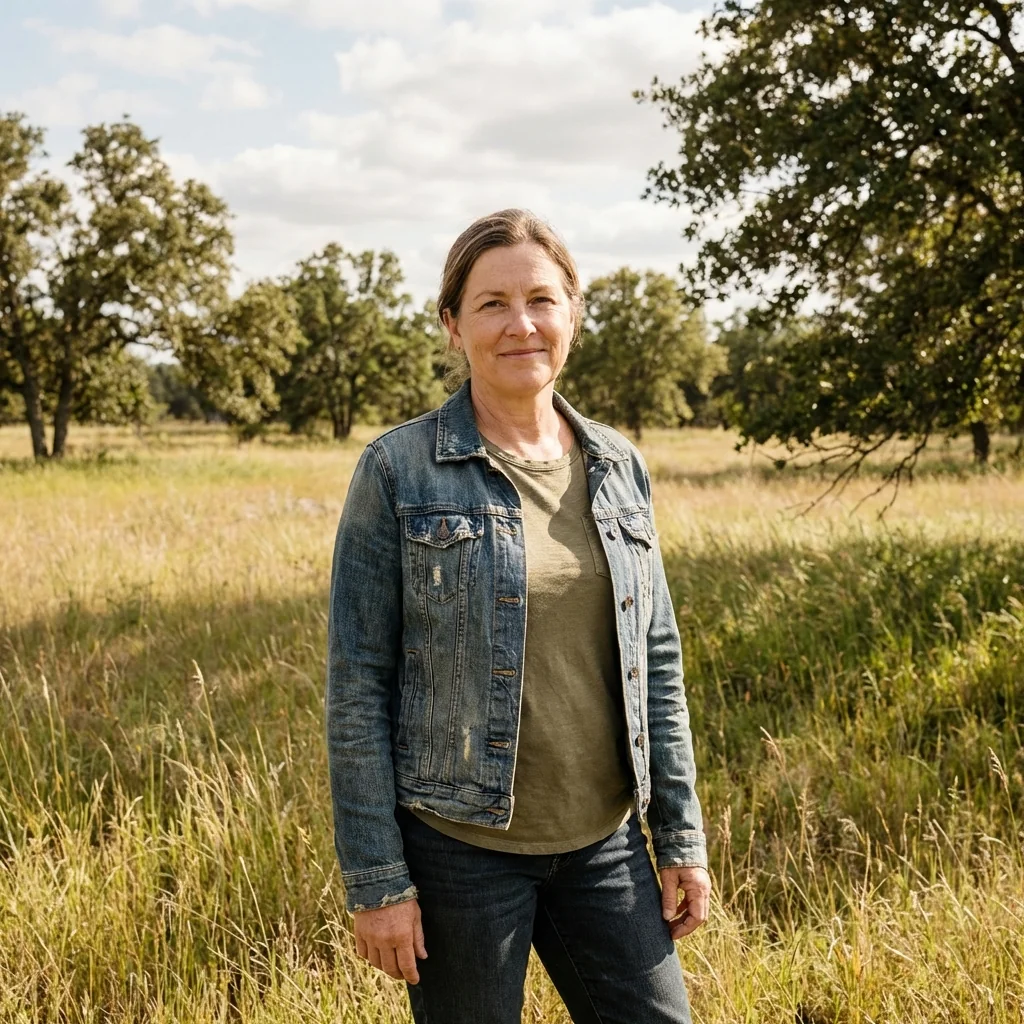
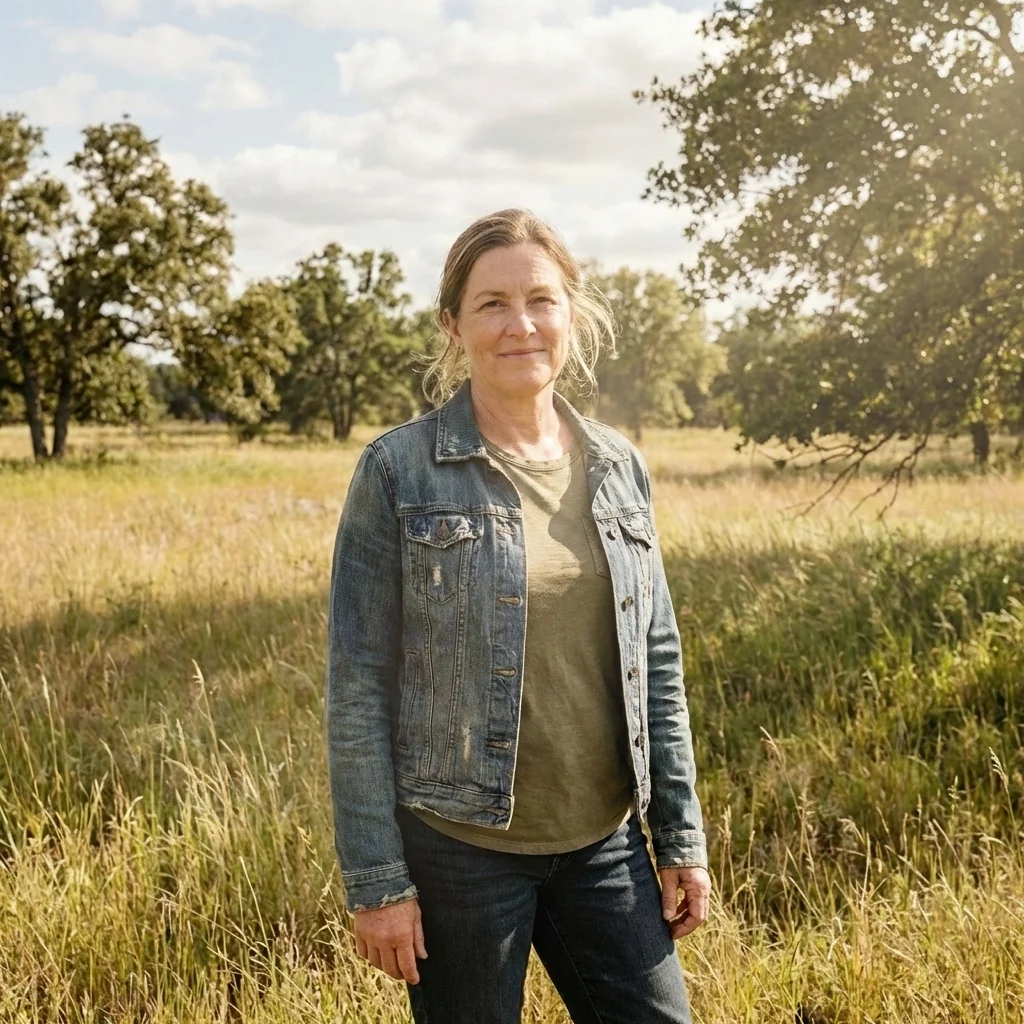
Ethereal Sunset Dreams brings the magic of golden hour photography to every portrait with advanced AI technology. This transformative filter recreates the warm, dreamy atmosphere of late-afternoon sunlight, adding professional-grade lighting effects that photographers spend hours chasing in nature. The AI intelligently applies diffused sunbeams, atmospheric glow, and cinematic color grading while preserving your subject's unique features and original background details.
The effect works by analyzing light patterns in your photo and strategically placing golden hour elements where they would naturally occur. Soft highlights dance across cheekbones, nose bridges, and hair strands, creating dimensional depth and luminous skin tones. The AI adds subtle lens bloom and atmospheric haze that wraps around your subject like a warm embrace, while maintaining the perfect balance between bright sunlit areas and deep, soft shadows. Film-like grain and gentle desaturation complete the aesthetic, giving your portraits that coveted editorial magazine quality.
Whether you're a content creator seeking Instagram-worthy portraits, a photographer looking to enhance natural light shots, or someone who wants to add dreamy aesthetics to everyday photos, this AI filter delivers professional results instantly. The technology respects facial features and hair details completely, only enhancing lighting, color mood, and atmospheric elements. Experience the transformation as ordinary portraits become ethereal works of art bathed in golden sunset glow, ready to captivate your audience with their cinematic beauty and emotional warmth.
Ready to create your own?
Try this trend for free. No credit card required, just sign up and start creating.
How It Works
Upload your portrait photo - works best with outdoor or natural light images
Click 'Apply Ethereal Sunset Effect' and let AI analyze lighting patterns
Adjust intensity slider to control golden hour glow strength (optional)
Preview the transformed portrait with dreamy sunset lighting and atmospheric effects
Download your ethereal portrait in high resolution and share across social platforms
Features
- AI-powered golden hour lighting simulation with natural sunbeam placement
- Cinematic high-contrast mood with balanced highlights and shadows
- Subtle lens bloom and atmospheric haze effects for dreamy aesthetics
- Luminous skin rendering with peachy warm tones and translucency
- Backlit hair enhancement with glowing strand details
- Film-like color grading with controlled saturation and gentle grain
- Soft bokeh and natural light flare integration
- Complete preservation of facial features and background details
- Professional editorial-quality portrait transformation
- One-click application with customizable intensity options
Use Cases
- Enhance social media portraits with professional golden hour aesthetics
- Create dreamy profile pictures for Instagram, TikTok, and dating apps
- Transform everyday selfies into editorial-quality fashion portraits
- Add cinematic sunset glow to wedding and engagement photos
- Elevate influencer content with consistent ethereal lighting effects
- Improve outdoor portrait sessions shot in flat lighting conditions
- Generate atmospheric headshots for creative professionals and artists
Pro Tips for Better Results
Start with Natural Light Base Photos
The Nano Banana Pro Edit model works best when your input already has some directional lighting. Photos taken near windows, outdoors during overcast days, or in open shade give the AI more lighting information to enhance. Avoid harsh overhead fluorescent lighting or completely flat illumination—the algorithm needs subtle shadows and highlights to build upon when creating that signature golden hour glow and atmospheric depth.
Position Your Subject Off-Center for Depth
Composition matters even with AI enhancement. Place your subject slightly off-center with some background space visible behind them. This gives the ethereal sunset effect room to add atmospheric haze, lens bloom, and bokeh elements that wrap around your subject naturally. The AI analyzes spatial relationships in your photo, so leaving breathing room helps it place those dreamy light rays and soft focus areas where they'd occur in real golden hour photography.
Use High-Resolution Inputs for Maximum Detail
Upload the highest quality version of your portrait you have available. The Nano Banana Pro Edit preserves fine details like individual hair strands, skin texture, and fabric weave while adding lighting effects. Higher resolution inputs mean more data for the AI to work with when rendering those luminous highlights on cheekbones, backlit hair glow, and subtle film grain that makes the final result look professionally shot rather than filtered.
Layer Multiple Passes for Editorial Intensity
If the single-pass result feels too subtle for your aesthetic, try running the output through again or combining it with JAI Portal Spicy Image Editor for fine-tuned color adjustments. Professional editorial portraits often have layered lighting effects. You can also start with a less intense application, save that version, then create a stronger variant—giving you multiple options to match different platform aesthetics or client preferences without losing the original.
Match Your Subject's Hair Color to Light Direction
The AI adds backlit glow effects that look particularly stunning on lighter hair colors—blonde, auburn, and light brown catch that golden rim lighting beautifully. If your subject has darker hair, position them so any existing light in the original photo comes from behind or the side. This helps the algorithm place those glowing strand details more convincingly, creating separation between subject and background that defines professional golden hour photography.
Pair with Headshot Models for Professional Profiles
After applying the ethereal sunset effect, consider running select results through AI Headshot Generator if you need formal professional variations. The warm, approachable glow from this trend creates an excellent base for corporate headshots that still feel human and engaging rather than sterile. You get the best of both worlds—dreamy aesthetics for social content and polished versions for LinkedIn or company websites from the same original photo.
Frequently Asked Questions
Other Models You Could Use
Ready to Try Ethereal Sunset Dreams: Add Dreamy Golden Hour Glow to Your Portrait?
Transform your images with AI in seconds. No design skills required.
Get Started FreeJoin thousands of creators using JAI Portal