Hawkins Living Room: Sit in Stranger Things Scene with Alphabet Wall
Transform into Stranger Things iconic Byers house scene
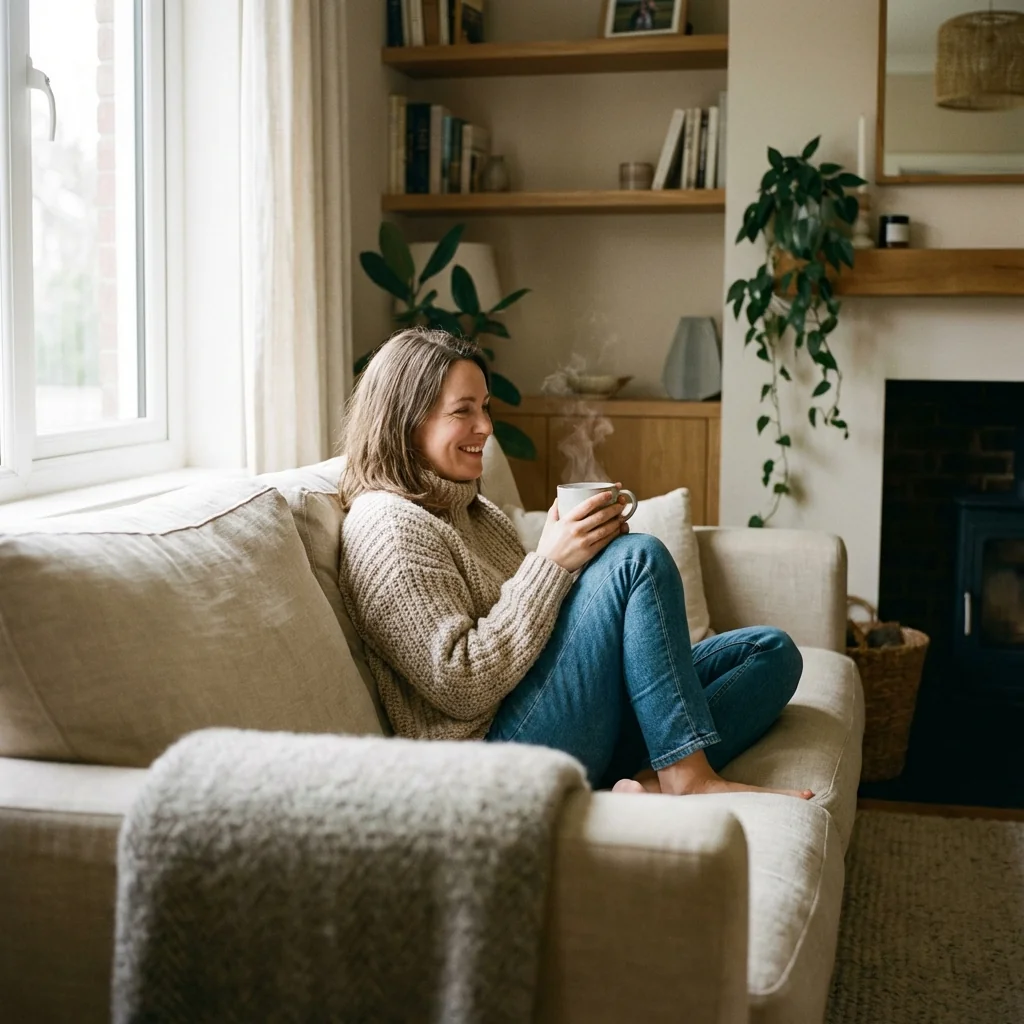
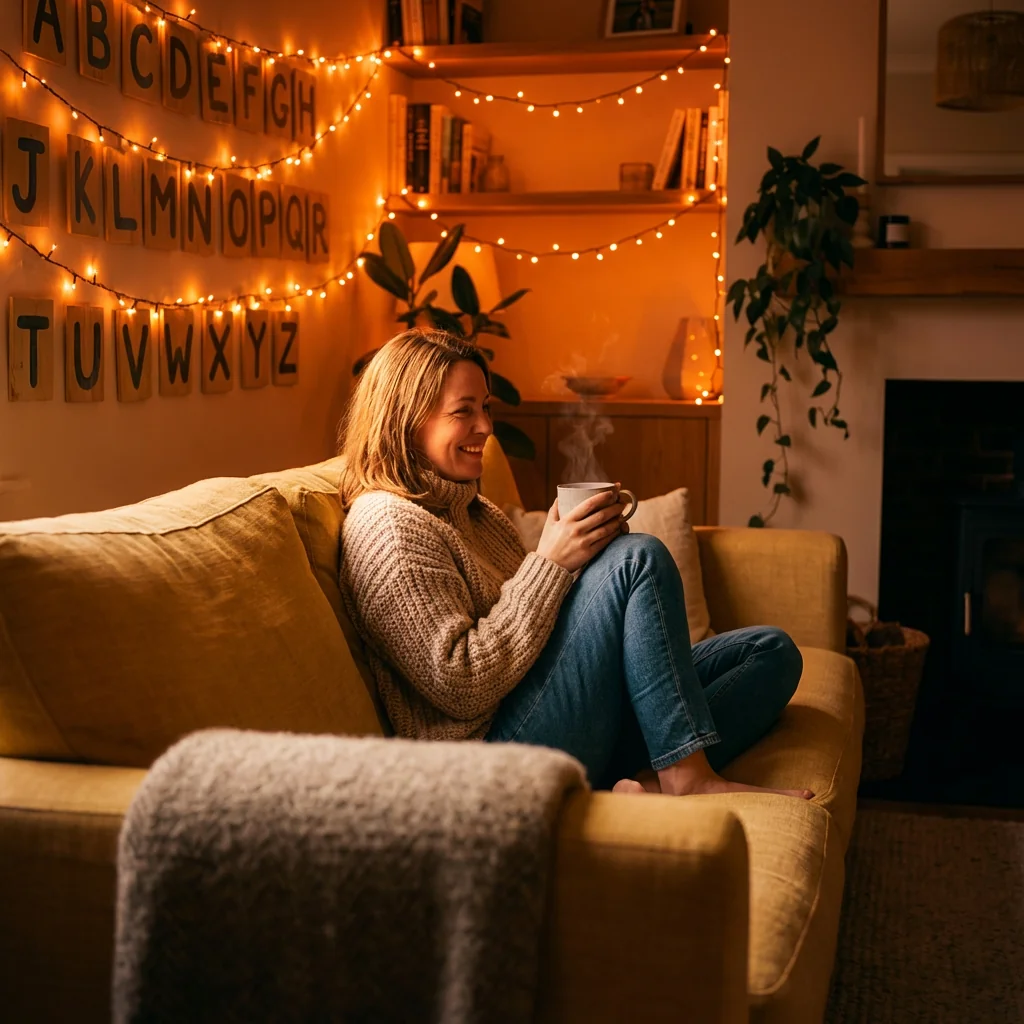
Free to try - Sign up in seconds
About This Trend
Experience the nostalgic atmosphere of Stranger Things' most iconic location with our AI-powered Hawkins Living Room photo transformation. This cutting-edge AI effect places you directly into the cozy, mysterious Byers family living room, complete with the famous hand-painted alphabet wall and colorful glowing string lights that became a symbol of hope and communication in the beloved Netflix series. Our advanced AI technology seamlessly blends your photo with the vintage yellow sofa setting, creating a cinematic and realistic scene that captures the exact mood and atmosphere of the show's most memorable moments.
What makes this AI transformation truly special is the attention to detail in lighting and atmosphere. The warm orange glow from the string lights softly illuminates your face and hair, casting gentle ambient shadows that perfectly match the room's tone. Unlike generic photo filters, our AI understands color temperature, texture transitions, and depth of field to ensure your outfit and skin tones harmonize naturally with the vintage 1980s aesthetic. Every element from the worn wallpaper to the retro furniture is rendered with photorealistic quality, making it impossible to tell where reality ends and AI magic begins. The result is a cohesive, moody, and atmospheric image that looks like a genuine behind-the-scenes photo from the Stranger Things set.
Whether you're a devoted Stranger Things fan wanting to celebrate your love for the series, a content creator looking for unique social media material, or simply someone who appreciates nostalgic 80s aesthetics, this AI photo effect delivers professional-quality results in seconds. The realistic depth of field and smooth blending techniques ensure that you don't just appear pasted into the scene – you become part of it. Share your Hawkins living room moment with friends, use it as a profile picture, or create a series of Stranger Things-inspired photos for your portfolio. With our AI generator, the Upside Down is just an upload away, and you can relive the magic of Hawkins, Indiana without leaving your home.
Ready to create your own?
Try this trend for free. No credit card required, just sign up and start creating.
How It Works
Upload a clear front-facing photo with good lighting and neutral background
Select the 'Hawkins Living Room' AI effect from the Stranger Things collection
Adjust your position on the vintage yellow sofa using the preview tool
Fine-tune lighting intensity and color warmth to match your photo tone
Generate your cinematic Stranger Things scene and download in high resolution
Features
- Cinematic Stranger Things Byers house living room AI recreation
- Realistic alphabet wall with colorful glowing string lights effect
- Vintage yellow sofa placement with natural sitting pose
- Warm orange lighting with accurate color temperature matching
- Advanced shadow casting and ambient lighting simulation
- Seamless skin tone and outfit color harmonization
- Professional depth of field and texture blending
- 1980s retro atmosphere with authentic period details
- High-resolution output suitable for prints and social media
- One-click transformation with instant preview
Use Cases
- Create unique Stranger Things fan art and tribute photos
- Generate eye-catching social media profile pictures with 80s nostalgia
- Design custom birthday or event invitations with retro TV theme
- Produce content for Stranger Things fan pages and communities
- Make personalized gifts for Netflix series enthusiasts
- Create themed photography for cosplay and convention portfolios
- Generate viral-worthy content for TikTok and Instagram Reels
Pro Tips for Better Results
Choose Photos with Clear Facial Features
The Nano Banana Pro Edit model works best when your face is clearly visible and well-lit in the source photo. Avoid sunglasses, heavy shadows across your face, or extreme angles. A straight-on or slight three-quarter angle captures the warm glow from the alphabet wall lights more naturally. If your source photo has harsh shadows, consider using AI Headshot Generator first to create a clean base image, then apply the Hawkins effect.
Wear Solid Colors for Best Blending
Clothing with solid, muted tones—especially earth tones, denim, or vintage-style prints—blend more seamlessly into the 1980s Byers house aesthetic. Busy patterns or neon colors can clash with the warm orange lighting and retro atmosphere. The AI adjusts color temperature automatically, but starting with clothing that matches the era helps the final composition look like an authentic Stranger Things production still rather than a digital insert.
Optimize Your Source Image Resolution
Upload the highest resolution photo you have—ideally at least 1024px on the shortest side. The Nano Banana Pro Edit model preserves fine details like hair texture and fabric weave when given high-quality input. Low-resolution or heavily compressed phone photos may result in softer edges or less convincing lighting transitions. If you need to upscale a photo first, the output from this model is already optimized for social media and print.
Consider Your Sitting Pose Beforehand
The vintage yellow sofa placement works best when your source photo shows you in a relaxed, seated, or slightly leaning posture. Standing or action shots can look awkward when mapped onto the couch. If your photo shows you standing, the AI will still place you in the scene, but the perspective may feel less natural. For maximum realism, use a photo where your shoulders and torso are already angled as if sitting comfortably.
Experiment with Lighting Intensity After Generation
While the Hawkins effect applies warm orange ambient lighting by default, you can adjust the final result's brightness and contrast in post-processing or by tweaking your source photo's exposure before upload. If you want a moodier, more dramatic look reminiscent of the show's darker scenes, slightly underexpose your input. For a softer, more nostalgic vibe, use a brighter source image. The FLUX 2 Dev Edit model offers more granular lighting control if you need it.
Use Neutral Backgrounds for Cleaner Cutouts
Photos taken against plain walls or simple backgrounds help the AI isolate your figure more accurately, resulting in smoother edge blending and more realistic shadow casting on the sofa and wall. Busy or cluttered backgrounds can confuse the segmentation, leading to artifacts around your hair or shoulders. If your only option is a complex background, OpenAI GPT Image 2 Edit can help you remove distractions before applying the Hawkins effect.
Frequently Asked Questions
Other Models You Could Use
Ready to Try Hawkins Living Room: Sit in Stranger Things Scene with Alphabet Wall?
Transform your images with AI in seconds. No design skills required.
Get Started FreeJoin thousands of creators using JAI Portal