Laika Studio Magic: Place Yourself in a Clay Stop-Motion World
Transform photos into Laika-style clay stop-motion scenes

Free to try - Sign up in seconds
About This Trend
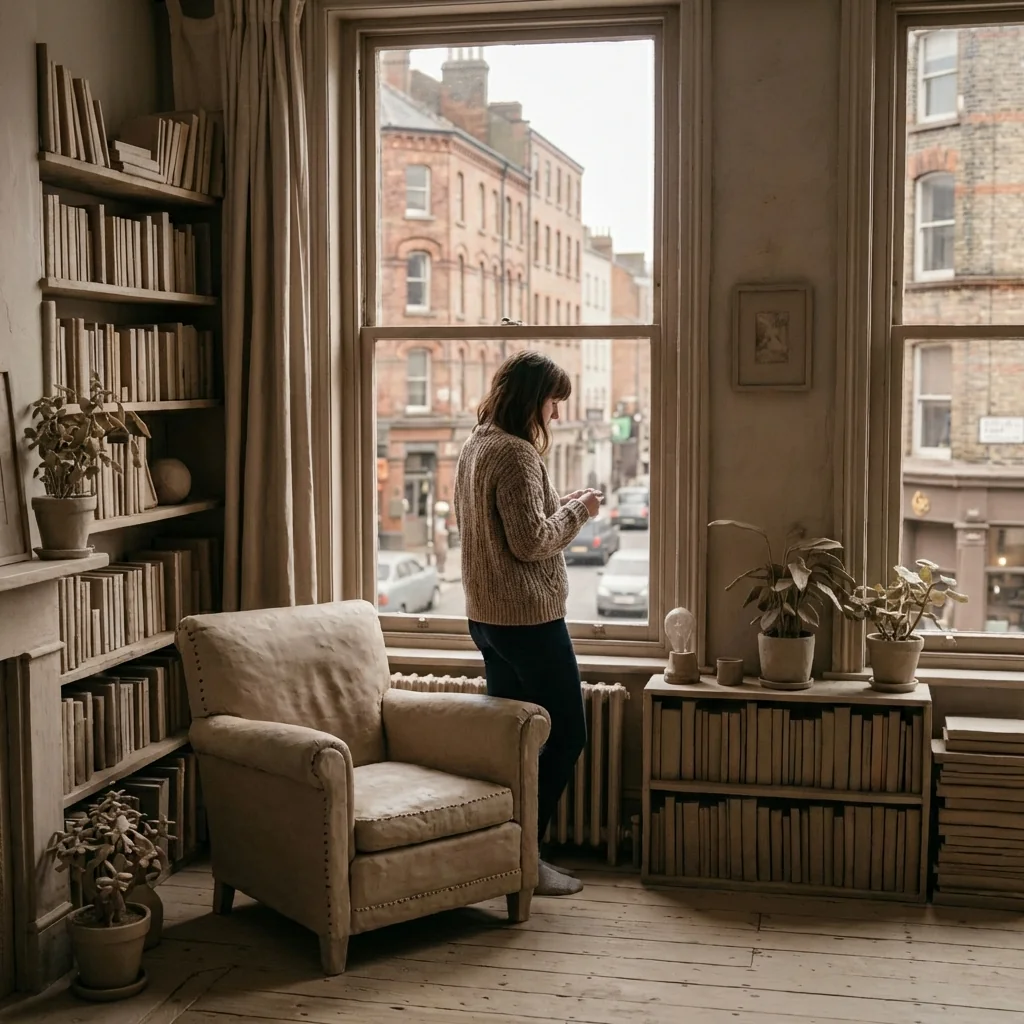
Step into the enchanting world of stop-motion animation with our revolutionary AI-powered Laika Studio Magic effect. This innovative tool transforms your ordinary photographs into extraordinary clay stop-motion masterpieces, reminiscent of beloved Laika Entertainment and Aardman Animations productions like Coraline, Kubo and the Two Strings, and Wallace & Gromit. Unlike traditional filters that apply effects uniformly, our advanced AI technology carefully preserves your realistic appearance while transforming everything around you into a meticulously handcrafted clay universe.
The magic lies in the stunning contrast between photorealistic subjects and artistically sculpted clay environments. Every element of your background—from towering buildings and bustling streets to delicate trees and intricate furniture—is reimagined as if lovingly molded by stop-motion artists. The AI captures authentic clay characteristics including subtle finger smudges, tool marks, gentle imperfections, and the tactile quality that makes stop-motion animation so captivating. Soft studio lighting, matte surfaces, and chunky rounded forms create an unmistakable stop-motion aesthetic that transports viewers into a miniature world of wonder.
Whether you're a photography enthusiast, social media creator, animator, or simply someone who loves the charm of stop-motion films, this tool offers endless creative possibilities. Transform vacation photos into clay adventures, create whimsical portraits that blend reality with fantasy, or produce eye-catching content that stands out in crowded social feeds. The sophisticated AI ensures that while your environment becomes a clay wonderland, you remain perfectly realistic—preserving every detail of your face, skin texture, hair, clothing, and expression. Experience the perfect fusion of photographic reality and handcrafted animation artistry, all with a simple upload.
Ready to create your own?
Try this trend for free. No credit card required, just sign up and start creating.
How It Works
Upload a clear photo with a visible main subject and background
AI automatically identifies the subject and background elements
The system transforms the environment into handcrafted clay while preserving subject realism
Review your Laika-style stop-motion masterpiece and download in high resolution
Share your clay world creation on social media or use in creative projects
Features
- Authentic Laika and Aardman-style clay stop-motion transformation
- 100% preservation of subject realism - no stylization on people
- Handcrafted clay textures with finger smudges and tool marks
- Professional stop-motion studio lighting effects
- Converts entire backgrounds into sculpted clay environments
- Maintains original camera angles and composition
- High-resolution output with cinematic quality
- Intelligent AI detection of subjects vs. backgrounds
- Tactile, imperfect clay aesthetic with rounded edges
- Perfect visual contrast between real subjects and clay worlds
Use Cases
- Create unique social media content with stop-motion aesthetics
- Transform vacation and travel photos into clay adventures
- Design whimsical portraits for creative portfolios
- Produce eye-catching marketing visuals with artistic flair
- Generate nostalgic animation-style family photos
- Create storytelling content for children's books or projects
- Develop distinctive personal branding imagery
Pro Tips for Better Results
Choose Photos with Rich Background Detail
The Nano Banana Pro Edit model shines when your background has architectural elements, furniture, or natural scenery to transform into clay. Empty or blurry backgrounds won't showcase the stop-motion magic. Urban streets, cozy interiors, and nature scenes with trees or rocks give the AI plenty of material to sculpt into that handcrafted Laika aesthetic with finger marks and tool textures.
Ensure Strong Subject-Background Separation
The AI needs clear visual boundaries to keep you realistic while transforming surroundings into clay. Stand a few feet away from walls or objects rather than leaning directly against them. Good separation helps the model accurately detect where your body ends and the clay world begins, preventing accidental stylization of your clothing or hair edges. Well-lit subjects with defined outlines produce the cleanest transformations.
Use Natural Lighting for Best Results
While the AI adds stop-motion studio lighting to backgrounds, starting with naturally lit photos helps preserve your realistic appearance. Harsh shadows or extreme backlighting can confuse the subject detection. Soft daylight or even indoor lighting works beautifully. If you need more control over lighting adjustments before applying the clay effect, try OpenAI GPT Image 2 Edit for preprocessing.
Experiment with Different Environments
Each setting type produces unique clay transformations. Outdoor cityscapes become miniature clay metropolises with chunky buildings. Forest photos turn into sculpted woodland scenes. Kitchen or living room shots create cozy stop-motion dioramas. The Nano Banana Pro Edit model handles diverse environments differently, so upload multiple photos from various locations to discover which backgrounds translate most dramatically into clay worlds.
Keep Your Pose Central and Clear
Position yourself prominently in the frame rather than at edges where the AI might struggle with boundary detection. Full-body shots work well, but portraits and mid-shots also produce stunning results. Avoid extreme angles or partial crops of your body. If you want professional portrait-focused results without background transformation, consider AI Headshot Generator instead.
Review Output Resolution Before Sharing
The high-resolution output from Nano Banana Pro Edit captures intricate clay textures and imperfections that make the effect convincing. Download the full-quality version rather than taking screenshots. The fine details—tiny finger smudges, matte surface quality, and subtle tool marks—are what sell the stop-motion illusion on social media. Compressed versions lose the handcrafted charm that makes this effect special.
Frequently Asked Questions
Other Models You Could Use
Ready to Try Laika Studio Magic: Place Yourself in a Clay Stop-Motion World?
Transform your images with AI in seconds. No design skills required.
Get Started FreeJoin thousands of creators using JAI Portal