Minecraft Character Style
Transform into Full-Body Blocky Minecraft Character
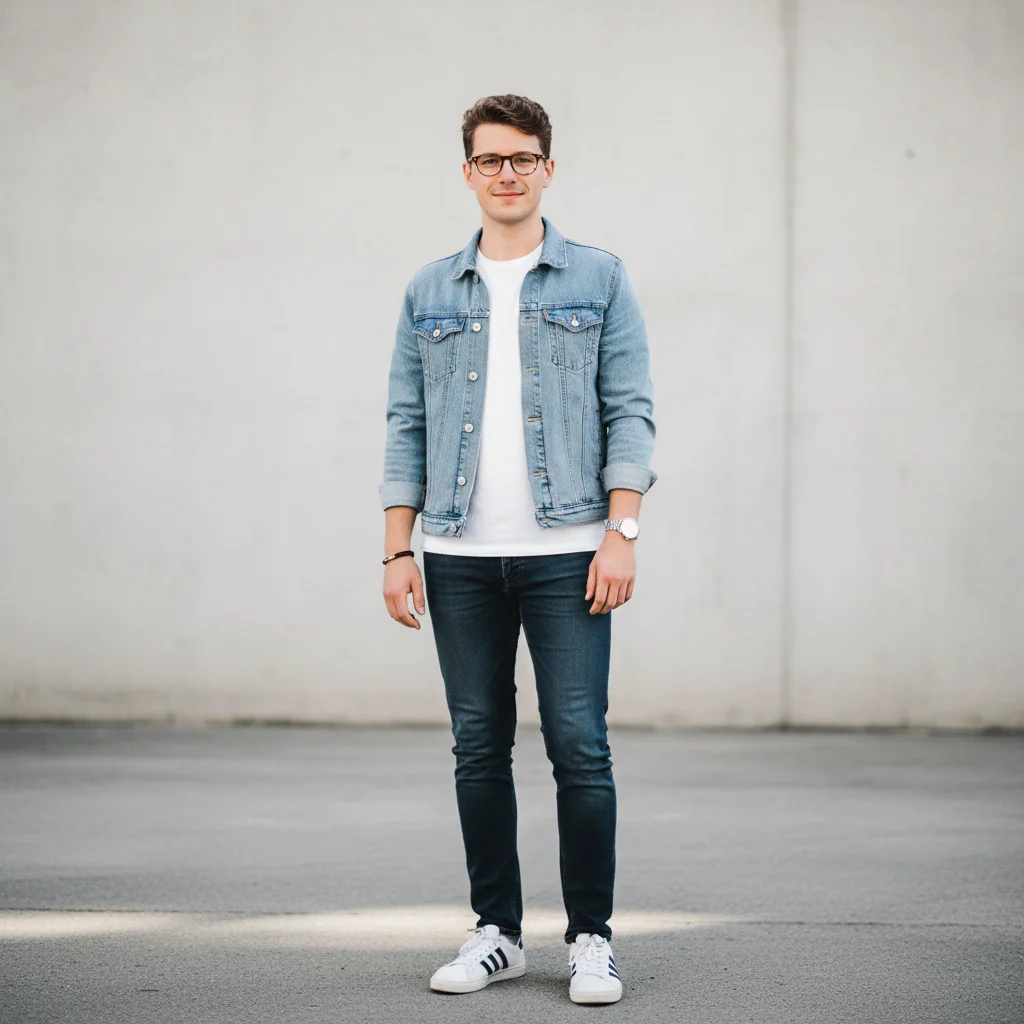
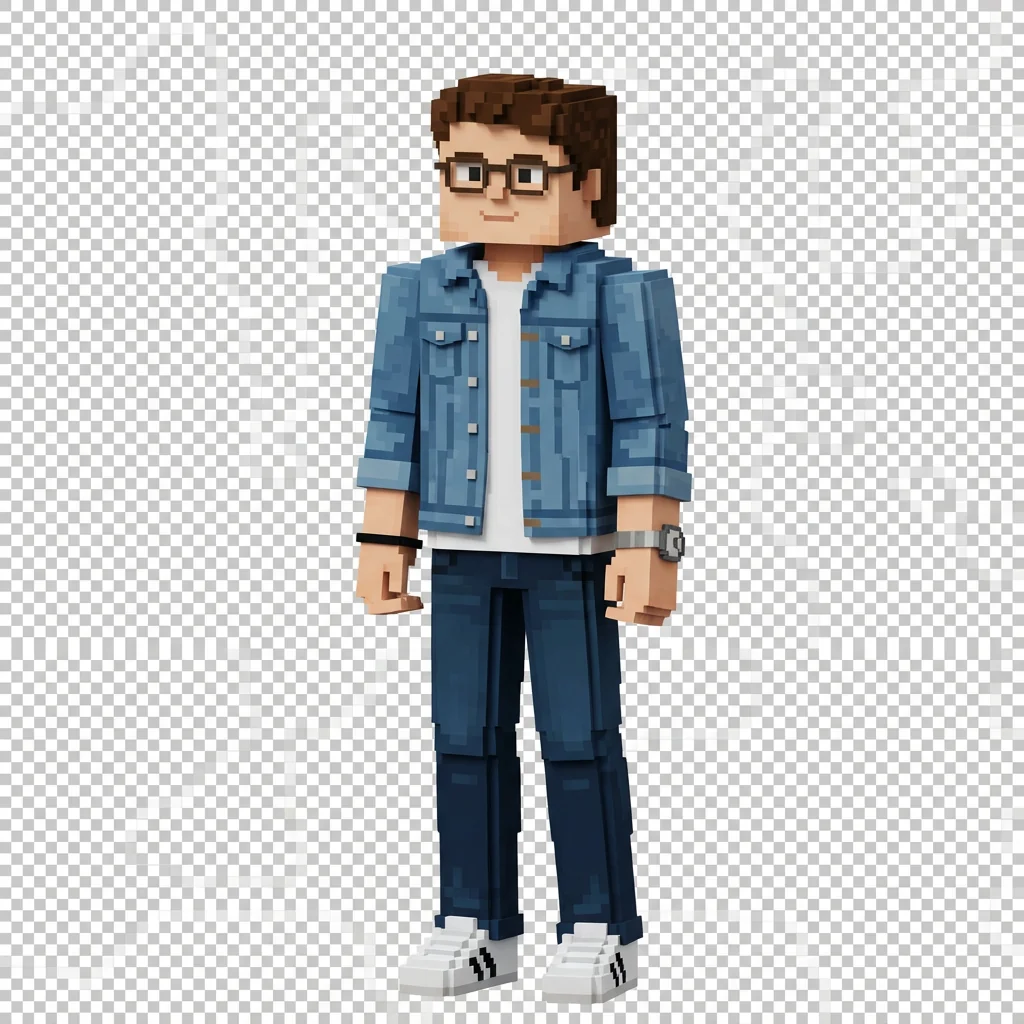
Free to try - Sign up in seconds
About This Trend
The Minecraft Character Style trend transforms your photos into iconic blocky Minecraft characters with authentic 3D voxel aesthetics. This AI effect creates full-body character representations that maintain your recognizable features, clothing, and colors in pure Minecraft cubic style.
Using Nano Banana Pro Edit, this transformation converts your entire outfit, hairstyle, and accessories into blocky pixelated elements while keeping you identifiable. The high-resolution PNG output with transparent background makes it perfect for avatars, gaming content, and creative projects requiring Minecraft-style characters.
Perfect for Minecraft fans, gaming communities, and anyone wanting to see themselves as a cubic voxel character. The blocky aesthetic captures the essence of Minecraft while maintaining your unique appearance and style.
Ready to create your own?
Try this trend for free. No credit card required, just sign up and start creating.
How It Works
Upload a full-body or portrait photo
AI analyzes clothing, hair, and accessories
Image converted to blocky voxel structure
Colors and features mapped to Minecraft style
Download high-res PNG with transparent background
Features
- Full-body Minecraft character conversion
- Blocky pixelated 3D voxel style
- Preserves clothing colors and patterns
- Hairstyle adapted to cubic blocks
- Accessories rendered in voxel style
- High-resolution PNG output
- Transparent background for versatility
- Recognizable character representation
- Authentic Minecraft cubic aesthetic
Use Cases
- Minecraft-style profile pictures
- Gaming community avatars
- Minecraft server character skins
- Creative voxel art projects
- Gaming social media content
- Minecraft YouTube thumbnails
- Custom character merchandise designs
Pro Tips for Better Results
Use Clear Full-Body Photos for Best Results
While the Nano Banana Pro Edit model works with portraits, full-body photos produce the most authentic Minecraft character transformations. Stand against a plain background with good lighting so the AI can accurately map your entire outfit, shoes, and accessories into blocky voxel elements. Clear separation between you and the background helps the model create cleaner transparent edges around your cubic character.
Wear Distinct Colors and Patterns
Minecraft's blocky aesthetic works best when your clothing has clear, distinct colors and patterns. Solid colors, stripes, or bold prints translate beautifully into voxel blocks, while subtle gradients or complex textures may lose detail in the cubic conversion. If you're comparing styles, FLUX 2 Face to Full Portrait handles gradients better but won't give you the authentic Minecraft blocky look.
Consider Your Hairstyle for Cubic Translation
Hairstyles with defined shapes—ponytails, buns, short cuts, or braids—convert more recognizably into Minecraft's cubic blocks than loose, flowing hair. The AI interprets hair volume and structure, then builds it using stacked voxel cubes. If you want a more realistic hair rendering before trying the blocky style, test with AI Headshot Generator first to see how AI interprets your features.
Keep Accessories Simple and Visible
Hats, glasses, bags, and jewelry all translate into blocky Minecraft elements, but they need to be clearly visible in your input photo. Large, distinct accessories work better than tiny details. The Nano Banana Pro Edit model excels at preserving accessory colors and general shapes while converting them to cubic voxel style, making your character instantly recognizable to friends.
Download High-Resolution PNG for Versatility
The transparent background PNG output is perfect for layering your Minecraft character over custom backgrounds, inserting into YouTube thumbnails, or creating Discord server icons. Save the high-resolution version immediately—you can always scale down later for web use. The transparent background means you can drop your blocky character into any Minecraft scene, gaming overlay, or social media template without awkward white boxes.
Try Multiple Photos for Character Variations
Different outfits and poses create distinct Minecraft character versions. Upload several photos wearing different clothing to build a collection of blocky character variations. Each transformation costs credits separately, but you'll have multiple Minecraft-style avatars for different contexts. For non-blocky style variations, explore OpenAI GPT Image 2 Edit for more flexible editing options.
Frequently Asked Questions
Other Models You Could Use
Ready to Try Minecraft Character Style?
Transform your images with AI in seconds. No design skills required.
Get Started FreeJoin thousands of creators using JAI Portal