Paparazzi Night Glow: Add Bold Flash Photography Effect to Your Portrait
Turn Portraits Into Raw Paparazzi-Style Flash Photography
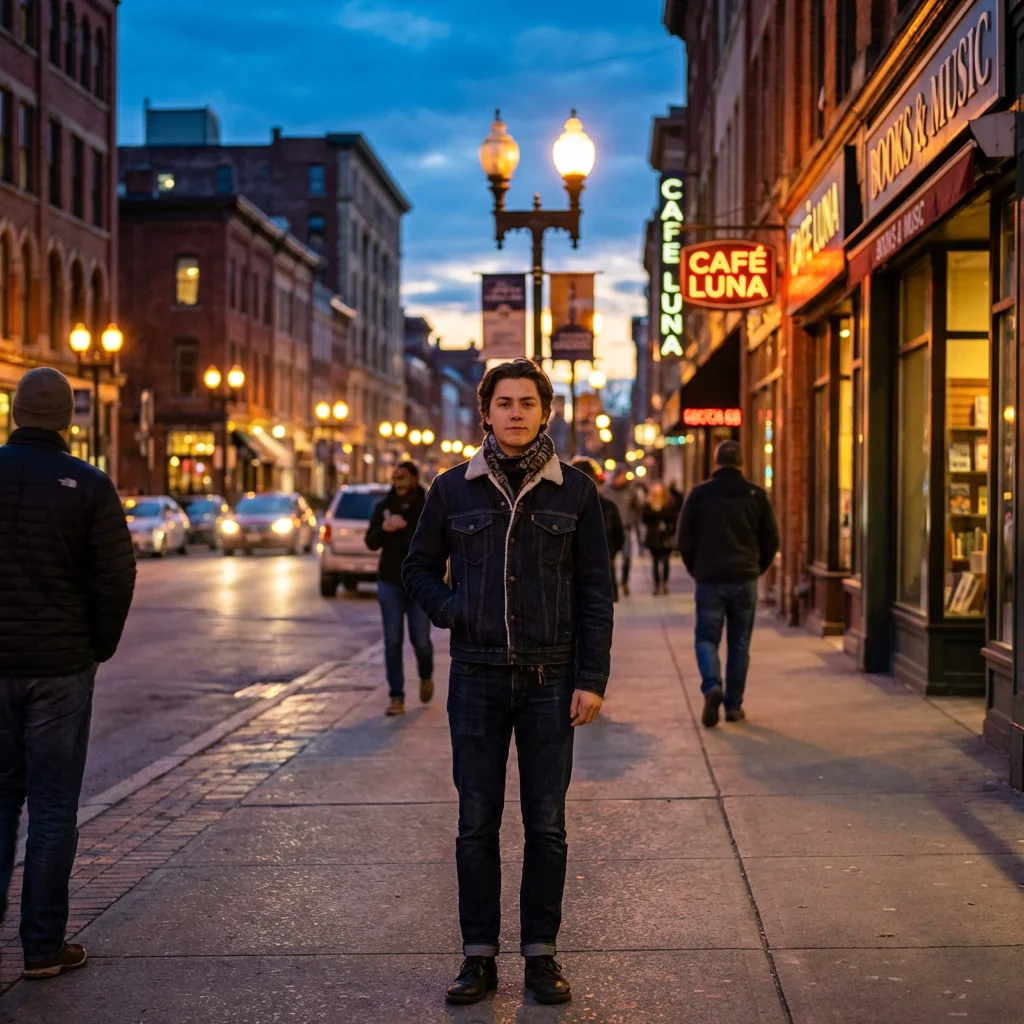
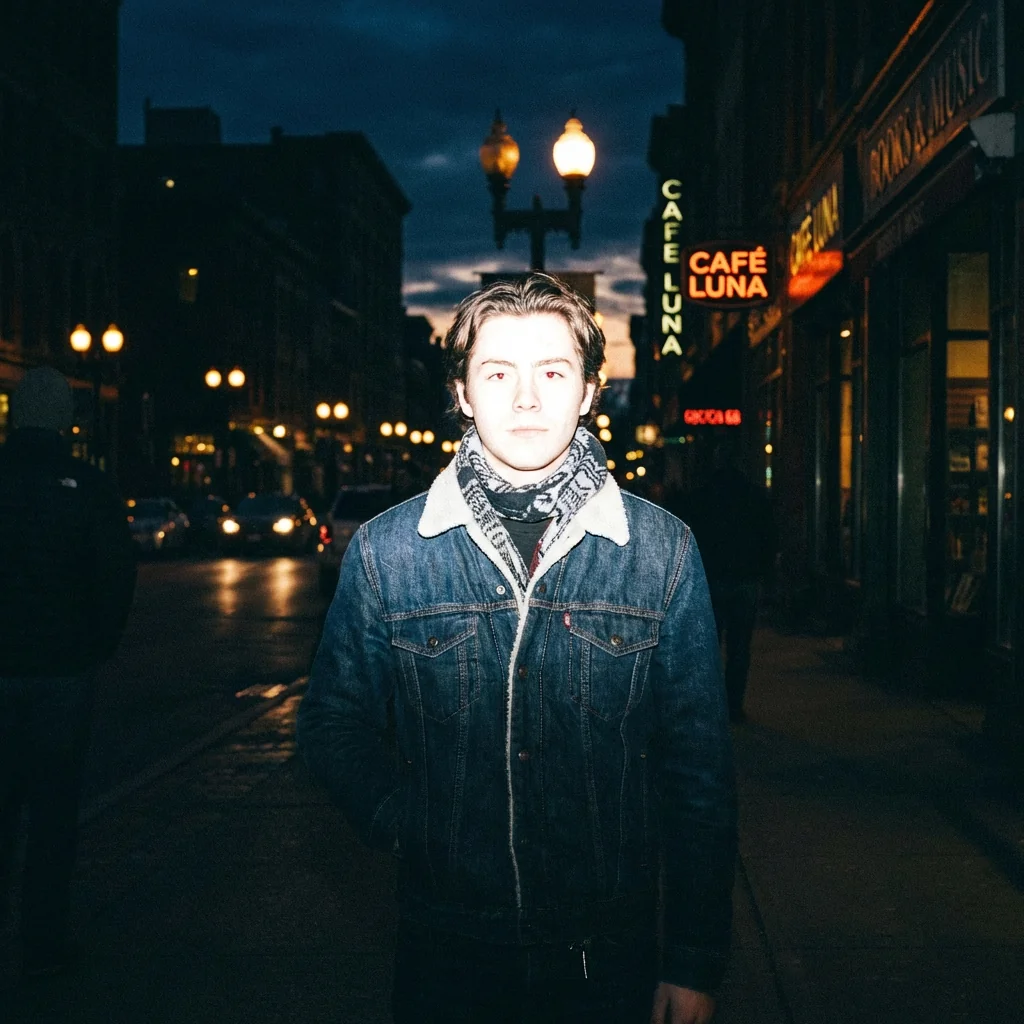
Free to try - Sign up in seconds
About This Trend
Experience the raw energy of paparazzi night photography with our AI-powered flash effect generator. This innovative tool transforms ordinary portraits into dramatic, high-contrast images that capture the authentic spontaneity of celebrity flash photography. Whether you're a content creator, photographer, or social media enthusiast, this effect brings the bold, unfiltered aesthetic of disposable camera flash and professional paparazzi shots to your fingertips.
The Paparazzi Night Glow effect recreates the distinctive characteristics of harsh direct flash photography — bright overexposed centers, strong contrast ratios, and deep black shadows that frame your subject dramatically. Our AI technology intelligently applies frontal flash lighting that mimics the flat, direct illumination style popularized by celebrity photographers and vintage disposable cameras. The algorithm carefully preserves facial features and expressions while adding that signature blown-out highlight quality on skin and clothing that defines authentic flash photography. Subtle grain, slight motion blur, and carefully calibrated imperfections create a handheld, spontaneous feeling that makes every shot feel like a candid moment captured in time.
Perfect for creating eye-catching social media content, artistic portfolio pieces, or adding dramatic flair to personal photos, this effect works seamlessly across portrait styles. The AI maintains subject identity and pose integrity while transforming lighting conditions to achieve that coveted paparazzi aesthetic. From fashion photography to casual snapshots, the Paparazzi Night Glow effect delivers professional-quality results with authentic night flash characteristics including red-eye potential, ambient background darkness, and the raw, unpolished energy that makes flash photography so visually compelling and emotionally immediate.
Ready to create your own?
Try this trend for free. No credit card required, just sign up and start creating.
How It Works
Upload your portrait photo — works best with clear frontal or three-quarter angle shots
Apply the Paparazzi Night Glow effect and let AI analyze lighting conditions
Adjust intensity settings to control flash brightness and shadow depth
Preview the transformation and fine-tune grain, blur, and contrast levels
Download your dramatic flash photography masterpiece and share instantly
Features
- Authentic harsh direct flash effect mimicking professional paparazzi lighting
- Intelligent overexposure on subject center with preserved facial detail
- Strong contrast enhancement with deep black shadow creation
- Disposable camera aesthetic with flat frontal flash simulation
- Automatic background darkness with subtle ambient detail retention
- Realistic grain addition and motion blur for handheld camera feel
- Red-eye potential and blown-out highlight effects on skin and clothing
- Subject identity and expression preservation during transformation
- Raw candid photography atmosphere with spontaneous energy
- Professional-grade night photography simulation with one-click application
Use Cases
- Social media content creation with dramatic paparazzi-style portraits
- Fashion photography enhancement with bold flash aesthetics
- Artistic portfolio development featuring high-contrast night photography
- Celebrity-style photo transformations for personal branding
- Vintage disposable camera effect recreation for nostalgic content
- Event photography enhancement with authentic flash characteristics
- Music artist promotional materials with raw candid energy
Pro Tips for Better Results
Use Well-Lit Source Photos for Best Flash Simulation
Start with portraits taken in decent ambient lighting rather than already-dark photos. The Nano Banana Pro Edit model works by simulating flash physics on top of your existing image data, so photos with clear facial features and visible detail give the AI more information to work with when creating that dramatic overexposed center and deep shadow falloff that defines authentic paparazzi lighting.
Position Subjects Close to Camera for Maximum Impact
Paparazzi flash photography works best when subjects fill the frame at close to medium distances. Photos where your subject is 3-8 feet from the camera will produce the most authentic harsh flash effect with proper light falloff. Distant subjects or wide environmental shots won't capture that signature blown-out skin tone and dramatic shadow contrast that makes this aesthetic so compelling and recognizable.
Experiment with Flash Intensity for Different Moods
Don't settle for the default settings—adjust flash brightness to match your creative vision. Lower intensity creates a subtle disposable camera vibe perfect for nostalgic content, while maximum brightness delivers that aggressive celebrity paparazzi look with extreme overexposure. The contrast and shadow depth controls let you fine-tune the drama, making each transformation unique to your artistic style and intended platform.
Combine with Portrait Refinement for Polished Results
For commercial projects or professional branding, consider running your source photo through AI Headshot Generator first to optimize facial features and composition, then apply the paparazzi flash effect. This two-step workflow gives you both the refined subject quality of studio photography and the raw energy of candid flash lighting, creating a polished yet authentic aesthetic.
Match Clothing Colors to Flash Photography Physics
White and light-colored clothing will blow out dramatically under simulated flash, while dark fabrics create striking contrast with the bright facial lighting. This mirrors real paparazzi photography where flash interacts differently with reflective surfaces. Plan your source photos accordingly—light tops emphasize the overexposed aesthetic, while dark clothing frames the face with deep shadows for a more mysterious, night-photography feel.
Add Grain Strategically for Authentic Film Camera Feel
The grain control isn't just decoration—it recreates the high-ISO film characteristics of disposable cameras and handheld night photography. Moderate grain levels add authenticity without obscuring facial detail, while heavy grain creates a gritty, documentary-style aesthetic. Compare this with cleaner editing options like FLUX 2 Dev Edit if you prefer the flash lighting style without the vintage texture.
Frequently Asked Questions
Other Models You Could Use
Ready to Try Paparazzi Night Glow: Add Bold Flash Photography Effect to Your Portrait?
Transform your images with AI in seconds. No design skills required.
Get Started FreeJoin thousands of creators using JAI Portal