Runway Sketch Elegance: Transform Your Photo into an Editorial Fashion Illustration
Transform photos into hand-drawn fashion illustrations instantly
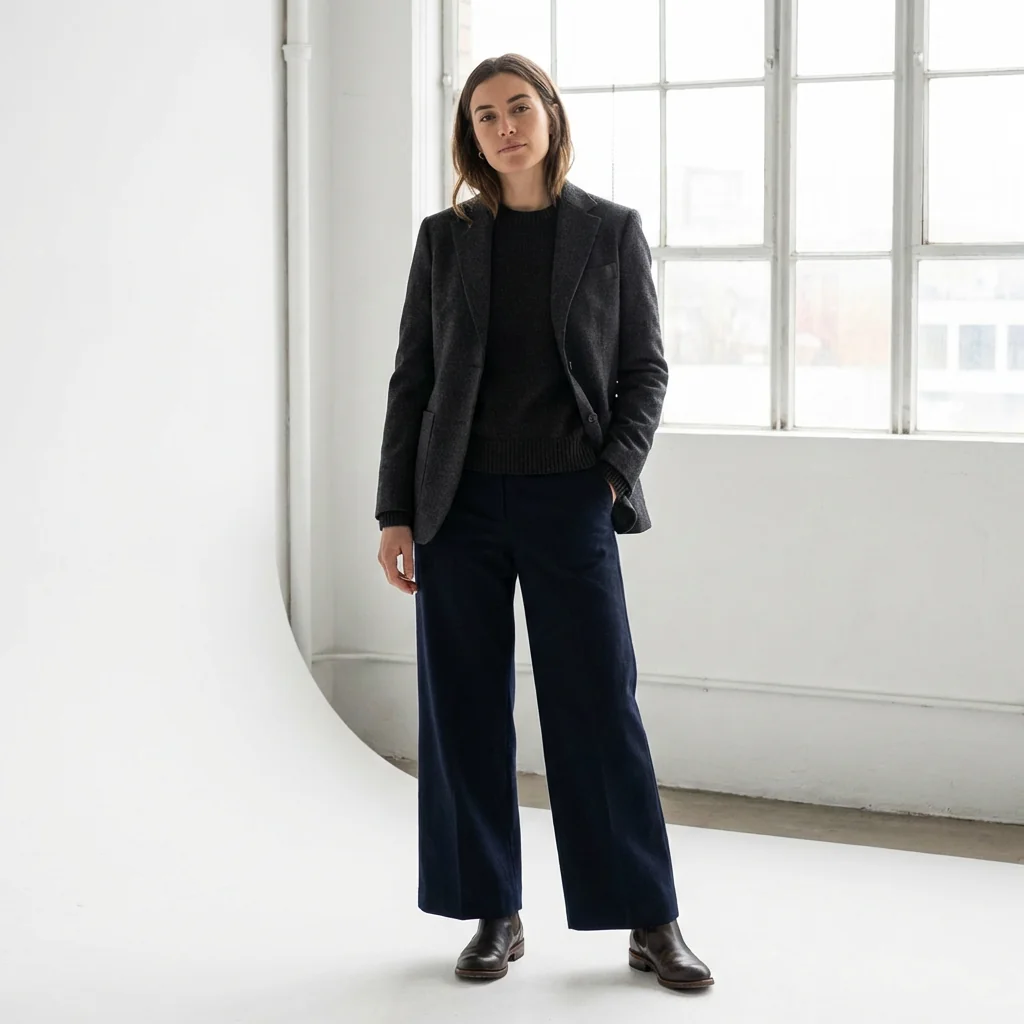
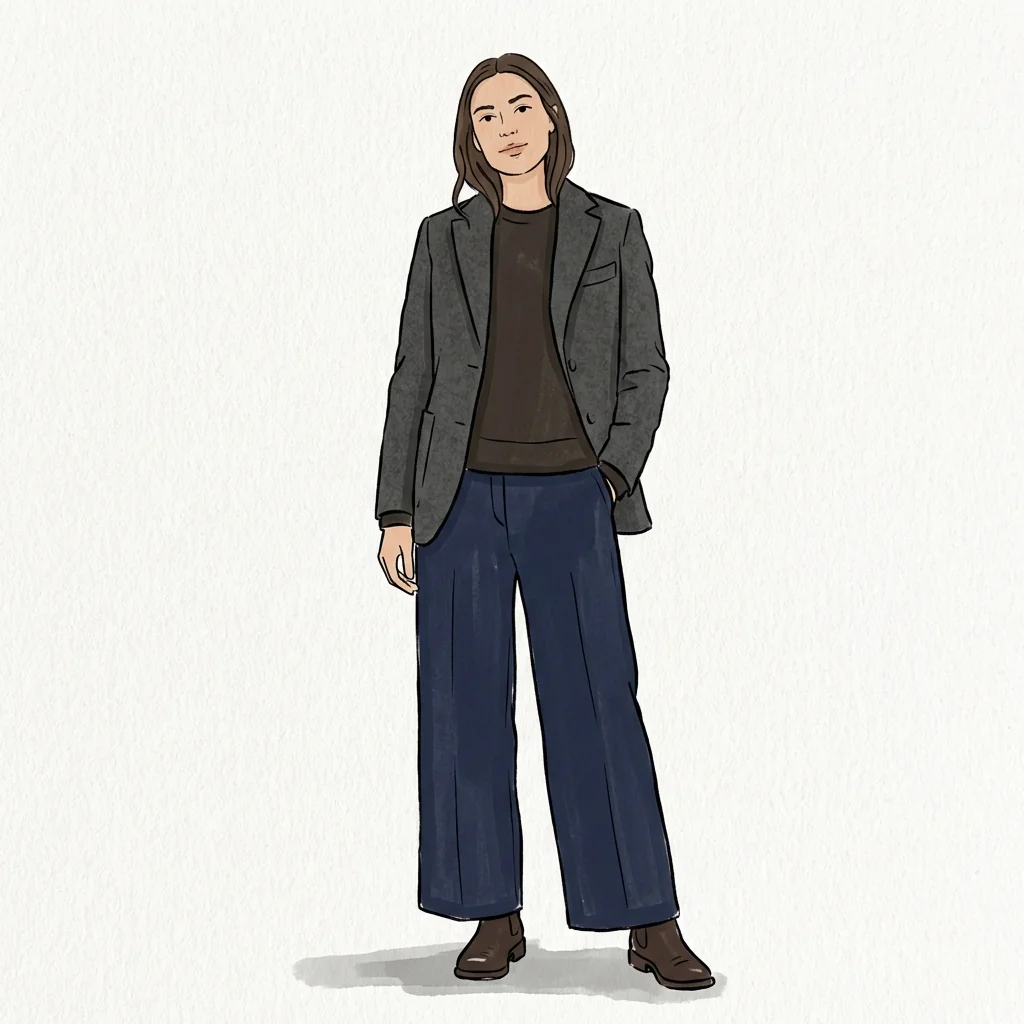
Free to try - Sign up in seconds
About This Trend
Runway Sketch Elegance revolutionizes the way fashion enthusiasts, designers, and content creators visualize style concepts by transforming ordinary photographs into sophisticated editorial fashion illustrations. This AI-powered tool captures the essence of high-end fashion sketching, mimicking the confident linework and bold color palettes favored by professional fashion illustrators. Whether you're documenting your daily outfits, creating a portfolio, or developing design concepts, this tool delivers authentic hand-drawn aesthetics that mirror the illustrations found in top fashion publications and Instagram's most-followed fashion artists.
Unlike simple photo filters that merely stylize images, Runway Sketch Elegance completely redraws your composition as a genuine fashion illustration. The AI preserves your pose, outfit structure, and accessories while applying editorial fashion drawing techniques including clean ink outlines, flat gouache-style color fills, and elongated fashion proportions. Each illustration features the hallmark characteristics of professional fashion sketches: consistent line weight, simplified facial features, crisp garment edges, and bold saturated colors that create striking visual impact. The visible paper texture and organic line imperfections add authenticity, ensuring your illustration looks genuinely hand-drawn rather than digitally filtered.
Perfect for fashion bloggers building cohesive visual identities, designers creating lookbooks, stylists documenting outfit combinations, or anyone wanting to elevate their fashion content with an artistic touch. The tool's emphasis on bold color blocking, clean composition, and editorial elegance makes every illustration Instagram-ready and portfolio-worthy. With no photorealistic elements, soft edges, or cinematic lighting, the results maintain the pure, graphic quality of traditional fashion illustration while leveraging AI speed and consistency. Create professional-quality fashion sketches in seconds that would traditionally take hours to draw by hand.
Ready to create your own?
Try this trend for free. No credit card required, just sign up and start creating.
How It Works
Upload a clear full-body photo showing your complete outfit, pose, and accessories
The AI analyzes pose structure, garment silhouettes, and composition elements
Watch as your photo transforms into a hand-drawn fashion illustration with bold colors and clean linework
Download your editorial-style fashion sketch ready for social media, portfolios, or design projects
Experiment with different outfit photos to create a cohesive illustrated fashion collection
Features
- Hand-drawn editorial fashion illustration style with authentic ink outlines
- Bold saturated color palettes with flat gouache and watercolor fills
- Clean confident linework with consistent weight and organic imperfections
- Elongated fashion proportions and relaxed editorial postures
- Simplified facial features and flat skin tones without realism
- Preserves exact outfit silhouettes, accessories, and garment details
- Visible paper texture for authentic hand-drawn appearance
- No photorealism, gradients, or cinematic lighting effects
- High contrast color blocking for striking visual impact
- Simple shadow washes and clean white backgrounds
Use Cases
- Transform daily outfit photos into cohesive Instagram fashion illustration feed
- Create professional fashion design portfolios and lookbook presentations
- Document personal style evolution with artistic editorial sketches
- Generate fashion illustration content for blogs and social media
- Develop clothing line concepts and design prototypes visually
- Create fashion editorial spreads and magazine-style illustrations
- Build brand identity for fashion influencers and stylists
Pro Tips for Better Results
Choose Full-Body Shots for Best Results
The Nano Banana Pro Edit model excels when your input photo shows your complete outfit from head to toe. Cropped or close-up shots limit the AI's ability to capture garment silhouettes and fashion proportions. Stand 6-10 feet from the camera with your entire body visible, including shoes and accessories. This gives the model enough visual information to create those signature elongated fashion illustration proportions and preserve every detail of your outfit's structure.
Use Simple Backgrounds to Enhance Line Clarity
Busy or cluttered backgrounds can interfere with the clean linework that defines editorial fashion sketches. Shoot against plain walls, neutral backdrops, or outdoor settings with minimal visual noise. The AI focuses on redrawing your figure and outfit as the primary subject, so simpler backgrounds allow the bold color blocking and confident ink outlines to stand out. If you need more control over background removal before transformation, try JAI Portal Spicy Image Editor first to isolate your subject.
Wear Outfits with Clear Silhouettes
Fashion illustrations celebrate garment structure and shape. Choose outfits with defined silhouettes—structured blazers, flowy dresses, tailored pants—rather than loose or formless clothing. The AI preserves your exact clothing lines and creates those crisp garment edges characteristic of professional fashion sketches. Accessories like hats, bags, and jewelry also translate beautifully into the illustration style, adding editorial flair. Avoid overly baggy or shapeless items that obscure your outfit's architectural details.
Experiment with Dynamic Poses for Editorial Energy
Static standing poses work fine, but relaxed editorial postures create more engaging fashion illustrations. Try casual hand-on-hip stances, walking poses, or seated positions that fashion illustrators favor. The Nano Banana Pro Edit model maintains your exact pose while applying those elongated proportions and confident linework. Look at fashion magazine editorials for pose inspiration—slight angles, weight shifted to one leg, and natural gestures all translate into more dynamic sketches.
Ensure Good Lighting to Capture Outfit Details
While the final illustration uses flat color fills without realistic shading, your input photo still needs clear lighting so the AI can accurately identify garment details, textures, and accessories. Natural daylight or well-lit indoor spaces work best. Avoid harsh shadows that obscure clothing structure or extremely dim lighting that makes details hard to distinguish. The model needs to see your outfit clearly to preserve those exact silhouettes and transform them into clean editorial sketches.
Create Series for Cohesive Visual Identity
Fashion illustrators often work in series with consistent style. Process multiple outfit photos through the same model to build a cohesive illustrated portfolio or Instagram feed. The Nano Banana Pro Edit model maintains consistent linework, color saturation, and editorial aesthetics across all outputs, giving your collection a professional, unified look. This approach works perfectly for documenting a capsule wardrobe, seasonal lookbook, or personal style evolution with artistic continuity.
Frequently Asked Questions
Other Models You Could Use
Ready to Try Runway Sketch Elegance: Transform Your Photo into an Editorial Fashion Illustration?
Transform your images with AI in seconds. No design skills required.
Get Started FreeJoin thousands of creators using JAI Portal