Twilight Vampire with Apple Portrait
Transform into a Twilight Vampire Biting a Red Apple

Free to try - Sign up in seconds
About This Trend
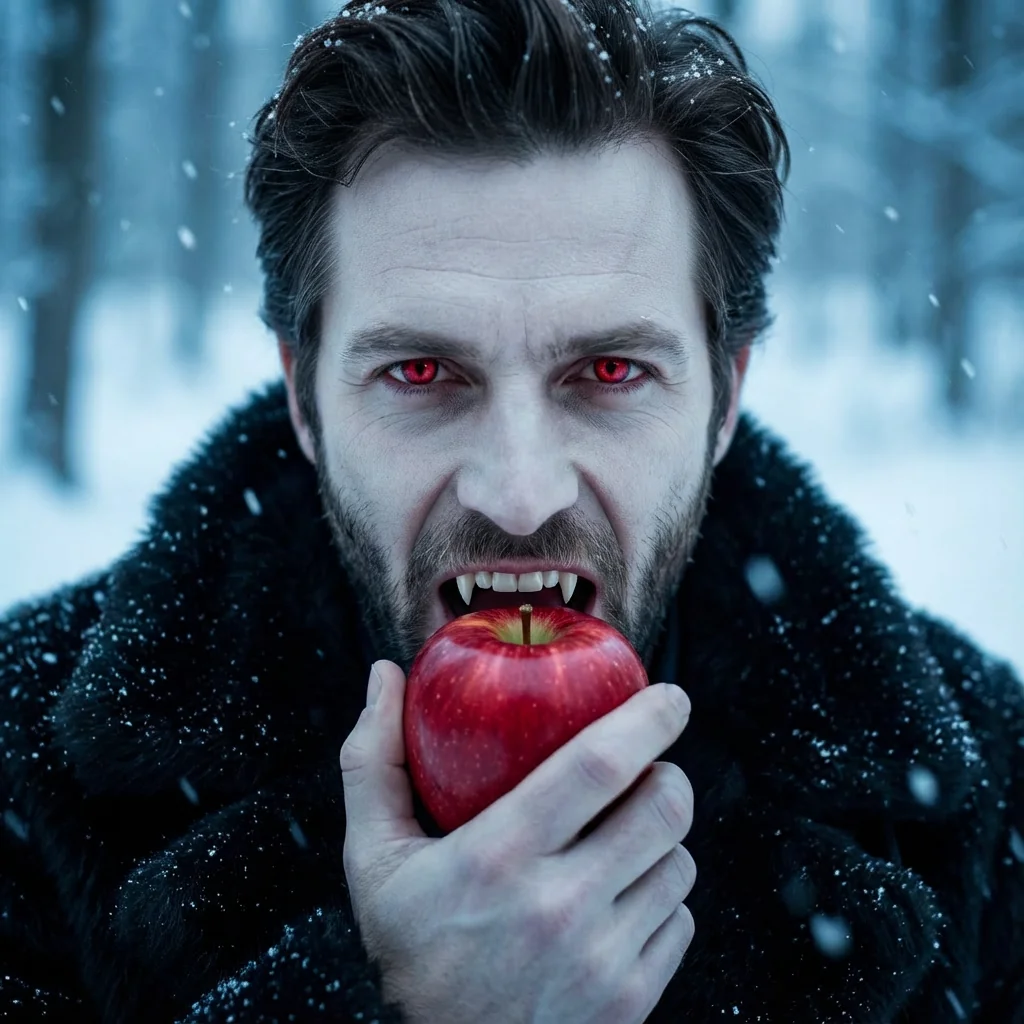
The Twilight Vampire with Apple Portrait trend brings the iconic cinematic vampire aesthetic to your personal photos using advanced AI image editing. Inspired by the legendary Twilight saga, this effect transforms ordinary portraits into dramatic vampire scenes featuring glowing red eyes, sharp fangs, and the symbolic red apple.
Powered by the Nano Banana Pro Edit model, this AI-driven transformation preserves your facial features while adding supernatural elements like pale porcelain skin, intense glowing eyes, and vampire fangs. The scene is completed with a luxurious black fur coat, falling snowflakes, and a moody winter forest background that captures the cold, mysterious atmosphere of the Twilight films.
This trend has become massively popular among Twilight fans, Halloween enthusiasts, and creative content creators who want to embody the vampire aesthetic. The red apple symbolism adds a layer of forbidden temptation and danger, making these portraits perfect for social media, fan art, or personal collections.
Whether you're a die-hard Twilight fan or simply love dark fantasy aesthetics, this AI effect delivers professional-quality vampire transformations that look like they came straight from a Hollywood movie set.
Ready to create your own?
Try this trend for free. No credit card required, just sign up and start creating.
How It Works
Upload a clear, front-facing portrait photo
AI analyzes facial features and applies vampire transformation
The model adds glowing eyes, fangs, pale skin, and red apple
Winter forest background and snowfall effects are rendered
Download your high-resolution Twilight vampire portrait
Features
- Transform any portrait into a Twilight-style vampire
- Glowing red eyes and realistic vampire fangs
- Pale supernatural skin tone with photorealistic texture
- Dramatic black fur coat and winter atmosphere
- Bright red apple with bite mark detail
- Falling snowflakes and moody forest background
- Preserves original facial features and identity
- 8K high-resolution cinematic quality output
Use Cases
- Twilight saga fan art and cosplay content
- Halloween vampire portrait transformations
- Dark fantasy social media posts
- Creative vampire-themed profile pictures
- Book cover concepts for vampire fiction
- Themed party invitations and promotional materials
- Gothic aesthetic photography projects
Pro Tips for Better Results
Use High-Contrast Source Photos
The GPT-Image 1.5 Edit model performs best with portraits that have strong lighting contrast. Choose photos with clear shadows and highlights on your face—this helps the AI accurately map vampire features like sunken cheekbones and glowing eyes. Avoid flat, overexposed selfies. Studio lighting or natural window light works perfectly for creating that dramatic Twilight atmosphere.
Face the Camera Directly
Front-facing portraits produce the most convincing vampire transformations. Side profiles or angled shots may result in asymmetrical fangs or misaligned glowing eyes. Keep your face centered and looking straight ahead. If you need more flexibility with angles, consider FLUX 2 Face to Full Portrait for multi-angle character generation, though it won't replicate this exact Twilight aesthetic.
Avoid Busy Backgrounds in Source Images
While the AI replaces your background with the snowy forest scene, starting with a clean background helps the model focus processing power on your facial transformation. Plain walls, solid colors, or simple outdoor settings work best. Complex backgrounds with multiple people or objects can confuse the edge detection, resulting in artifacts around your hair or shoulders where the vampire effect meets the new background.
Experiment with Neutral Expressions
Slight smiles or neutral expressions allow the AI to add fangs more naturally. Broad grins or open-mouth photos can create awkward fang placement. The model needs to generate the bite on the apple convincingly, so a closed or slightly parted mouth gives better results. For more control over facial expressions in fantasy portraits, OpenAI GPT Image 2 Edit offers advanced expression mapping.
Check Resolution Before Uploading
Upload photos at least 1024×1024 pixels for optimal 8K output quality. Low-resolution source images will produce blurry vampire portraits even though the model supports high-res output. The GPT-Image 1.5 Edit model preserves fine details like skin texture and snowflakes only when given quality input. Phone cameras set to high-quality mode work perfectly—avoid screenshots or heavily compressed social media downloads.
Save Multiple Variations for Comparison
Run the same photo through the effect 2-3 times. AI generation includes subtle randomness, so each output will have slightly different snowflake patterns, apple bite details, or eye glow intensity. Pick your favorite or create a carousel post showing variations. This trend uses minimal credits per generation on GPT-Image 1.5 Edit, making experimentation affordable compared to premium portrait models.
Frequently Asked Questions
Other Models You Could Use
Ready to Try Twilight Vampire with Apple Portrait?
Transform your images with AI in seconds. No design skills required.
Get Started FreeJoin thousands of creators using JAI Portal