Nano Banana 2 is here 🍌 Try Now
✨ 10 FREE Credits on Signup!

Transform Images with Free AI Image-to-Image Generator 🚀

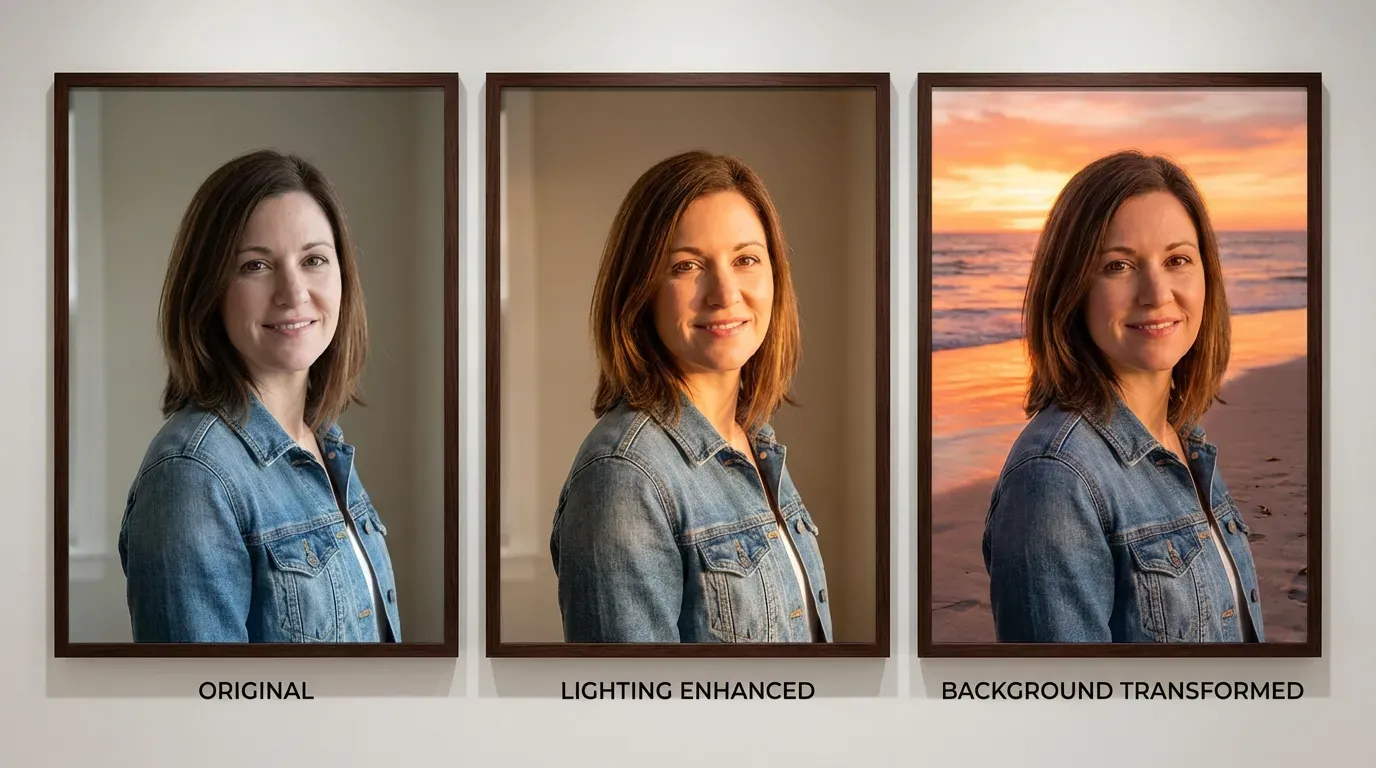
Remix, enhance, and reimagine your images with 12+ models. Get 10 free credits—no subscription, no credit card.

Best free alternative to Midjourney Cheaper than DALL-E for image-to-image No subscription like Runway AI More models than Stable Diffusion Online Better pay-as-you-go than Ideogram No watermark, unlike Bria AI
500K+
Active Users
10M+
Generations
4.9/5
Rating
12+
AI Models
Free to Try
12+ Powerful AI Image-to-Image Models
Access a diverse suite of image-to-image AI models, from photorealistic enhancement to creative remixing. All models included—no subscription needed!
✓ No Watermarks ✓ Commercial License Included ✓ No Subscription Required ✓ Fast AI Processing ✓ Secure & Private
Reve Fast Edit
Try Now →
Free to Try
Reve Fast Edit
Edit images quickly using text prompts, generate up to 4 variations
Playground v2.5 Inpainting
Try Now →
Free to Try
Playground v2.5 Inpainting
Fill in or replace parts of images using masks and text prompts
Fast SDXL Inpainting
Try Now →
Free to Try
Fast SDXL Inpainting
Fill in or replace specific areas of images using masks
Image2Pixel
Try Now →
Free to Try
Image2Pixel
Convert any image into authentic retro pixel art with advanced color and scale control.
Z-Image Turbo Image to Image
Try Now →
Free to Try
Z-Image Turbo Image to Image
Transform images lightning-fast with text prompts.
Recraft Vectorize
Try Now →
Free to Try
Recraft Vectorize
Convert your photos and illustrations into scalable SVG vector graphics.
Playground v2.5 Image to Image
Try Now →
Free to Try
Playground v2.5 Image to Image
Transform existing images with adjustable strength and aesthetic quality
Kolors Image to Image
Try Now →
Free to Try
Kolors Image to Image
Transform images into photorealistic 8K versions with adjustable strength
Reve Fast Remix
Try Now →
Free to Try
Reve Fast Remix
Combine and transform up to 4 images into new creations
Fast SDXL Image to Image
Try Now →
Free to Try
Fast SDXL Image to Image
Transform existing images while preserving aspect ratio and details
NVIDIA Chrono Edit
Try Now →
Free to Try
NVIDIA Chrono Edit
Edit images with physics-aware AI that understands how objects should look and behave.
FLUX 2 Flash Edit
Try Now →
Free to Try
FLUX 2 Flash Edit
FLUX.2 [dev] Flash image editing. Precise modifications using natural language descriptions and hex color control. Fast editing in a flash
GPT Image 1 Mini Edit
Try Now →
Free to Try
GPT Image 1 Mini Edit
Edit and combine multiple images using natural language instructions.
Luma Photon Flash Modify
Try Now →
Free to Try
Luma Photon Flash Modify
Quickly edit images using text prompts with adjustable strength
Z-Image Turbo Inpaint
Try Now →
Free to Try
Z-Image Turbo Inpaint
Generate images from text, an image and a mask using Z-Image Turbo. Precise inpainting with Tongyi-MAI's super-fast 6B model for seamless image editing
Z-Image Turbo Inpaint LoRA
Try Now →
Free to Try
Z-Image Turbo Inpaint LoRA
Generate images from text, image, mask and custom LoRA using Z-Image Turbo. Advanced inpainting with LoRA support for precise modifications and style control
Grok Imagine Image Edit
Try Now →
Free to Try
Grok Imagine Image Edit
Edit images precisely with xAI's Grok Imagine model. Natural language image editing with automatic prompt enhancement
FLUX 2 Turbo Edit
Try Now →
Free to Try
FLUX 2 Turbo Edit
FLUX.2 [dev] Turbo image editing. Precise modifications using natural language and hex color control at turbo speed
JAI Home Edit
Try Now →
Free to Try
JAI Home Edit
AI Home Edit transforms your home interior and exterior photos with realistic, prompt-based edits. Edit structural elements, furniture, or both with extensive style and color options
JAI Home Style
Try Now →
Free to Try
JAI Home Style
AI Home Style reimagines your home interior and exterior design with bold, prompt-driven concepts. Transform your space with extensive style options and optional style reference images
Kling Omni Image O1
Try Now →
Free to Try
Kling Omni Image O1
Create consistent characters and scenes using up to 10 reference images - perfect for comics, IP design, and series.
Bria Fibo Mashup
Try Now →
Free to Try
Bria Fibo Mashup
Merge three images into one cohesive creation blending subject, scene, and style
Kling Image O3 Image to Image
Try Now →
Free to Try
Kling Image O3 Image to Image
Kling Omni 3 image-to-image with flawless consistency. 1K/2K/4K resolution, supports up to 10 reference images (@Image1, @Image2, etc.)
Kling Image v3 Image to Image
Try Now →
Free to Try
Kling Image v3 Image to Image
Kling V3 image-to-image transformation with face control support. 1K/2K resolution, multiple aspect ratios
Wan v2.6 Image to Image
Try Now →
Free to Try
Wan v2.6 Image to Image
Wan 2.6 image-to-image model with multi-image composition. Combine elements from up to 3 reference images with natural language instructions. Supports Chinese and English
Bytedance Seedream v5 Lite Edit
Try Now →
Free to Try
Bytedance Seedream v5 Lite Edit
Fast, high-quality intelligent multi-image editing. Reference up to 10 input images (Figure 1, Figure 2, etc.), 2K resolution, prompt enhancement
Qwen Image Image-to-Image
Try Now →
Free to Try
Qwen Image Image-to-Image
Transform and edit images with style transfer, enhancement, and creative modifications
FLUX Kontext Pro
Try Now →
Free to Try
FLUX Kontext Pro
Edit images by describing changes in plain language
Bria Generate Background
Try Now →
Free to Try
Bria Generate Background
Generate new backgrounds for your images
FLUX 2 Apartment Staging
Try Now →
Free to Try
FLUX 2 Apartment Staging
Turn empty rooms into furnished spaces for real estate listings and design previews
Seedream v4.5 Edit
Try Now →
Free to Try
Seedream v4.5 Edit
Edit images using up to 10 reference images for complex tasks like product replacement and composition.
ByteDance Seedream 4.0 Edit
Try Now →
Free to Try
ByteDance Seedream 4.0 Edit
Edit images using text prompts with support for up to 6 reference images.
Qwen Image Edit
Try Now →
Free to Try
Qwen Image Edit
Edit images with text prompts in English or Chinese - change appearance, semantics, or add text
Fibo Edit
Try Now →
Free to Try
Fibo Edit
High-quality image editing model achieving maximum controllability and transparency by combining JSON + Mask + Image. Supports both natural language and structured instructions
Stable Diffusion V3 Medium Image-to-Image
Try Now →
Free to Try
Stable Diffusion V3 Medium Image-to-Image
Transform images with enhanced typography and adjustable modification strength
FLUX 2 Flex Edit
Try Now →
Free to Try
FLUX 2 Flex Edit
Edit images with multiple references and precise color control using HEX values.
FLUX 2 Dev Edit
Try Now →
Free to Try
FLUX 2 Dev Edit
Edit images precisely using text descriptions and HEX color control.
FLUX 2 Add Background
Try Now →
Free to Try
FLUX 2 Add Background
Add backgrounds to product photos and isolated subjects automatically.
FLUX 2 Face to Full Portrait
Try Now →
Free to Try
FLUX 2 Face to Full Portrait
Expand headshots into full body portraits for profiles and avatars
Bria Expand Image
Try Now →
Free to Try
Bria Expand Image
Expand images beyond their borders to any aspect ratio
Bria Reimagine
Try Now →
Free to Try
Bria Reimagine
Transform sketches into illustrations while preserving the original structure.
Flux Kontext Dev
Try Now →
Free to Try
Flux Kontext Dev
Transform images using natural language descriptions
Bria Eraser
Try Now →
Free to Try
Bria Eraser
Remove unwanted objects from images using masks
Flux Kontext Zoom Out
Try Now →
Free to Try
Flux Kontext Zoom Out
Expand your image canvas by zooming out to reveal more context while keeping the subject unchanged.
Reve Remix
Try Now →
Free to Try
Reve Remix
Combine and transform 1-4 reference images using text prompts with precise control.
Reve Edit
Try Now →
Free to Try
Reve Edit
Transform any image using simple text instructions.
Gemini 2.0 Flash Multi Edit
Try Now →
Free to Try
Gemini 2.0 Flash Multi Edit
Edit multiple images at once with a single text instruction for consistent results.
Luma Photon Modify
Try Now →
Free to Try
Luma Photon Modify
Edit images using text prompts with adjustable strength control
Multi-Image Qwen Edit
Try Now →
Free to Try
Multi-Image Qwen Edit
Merge and edit multiple images together using text instructions.
ByteDance SeedEdit 3.0
Try Now →
Free to Try
ByteDance SeedEdit 3.0
Edit images with text instructions while keeping original details intact
Bria GenFill
Try Now →
Free to Try
Bria GenFill
Add or modify objects in images with precise mask control
Alibaba WAN 2.6 Image Edit
Try Now →
Free to Try
Alibaba WAN 2.6 Image Edit
Turn prompts into precise photo edits—adjusting color, lighting, restyling aesthetics, replacing backgrounds, removing objects, and refining details while preserving subject identity
Nano Banana Edit
Try Now →
Free to Try
Nano Banana Edit
Edit and combine multiple images using natural language with Google's Gemini-powered editor.
Gemini 2.0 Flash Edit
Try Now →
Free to Try
Gemini 2.0 Flash Edit
Edit images fast using simple text instructions powered by Google's Gemini.
FLUX 2 Dev LoRA Edit
Try Now →
Free to Try
FLUX 2 Dev LoRA Edit
Edit images with specialized LoRA styles for domain-specific modifications.
FLUX 2 Virtual Try-on
Try Now →
Free to Try
FLUX 2 Virtual Try-on
See how clothes look on anyone by uploading a person and garment photo
FLUX 2 Sepia Vintage
Try Now →
Free to Try
FLUX 2 Sepia Vintage
Create nostalgic sepia-toned photos with vintage photography aesthetics
Flux 2 Klein 9B Base Edit
Try Now →
Free to Try
Flux 2 Klein 9B Base Edit
Image-to-image editing with Flux 2 Klein 9B Base. Larger 9B model for precise modifications using natural language descriptions with up to 4 reference images
Flux 2 Klein 4B Edit
Try Now →
Free to Try
Flux 2 Klein 4B Edit
Image-to-image editing with Flux 2 Klein 4B. Precise modifications using natural language descriptions and hex color control with up to 4 reference images
Qwen Add Background
Try Now →
Free to Try
Qwen Add Background
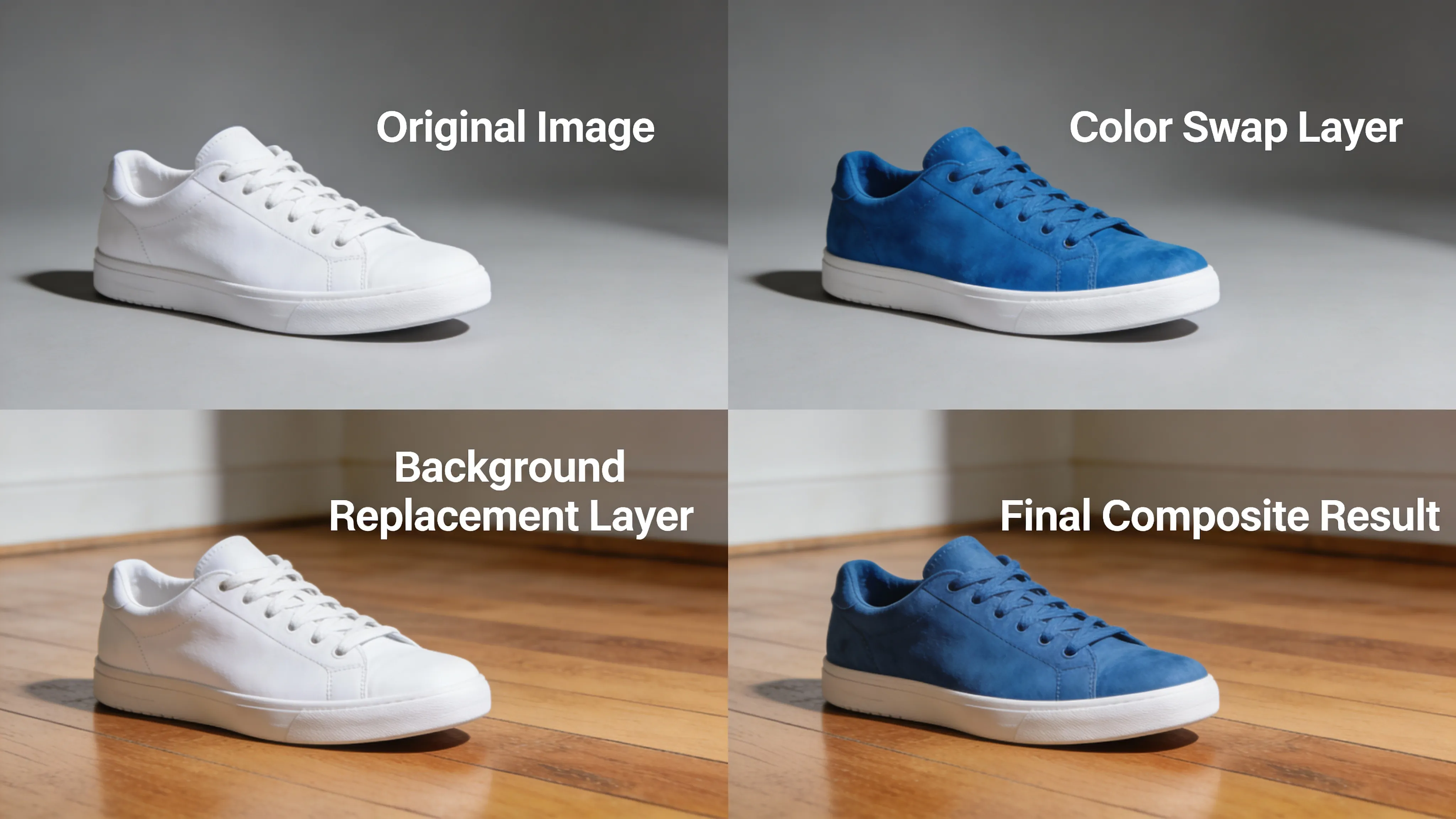
Replace white backgrounds with realistic scenes that match your subject
Qwen Camera Control (Multiple Angles)
Try Now →
Free to Try
Qwen Camera Control (Multiple Angles)
Adjust camera angles, zoom, and position without changing your subject
Qwen Integrate Product
Try Now →
Free to Try
Qwen Integrate Product
Place products into backgrounds with automatic perspective and lighting matching
Step1X Edit
Try Now →
Free to Try
Step1X Edit
Transform photos with simple text instructions into professional-quality edits
Qwen Group Photo Creator
Try Now →
Free to Try
Qwen Group Photo Creator
Combine individual portraits into vintage-style group photos
DreamOmni2 Edit
Try Now →
Free to Try
DreamOmni2 Edit
Combine multiple images with text for advanced style transfer and creative edits.
FLUX 2 Pro Edit
Try Now →
Free to Try
FLUX 2 Pro Edit
Edit images with high-quality manipulation and style transfer capabilities.
Qwen Remove Element
Try Now →
Free to Try
Qwen Remove Element
Erase unwanted objects, people, or text while keeping the rest intact
Qwen Image Edit Inpaint
Try Now →
Free to Try
Qwen Image Edit Inpaint
Inpainting endpoint for Qwen Edit image editing model. Advanced inpainting with natural language editing instructions and precise mask-based modifications
Wan 2.5 Image-to-Image
Try Now →
Free to Try
Wan 2.5 Image-to-Image
Transform and edit images using text prompts with support for two reference images.
Qwen Shirt Design Transfer
Try Now →
Free to Try
Qwen Shirt Design Transfer
Apply designs and logos onto clothing for mockups and visualizations
Qwen Face to Full Portrait
Try Now →
Free to Try
Qwen Face to Full Portrait
Expand cropped headshots into complete portraits with body and background
Qwen Image Edit 2509
Try Now →
Free to Try
Qwen Image Edit 2509
Qwen's Image Editing Plus model with superior text editing capabilities and multi-image support. Can edit multiple images simultaneously with high-quality text rendering
Hidream E1 1
Try Now →
Free to Try
Hidream E1 1
Edit images using natural language instructions
GPT-Image 1.5 Edit
Try Now →
Free to Try
GPT-Image 1.5 Edit
GPT Image 1.5 image editing with high-fidelity output. Strong prompt adherence while preserving composition, lighting, and fine-grained detail from reference images
Qwen Image Edit 2511
Try Now →
Free to Try
Qwen Image Edit 2511
Qwen's Image Editing 2511 model for precise image transformations. Change angles, modify styles, and transform images with natural language instructions
FLUX SRPO Image-to-Image
Try Now →
Free to Try
FLUX SRPO Image-to-Image
Transform and enhance images with beautiful aesthetic quality.
FLUX.1 SRPO Image-to-Image
Try Now →
Free to Try
FLUX.1 SRPO Image-to-Image
Transform and enhance images with beautiful aesthetic quality.
Runway Gen-4 Image
Try Now →
Free to Try
Runway Gen-4 Image
Create exact images you need using up to 3 reference images for guidance
FLUX Kontext Max Multi-Image
Try Now →
Free to Try
FLUX Kontext Max Multi-Image
Blend multiple images into one scene by describing how to combine them
FLUX Kontext Max
Try Now →
Free to Try
FLUX Kontext Max
Edit images with text descriptions and get improved typography results
Product Photoshoot
Try Now →
Free to Try
Product Photoshoot
Place your products in professional scenes and backgrounds for marketing-ready images.
Nano Banana 2 Pro Edit
Try Now →
Free to Try
Nano Banana 2 Pro Edit
Google's state-of-the-art image editing. Multi-image input support, multi-resolution (1K/2K/4K), optional web search grounding, 1-4 outputs per generation
Cinematic Angle Generator
Try Now →
Free to Try
Cinematic Angle Generator
Generate same scene from different camera angles using Qwen Image Edit 2511 with LoRA Multiple Angles. Control horizontal rotation, vertical elevation, and zoom for precise viewpoint control
Custom Reframe Excellent
Try Now →
Free to Try
Custom Reframe Excellent
Reframe and optimize your image composition with AI-powered aspect ratio adjustment.
Ideogram v3 Remix
Try Now →
Free to Try
Ideogram v3 Remix
Create variations of your images while keeping their core elements intact.
Qwen Image Edit Plus
Try Now →
Free to Try
Qwen Image Edit Plus
Edit text in images and combine multiple photos with advanced transformations.
Wan v2.2 A14B Image-to-Image
Try Now →
Free to Try
Wan v2.2 A14B Image-to-Image
Edit high-resolution, photorealistic images with precise prompt understanding.
Vidu Q2 Reference-to-Image
Try Now →
Free to Try
Vidu Q2 Reference-to-Image
Create images with consistent subjects using reference photos and prompts.
Vidu Reference-to-Image
Try Now →
Free to Try
Vidu Reference-to-Image
Create images with consistent subjects by combining reference images and text prompts.
Bagel Image Editor
Try Now →
Free to Try
Bagel Image Editor
Edit images using natural language while preserving everything you don't mention.
NextStep 1
Try Now →
Free to Try
NextStep 1
Make complex edits to your images using simple text instructions
SOUL Image-to-Image
Try Now →
SOUL Image-to-Image
Transform images with style presets while keeping characters consistent across scenes.
USO Subject-Driven Generation
Try Now →
USO Subject-Driven Generation
Transfer styles and customize subjects using multiple reference images.
Ideogram Character
Try Now →
Ideogram Character
Create consistent characters from one reference image in any style, or add them to existing images
Gemini 3 Pro Image Preview Edit
Try Now →
Gemini 3 Pro Image Preview Edit
Edit images with multi-image support and precise control
Hunyuan Image v3 Instruct Edit
Try Now →
Hunyuan Image v3 Instruct Edit
Image editing with Hunyuan Image 3.0 Instruct from Tencent. Internal reasoning capabilities for intelligent image transformations with up to 2 reference images
Nano Banana Pro Edit
Try Now →
Nano Banana Pro Edit
Edit and transform images using multiple reference photos
Ideogram V3 Character Edit
Try Now →
Ideogram V3 Character Edit
Change your character's pose, expression, or clothing while keeping them recognizable
Image Translator
Try Now →
Image Translator
Translate text in images to 30+ languages while keeping fonts and layout intact
GLM Image to Image
Try Now →
GLM Image to Image
Transform images with accurate text rendering and rich details. Edit, style transfer, and maintain consistent characters across multiple reference images (up to 4)
Ideogram V3 Character Remix
Try Now →
Ideogram V3 Character Remix
Put your character in different styles, settings, or scenarios while keeping their appearance consistent.
LongCat Image Edit
Try Now →
LongCat Image Edit
Edit images with multilingual text rendering and photorealistic results.
StepX Edit2
Try Now →
StepX Edit2
Edit images using simple instructions - the AI understands what you want and makes smart modifications.
Emu 3.5 Image Editor
Try Now →
Emu 3.5 Image Editor
Transform images with text prompts for style transfer, object changes, and creative edits.
OmniGen V2
Try Now →
OmniGen V2
Edit images, swap outfits, personalize content, or create multi-person scenes with up to 3 input images
View All 105 Models

Inspiration
Example Prompts
Try these prompts to get started
Photo to Art
"Transform this photo of a city skyline into a dreamy watercolor painting."
Sketch to Comic
"Remix my pencil sketch into a vivid comic book style illustration."
Avatar Generation
"Create a sci-fi avatar from this selfie, with neon colors and futuristic elements."
Product Enhancement
"Enhance this product shot with vibrant lighting and a clean white background."
Art Style Transfer
"Make four variations of this landscape photo in the style of Van Gogh."
Photo to Cartoon
"Turn my pet's photo into a playful cartoon character."
Logo Design
"Reimagine this logo sketch as a glossy 3D emblem."

Getting Started
How It Works
Start creating in 3 simple steps
1
Sign Up Free
Create your account in seconds—no credit card required. Instantly receive 10 free credits to start generating.
2
Choose AI Model
Pick from over 12 expert AI models tailored for image-to-image tasks, including style transfer, enhancement, and remixing.
3
Generate & Download
Upload your image, enter a prompt, and let AI work its magic. Download your new creation instantly—no watermarks.
Get Started Free

Why JAI
Why Choose JAI Portal?
🎨
Remix Any Image Instantly
Transform and enhance your photos or artwork in seconds with advanced AI-powered style transfer and editing, all for free.
🖼️
12+ Specialized Models
Choose from over a dozen state-of-the-art AI models, each designed for unique image-to-image creativity—from avatars to photorealism.
💸
Truly Free – No Subscription
Enjoy 10 free credits when you sign up. No monthly fees, no hidden charges—pay as you go, with no commitment.
Lightning Fast Results
Get high-quality, high-resolution image transformations delivered in seconds, ready for instant download and sharing.

Use Cases
Perfect For Every Use Case
Create professional content for any purpose
🎭
Remix Artwork Styles
Upload your sketches or illustrations and transform them into new art styles using AI-powered style transfer.
🖌️
Photo to Digital Painting
Convert photos into stunning digital paintings or unique artistic renditions instantly.
👤
Avatar Generation
Create personalized AI avatars from your selfies or portraits in various styles and scenes.
📚
Consistent Character Design
Maintain the same character across multiple images for storyboards, comics, or brand assets.
🔍
Image Restoration & Enhancement
Sharpen, upscale, and restore old or low-res images with advanced AI image enhancement models.
📦
Product Mockup Variations
Generate multiple product mockups or packaging designs from a single reference image.
📱
Style Consistency for Social Media
Keep your social posts visually cohesive by generating on-brand image variations for every platform.
✏️
Sketch to Illustration
Turn pencil sketches into full-color illustrations—perfect for designers and illustrators.

Social Proof
Loved by Creators
★★★★★
"I use the AI image-to-image tool for generating product mockups with different backgrounds. The results are always crisp, and I love that there are no subscription traps—just free credits to start!"
Olivia Chen
Product Designer
★★★★★
"Transforming my pencil sketches into full-color comic panels has never been easier. The range of models is impressive, and the pay-as-you-go pricing is a lifesaver for freelancers."
Rahul S.
Comic Illustrator
★★★★★
"The image remix features help me keep my brand visuals consistent across all channels. I especially appreciate the no-watermark downloads and commercial license included."
Maria Gonzalez
Social Media Manager
★★★★★
"Enhancing old family photos with AI was simple and affordable. The image restoration models delivered stunning results, and I didn't have to commit to a monthly plan."
Adam B.
Photographer
★★★★★
"I generated hundreds of unique character concepts using just a few reference images. The variety of supported styles is unmatched!"
Jasmine Lee
Indie Game Artist
★★★★★
"Creating professional-looking product images has never been this fast or budget-friendly. The AI models are top-notch and the free credits on signup are a huge bonus."
David Turner
eCommerce Owner
★★★★★
"From avatars to marketing banners, the image-to-image AI generator saves me hours each week. No hidden fees—just straightforward, pay-as-you-go pricing."
Stephanie W.
Digital Marketer

What is an AI Image-to-Image Generator?

An AI image-to-image generator is a powerful tool that uses deep learning models to transform, remix, or enhance images based on user prompts or reference images. Unlike traditional editors, these tools can create new visual styles, variations, or improvements in seconds. With JAI Portal's free AI image-to-image generator, you can access state-of-the-art technology—perfect for artists, marketers, designers, and anyone looking to elevate their visual content.

Best Free Image-to-Image AI Tool – No Subscription Needed

JAI Portal offers the best free image-to-image AI tool with 10 free credits and no subscription required. Enjoy a pay-as-you-go system with no hidden fees. Use advanced models like FLUX, Wan, Ideogram, and more to remix, enhance, or reimagine your images at professional quality. With commercial licensing, watermark-free downloads, and instant processing, it's the ultimate solution for creators who want powerful AI without the hassle of monthly payments.

How to Use a Free AI Image-to-Image Generator

Getting started with JAI Portal's image-to-image AI generator is easy. First, sign up for free and receive 10 credits instantly. Next, upload your image and choose from over 12 specialized AI models tailored for everything from style transfer to avatar creation. Enter your prompt, hit generate, and download your brand new image in seconds. No credit card, no subscription, just pure creative freedom!

Benefits of AI-Powered Image-to-Image Transformation

AI-powered image-to-image tools save you hours of manual editing and open up limitless creative possibilities. Instantly transform sketches to illustrations, photos to digital paintings, or generate consistent character designs for projects. With features like style transfer, photo enhancement, and avatar creation—all available free on JAI Portal—you can elevate your art or marketing without expensive software or locked-in subscriptions.

Popular Use Cases for Image-to-Image AI Tools

Image-to-image AI tools are revolutionizing workflows for artists, designers, marketers, and businesses. Common use cases include creating social media graphics, designing product mockups, restoring or enhancing old photos, generating avatars, and quickly producing multiple image variations for branding. JAI Portal's free image-to-image generator empowers you to explore all these use cases and more, with flexibility and creative control.

Why Choose JAI Portal for AI Image-to-Image Generation?

JAI Portal stands out as the best free image-to-image AI generator with 12+ advanced models, 10 free credits, and no subscription plans. Enjoy fast results, full commercial rights, and a user-friendly interface that makes image transformation effortless. Whether you're an artist, marketer, or entrepreneur, JAI Portal provides the ultimate toolkit for high-quality, AI-driven creativity—risk free.
Questions
Frequently Asked
The AI image-to-image generator transforms your uploaded images based on prompts and advanced machine learning models. Whether you're remixing artwork, enhancing photos, or creating variations, our 12+ specialized AI models ensure high-quality, creative output tailored to your needs.
Yes! When you sign up, you receive 10 free credits to try any of our image-to-image AI models. There are no subscriptions, no monthly fees, and no credit card required—just pay as you go after you use your free credits.
Absolutely! Every image you generate with our AI image-to-image tool comes with a commercial license. Use your creations for marketing, products, social media, or client work without any restrictions or watermarks.
Our platform supports a wide range of image-to-image tasks, including style transfer, photo enhancement, avatar creation, sketch-to-illustration, image remixing, and generating consistent character designs. Each model is optimized for specific creative workflows.
JAI Portal uses a simple pay-as-you-go credit system. After your 10 free credits, you only pay for what you use—no subscriptions or recurring charges. Each AI model has a clearly listed credit cost, so you always know exactly what you’re paying for.
JAI Portal stands out with its 12+ high-quality AI models, 10 free credits on signup, and zero subscription fees. Our platform delivers fast, watermark-free results with full commercial rights, giving you more flexibility and value than competitors.

Explore
More Free AI Tools
Enhance your creative workflow
Start Creating Stunning AI Images – Free!
Sign up now for 10 free credits and transform your images with the world’s best AI image-to-image tools. No subscription, no credit card needed.
Start Generating Free
🎉 10 Free Credits · No Credit Card Required